Welcome to our community

Be a part of something great, join today!

  • Hey all, just changed over the backend after 15 years I figured time to give it a bit of an update, its probably gonna be a bit weird for most of you and i am sure there is a few bugs to work out but it should kinda work the same as before... hopefully :)

Best sub-$300 monitor?

Brandon Fraley

Well-known member
Joined
Apr 20, 2007
Messages
2,269
Reaction score
0
Points
0
Age
41
Location
Bay Area, Ca.
Hey guys, I'm trying to buy a monitor and am looking for any advice. I'm looking for something under $300, at least 22", and 1080p. Of course, after that, things like high contrast ratio, refresh rate, color reproduction, and an HDMI input would be nice as well. :)

THANKS!
 
I'd look at the DELL line. I'm running the 2407 wfp and the new U2410...but these were both slightly higher...i think around $485 to $500 each....but the new U2410 was best i could find for what it offered. The listed price is one thing, but believe it or not...DELL will bargain on the phone with you to match a price on ANY of their products and if they can make % they'll sell it to you.
Guess it's sign of the tough times!
 
Thanks John :) Anything over $300 is out of the question for me right now. Obviously this isn't going to be the best monitor out there, and I'm not planning on doing any critical grading on it or anything. I'm more interested in it as a second monitor and something to watch movies and play games on in my small bed room.

What do you guys think of this?: http://www.newegg.com/Product/Product.aspx?Item=N82E16824009179
 
In that price range for a second monitor I would pick an LCD TV. The digital video processors in the TV's are better than those in computer monitors and you will see less banding in low contrast gradients like skies on movies. The trade off is they accept a more limited range of computer video formats and refresh rates.

http://www.bestbuy.com/site/Insigni...HDTV/9460807.p?id=1218108384249&skuId=9460807

I can't recommend Insignia though. I have one and it sucks hard. :)
 
I have a 28" I-Inc and I wouldn't recommend that either. The brightness changes too much whether I am slouching or sitting up straight. Vertical viewing angle is not good. I picked it up for about $309 CAD.
 
My brother and I bought one of those Samsung monitors Jeremy mentioned. It's awesome, period! It's clear and crisp at the 2k resolution and it's so compact, almost on-set production worthy.

If you want more inputs than just VGA or DVI though, another good choice would be Vizio's 22-23" 1080P TV LCD's. I've got one as my cheap video production LCD and it's a solid monitor for the price and would be much better with an HDMI capture card. Costco and Target carry them and, although it's a little more than $300, maybe $350 if I remember correctly, there is a newer model that has a 120hz feature as well, may not be all that great if you're not a fan, I'm not myself, but nevertheless that gives you the option for 3D using something like nVidia's 3DVision system.
 
I bought an Acer few months ago. Very cheap. But it has DVi and HDMI connection and it is compatible with the REd, so I can use as directors monitor via hdmi. I think it was something like 200$. The quality is not amiazing but hey, for the price I can't complaint. It is 16:9 ratio full hd, and it has even built in speakers. You have to be carefull with the HDMI cable. I was getting problems with connection and I thought it was the monitor, but it was the plug that was quite tight so somethimes the cable would lose. I changed the HDMI cable and don't have any problem. Mine is the 24 inches, but can't find it again in B&H.

I foujnd this one, that is is really cheap, but haven't tryied it on the RED, so it might not work via HDMI. But if you want a cheap monitor, here you have the link:

http://www.bhphotovideo.com/c/product/602277-REG/Acer_ET_WH3HP_002_H213H_bmid_21_5_Widescreen.html
 
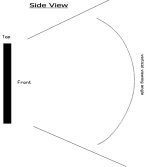
Attached is a crude drawing to go with a question:

What is the Vertical viewing angle on your beloved monitors?

As I said I can move in my chair so that I am perpendicular to the bottom of the screen, (28" I-inc) and the picture will be noticeably darker.
 

Attachments

  • Untitled-1.jpg
    Untitled-1.jpg
    23.9 KB · Views: 0
Back
Top