Welcome to our community

Be a part of something great, join today!

  • Hey all, just changed over the backend after 15 years I figured time to give it a bit of an update, its probably gonna be a bit weird for most of you and i am sure there is a few bugs to work out but it should kinda work the same as before... hopefully :)

The glowing white look

Truls Skare

Active member
Joined
Sep 18, 2009
Messages
39
Reaction score
0
Points
0
Location
Oslo, Norway
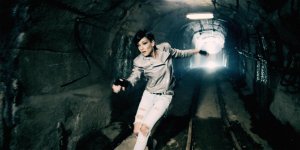
How do you typically achive this glowing white look?

Do you just crush the highlights in post ?

I also know that this a a lot to do with the color scheme of the set and clothes etc.

 

Attachments

  • 1.jpg
    1.jpg
    41.5 KB · Views: 0
  • 2.jpg
    2.jpg
    42.6 KB · Views: 0
  • 3.jpg
    3.jpg
    50.3 KB · Views: 0
  • 4.jpg
    4.jpg
    91.6 KB · Views: 0
  • 5.jpg
    5.jpg
    68.5 KB · Views: 0
my $0.02.. a lot of that is high key visual content to begin with.. (just as you note), and it appears exposed normal to a tiny bit hot, then is tuned further in post.. looks like curves and some selective desaturation going to too (like with the reds?). It's not an even split of contrast with the highs and lows, the darks fall off pretty heavy in places, and the highs are up'd in the midtones and above, some shadow bumping too. Kinda reminds me of a slightly desaturated Fuji Reala(a color negative still film), except this is not as green. :)

Of course.. I'm very much guessing.. since I don't know what the original shots look like.
 
My money would be on a NLE plug-in filter like GenArts Sapphire glow or something similar. Just a hunch as I see it being used more and more nowadays.
 
What I'd do

What I'd do

If I was attempting this look

Ist, use a polarizer to cut down any reflected highlights in the frame.

Low con lenses. Cooke S4's

Make sure to preserve the smallest bit of definition in the highlights of the white in a shirt or something that's on the edge of blowing out.

I'd also be mindful of the contrast rations buy increasing my fill/bounce to keep the ratios lower.

I'd use a spot meter as well and test some ratios as well.

It does look Fuji to me as well.
 
Could be done with slight overexposure and the use of a diffusion filter like a Schneider Classic Soft.
 
And I would advise doing it in post, just pulling a key on the highlights and defocusing them somewhat. Just don't let the highlights overexpose in production, and fill to compensate.

We used to call this "The Madonna Glow" in commercials. It takes about :10 seconds to do in any modern high-end color-correction system.

The advantage of doing it in post is that a diffusion filter will affect everything; if you do it in post, you can confine the glow to only specific objects you want.
 
Thanks for the suggestions! :)

The example pictures was shot on Panavision Genesis by the way.

David Wyatt: Never used the Cooke S4 myself, but I have heard that they have a slightly lower contrast than for example Ultra and Master primes which is part of the "Cooke look".
 
As an Cinematographer AND Editor, i would deinately recomend doing this in post. Testing footage is a good way to assure yourself that you CAN get the look you want later.

The director on my upcoming project wants a very stylized, diffused whites, look, and I am convincing him it is still best to shoot clean, then push it later. been sending him lots of before and afters...

The problem on this project is we don't know who the editor is or what their color correction abilities are....

I know a lot of Pro DP's will try to get the looks in camera so it is set... I would rather be / use a good colorist.

Jeff
 
The director on my upcoming project wants a very stylized, diffused whites, look, and I am convincing him it is still best to shoot clean, then push it later.
There are a lot arguments either way. I worked on Spy Kids 2 for Robert Rodriguez, and we had a lot of discussions about his preference for shooting with fairly extreme coral/sepia filters during photography.

The danger is, if you go too far, it's hard to undo it later on. On the other side, you can make a good argument the effect isn't as "organic" in post as it is with filters. And I know of many, many DPs who deliberately want to bake in the look during photography so that the director (or studio execs) won't change it later on. But it's a big problem for green screen and other VFX work.

For the "glow" look like this, I think Jeff's approach is best: do some tests, shoot it clean, and add the glow in post. If possible, add as much of the look as you can for dailies, so they get used to the look throughout the editing process. The danger is, if they watch the footage clean hundreds of times during the rough cut, they'll be distracted when an extreme change is added in the final. And if it's for theatrical, don't be surprised if things look much different on a 20-foot screen, vs. a 30" screen in the edit bay.
 
The Informant! also has this glowing white look, only more of a period look, more diffused and more blown highlights kind of similar to The Box.

Im guessing it also was shoot with diffusion filters.
 
Back
Top