Welcome to our community

Be a part of something great, join today!

  • Hey all, just changed over the backend after 15 years I figured time to give it a bit of an update, its probably gonna be a bit weird for most of you and i am sure there is a few bugs to work out but it should kinda work the same as before... hopefully :)

"S-Curve" Alternative with RedCine-X

Joe Taylor

Well-known member
Joined
Jun 29, 2007
Messages
1,146
Reaction score
0
Points
36
Location
Las Vegas, Nevada
Website
www.joetaylorcinema.com
After putting so much CC time in using RedAlert, I've become partial to using the "Curve" feature that whenever using RedCine-X I find that there are almost too many alternatives and that relying on curves has become redundant and that there might be substitutes that could be used with better results.

I mainly use Curves to crush and deepen contrast but I'm learning that similar and differing results can be achieved with the Lift/Gamma/Gain and fine tuning with some of the sliders. My problem I guess is being a novice with CC'ing, I miss some of the simplicity and familiarity and feel somewhat intimidated with what might be too much. I'm sure there will be some sort of instruction with RedCine in the future, but in the meantime can anybody offer some alternatives that can bring back some of the simplicity of RedAlert while enjoying the benefits of RedCine-X?
 
Last edited:
Umm.

Can't you just use the curves in REDCINE-X?

I'm pretty sure the tool is there. Check the menu.

David
 
Joe, don't be afraid of the controls in Redcine-X. Just figure out what each one does, why it does it, and then experiment to see what kind of results you can come up with. I'm craving even more controls in Redcine-X, although if we are talking about on-set tools as they relate to the DIT, we just need the tools that are necessary to help us accomplish our job. We don't need to replace the colorist in post. If you are the DP, DIT, and colorist, that's different. :-)
 
Joe, I know what you mean. I've been using RedAlert for so long it's a bit overwhelming to jump into the new Redcine-X. A couple of days ago I started to play with the Lift/Gamma/Gain and it really grew on me. Still am wandering in the wilderness somewhat and would love a guide of some sort, but for now it's like an Easter egg hunt.
 
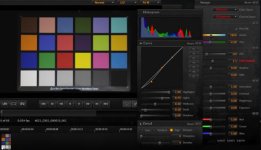
I think this is a great curves tool.

David
 

Attachments

  • Screen shot 2010-01-24 at 9.28.04 PM.jpg
    Screen shot 2010-01-24 at 9.28.04 PM.jpg
    8.3 KB · Views: 0
Another concern I have is that I'm not sure how some of these controls really affect the image. When playing around with controls like DRX and Lift, I can see subtle changes in the image on screen, but how are these changes going to appear on a 40' screen? I understand that this software is still in development not to mention free!, but it would be great if there were a manual of some sort in the future, or in the meantime some a white sheet that describes what these features are and what they really.

Like using FLUTE, for example. I understand that FLUTE fine tunes exposure levels (in a nut shell) but is there any degradation going on in terms of image quality when or if we use it.
 
Joe, the whole new FLUT system is done at a very high precision behind the scenes, so I din't think there's any degradation by using FLUT over any other fine tuning of levels technique that would produce similar visual results.

As for how they appear on very large screens - superb if last weekend's RED Day is anything to go by as all the M-X footage shown went through this system. Although REDCine-X is still beta, the underlying math has been used internally at RED well beforehand to ensure it worked great and looked great before it got migrated into the consumer app.

Graeme
 
I really second this. Maybe a more knowledgable folk could create a post (sticky) that explains in a bit of detail what each different tool does. Since using the new Redcine-X, it's almost like there's too many tools to do the same job, and I'm unsure which is the best to use for each situation. I hope this makes sense!

Not a criticism at all, more an ask for an explanation from a knowledgable red user so I can get the most out of my images.
 
Like using FLUT™™E, for example. I understand that FLUT™™E fine tunes exposure levels (in a nut shell) but is there any degradation going on in terms of image quality when or if we use it.


The nice thing about FLUT™ is that you can widen the histogram without clipping the highlights. I find with the new science you need more of a ramped curve vs. an S curve and let the FLUT™ take care of the brightening without clipping the highlights.

David
 

Attachments

  • Screen shot 2010-01-24 at 10.08.05 PM.jpg
    Screen shot 2010-01-24 at 10.08.05 PM.jpg
    19.2 KB · Views: 0
I really second this. Maybe a more knowledgable folk could create a post (sticky) that explains in a bit of detail what each different tool does. Since using the new Redcine-X, it's almost like there's too many tools to do the same job, and I'm unsure which is the best to use for each situation. I hope this makes sense!

Not a criticism at all, more an ask for an explanation from a knowledgable red user so I can get the most out of my images.


Jim did this in the thoughts and tips thread of RECON.

That is full of a bunch of "best practices" for shooting RED.

David
 
Redcine X doesn't seem like an app you can explain because it is different things for different people. Sorta like when one gets hands on a Red One, it takes time to get comfortable with it. And like the Red One there may be things that will work differently as they upgrade the app over time.

Taking the advice given in the Thoughts and Tips, I open everything up in Redcolor/Redgamma, set white balance, and play. When you see the look you want, you'll know it and you can then save that as metadata to the clip you are working on.

One thing I have learned from the forum though, is to automatic white balance in the camera before shooting.
 
Last edited:
I understand that, and it's a great resource. I meant a more specific runthrough of the new Redcine-X, and what tools are best for what job.

Cool. But I am not sure you'll see an operation manual anytime soon. There is not one for RA, there was not one for REDCINE and I think that the tools are very consistent with any grading app for moving images or a DSLR.

The thing that was stated is that FLUT lets you move the grey point of the image without clipping highlights.

I found I really had to revisit all the reading on RAW and DSLR workflows when I first heard about RED and that really has paid off.

Every shot is different, but you might see the off whitepaper for specific workflows in the future.

David
 
There is a Redcine-X manual included with Build 54. It doesn't include the new controls obviously, but for those who are looking to get comfortable with the interface, it does have some useful info. I imagine they are writing the updates to include info about FLUT™ and the new color science. A lot of the stuff in the app is pretty straightforward though. Histogram, lift-gamma-gain control, curves, etc. FLUT™ also seems to make sense to me at its most basic level and by trying it, you can immediately see the effect it has on footage. I suppose the more complex part of all this is what the new RED color space and gamma actually is from a mathematical perspective, but right now I'm just letting my eyes be the judge of what it's doing to the footage, and comparing it to results obtained using older color/gamma settings. As this is all new, there will be some transition time to fully grasp what the new offerings do to workflows. It seems to me, that Red is putting a lot of emphasis on color science right now, as well as ways to help people understand how to get the best images out of the Red. I think Jim's new Recon thread will be very helpful as a tips and tricks guide. The thing to remember is that they are still learning too. They make discoveries along the way and perhaps this is a centralized place where Jim can communicate these things. In the meantime, we do our best to understand the tools that are available and it's amazing how far those tools have come in a year. Redcine-X has potential to be the go-to application for viewing/processing RED footage. It just needs refinement, bug testing/reporting, and eventually a release build (not sure if that will happen, but could be essential for some facilities to implement it).
 
Reading manuals is usually my method of last resort. My folly. But little nuggets like this one from David Ibbitson (first time poster) on another thread are really helpful. Sometimes if one has the time, it works well to passively let the information find you instead of actively seeking it out, especially if you don't yet know you may need this information. But that's just me. The info posted is:

If your attempting to apply looks to a selection of clips try this:
1. Load all the clips your interested in processing into a bin.
2. Drag one of those clips directly to the viewer (or double click to append to the timeline).
3. Apply any looks to this clip.
4. In the "Look Presets" tool click '+' to add a new preset. Give it a name.
5. In the 'Apply to:' dropdown of the same tool, select 'Bin (all clips)'.
6. Click apply.

You should now have the same look applied to each clip in the bin.
 
Back
Top