Welcome to our community

Be a part of something great, join today!

  • Hey all, just changed over the backend after 15 years I figured time to give it a bit of an update, its probably gonna be a bit weird for most of you and i am sure there is a few bugs to work out but it should kinda work the same as before... hopefully :)

AN IMPORTANT TEST vs. R1- REDCINE-X

Here are two more shots, both somewhat different lighting from the previous post in that both used predominantly indirect daylight illumination. Again, just a simple saturation tweak for each, full debayer and no noise reduction.

The first is on sticks with the Arri 75mm T1.3 MP shot wide open with a .9 ND as I recall. Camera was rated 320. CameraRGB/rec709.

The second is handheld with the Arri 100mm T1.3 MP shot at T2.8 with no filtration. Camera again rated at 320. CameraRGB/rec709.

In both shots I feel there is much more accurate color representation. Skin tones are better and the color temperature seems much more accurate.

Shot 1Shot 2On the second shot I would actually prefer a slightly warmer timing, but for the sake of comparison the output from RCX and RA use identical settings.

Hey Jonathan,

Thanks for putting up the high-res images to compare. It might be easier for us to make more informed comment here if you shared with us what those settings were. In some of the other threads users have taken screensnaps so we can see things like WB, lift, gamma, gain, curves, FLUT™, etc. The most important question I have is how and to what temp these were white-balanced?

Now the following is only my opinion and I only looked at shot 1 when writing this.

Just from viewing these stills, it seems to me that the color in RA is a little off. I wasn't on location so, first, I'm looking for something I'm familiar with from everyday experiences that I can use to balance my interpretation of the color. In this case the only thing in the frame I can identify that might be used for color consistency interpretation is the canvas the artist is painting on. When looking at the RA image that canvas is VERY orange. Comparing that detail to the RCX image I find the RCX image to look much closer to real-life. From here I can start to expand my field of view and I start to notice that the entire image in RA has an orange cast, whereas the RCX has a much greater range of colors. From the maroon shirt to floors to the window panes: everything is tainted with orange. In the RCX image there is a variety of color that seems much more life-like to me.

Funnily enough, my wife the publicist is sitting next to me and was watching as I toggled back and forth between the images. She has no horse in the game and a completely untrained eye, she only knows what looks natural to her. I did not solicit the opinion but she said the RCX image looked "better".

Personally, I think what you have highlighted is the advantage of RCX and the new color science (at least from what I have seen thus far): the color representation is much more life-like. Whatever my preference for how a final image should look, be it cool, warm, saturated, contrasty, whatever... I would much prefer to have as accurate (to real life) an image to start with as possible and then adjust from there.

Best,

Todd
 
Careful, Mike. Gamma is a separate function, but [combined into] part of the same transform that is used in calculating how colors are rendered to the color space. It may not directly define the color space itself, but it does affect how colors within the space are rendered, especially when you are rendering colors that are on the edge of, or outside, the gamut.

What Jonathan said is incorrect nevertheless. You can't plot gamma on a CIE diagram.

If you're asking for a CIE plot, it's only going to help you if you understand what it's actually plotting.
 
What Jonathan said is incorrect nevertheless. You can't plot gamma on a CIE diagram.

If you're asking for a CIE plot, it's only going to help you if you understand what it's actually plotting.

Gamut not gamma. Like rec709 redcolor CAN be plotted. Gamma does however alter the representation of gamut in these plots. I'll let MM or Kyle elaborate as their knowledge exceeds mine in this arena.

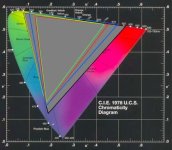
Here is one such plot showing a couple "gamuts" you may be familiar with, rec709 and DCI-P3. Blue is DCI, red is rec709, green is SMPTE-C.
 

Attachments

  • CSDiag.JPG
    CSDiag.JPG
    81.6 KB · Views: 0
Hey Jonathan,

Thanks for putting up the high-res images to compare. It might be easier for us to make more informed comment here if you shared with us what those settings were. In some of the other threads users have taken screensnaps so we can see things like WB, lift, gamma, gain, curves, FLUT™, etc. The most important question I have is how and to what temp these were white-balanced?

Todd,

Because none of those are available in previous builds I left them unchanged from the defaults. WB is the same in each case, shot 1 is 4800K at -4.6 tint and shot 2 is 5000K at -2.5. FLUT™ is at default (no contribution) for both shots (in either build). There are no changes to the default curves.

The color temp is what I measured on location with my old Minolta color meter. What I see with the newer build is much closer to what I expect to see if I set the color temp to what I measured on location. Like the improvements to metering accuracy we saw from last Saturday this is a big step forward.

The only parameters that were touched were contrast, WB, tint, saturation. I tried to keep it as 'apples to apples' as possible given what we know about how each of these parameters functions.

Hope that helps,

J
 
I'd be very wary of small affordable colour temperature meters. I've not found the Sekonic C500 to be terribly accurate (mine will read a 3200k tungsten light as around 2800k) which is enough out to make a significant visual difference. I think it was a Minolta I used also on the same shot and it agreed with the Sekonic...

But this new set of calibrations should make for vastly more accurate colour temperature readings, and measurably more so than what my Canon DSLR provides under the same lights, and how Apple and Adobe interpret the raw from the Canon too.

Graeme
 
Gamut not gamma. Like rec709 redcolor CAN be plotted. Gamma does however alter the representation of gamut in these plots. I'll let MM or Kyle elaborate as their knowledge exceeds mine in this arena.

Here is one such plot showing a couple "gamuts" you may be familiar with, rec709 and DCI-P3. Blue is DCI, red is rec709, green is SMPTE-C.

Why are you using the CIE 1976 u,v diagram to display these?

Albert
 
Gamut not gamma. Like rec709 redcolor CAN be plotted. Gamma does however alter the representation of gamut in these plots. I'll let MM or Kyle elaborate as their knowledge exceeds mine in this arena.

Yes, the gamut can be plotted (ie. color space like red color, camera rgb, etc) but you said gamma also:

If I had a CIE chart showing me what 'redcolor' and 'redgamma' were I might use them

Gamma does not alter the plotted color space.

It makes me wonder what you're doing with the gamut plots if you don't understand what it is.
 
Why are you using the CIE 1976 u,v diagram to display these?

Albert

Display and projector manufacturers have been doing it for a long time.

Again, this is a reference. I know, it's a common but imperfect reference. But rather than have to replot our displays and projector to something other than that CIE chart for the sake of a post on reduser, I figured I'd use that one. It was handy and I wasn't in the mood to dig around for anything else.

Carsten,

You too read things a little too literally. This is not a peer reviewed scientific paper, it's a web forum, and you've got yourself so wound up over semantics you are blinding yourself to the point of this. The point of my post is that we know nothing about RedGamma and RedColor. Rather than make my post 500 words longer to be razor precise for your sake I felt that people could put 1+1 together and realize that when I speak about gamut and plotting it I mean RedColor and when I talk about gamma I mean RedGamma.

Where you are wrong is in saying gamma has no effect. Gamma does effect the hue of certain color representations. This is a critical part of the puzzle when doing transforms from say Cineon to rec709. You need the starting gamma to do the gamut transform or you will misrepresent certain hues in the target.

The point of this whole rant is that Jim has stated, "Camera RGB is the native color coming off the sensor. REDcolor is corrected Camera RGB matched to industry standards."

The question I and many others I'm talking with offline is, "what industry standards?"

In what way has the data been reformatted from what the sensor sees to "industry standards" and what if anything is being clipped in the process? My guess is that we finally have a decent saturation matrix, but there's nothing to base that on other than my own observations.

As a person who did post on numerous features over the past 17 years I get a little scared when people start saying things like , "As a user, you really don't need to know anything about how FLUT works... just that it should be your primary brightness control."

If that doesn't concern you I would hazard you don't have much feature post experience.
 
Carsten, I think the real question that Jonathan is trying to ask. which is still valid, is "what is RedGamma?", and "what is RedSpace"? Sure, we know it looks pretty.. but is it 2.2 gamma? or is 2.4? 1.8? or some magical complex curve? What is RedSpace? is it rec709? is it P3? Or is it something in between?

Without knowing exactly what they are (or what they represent), there is no definitive way to map from one color space to another, and ensure that no data is lost in the process. Jonathan chose not to export using RedSpace (for Color and Gamma) because he doesn't know if the resulting image's colors are within a particular color gamut, or outside of it.

If you can answer this question, I think we will all be eternally grateful. If not, then knit-picking posts apart for what might as well amount to a typo, is really unproductive.
 
I'd be very wary of small affordable colour temperature meters. I've not found the Sekonic C500 to be terribly accurate (mine will read a 3200k tungsten light as around 2800k) which is enough out to make a significant visual difference. I think it was a Minolta I used also on the same shot and it agreed with the Sekonic...

Graeme

Graeme,

Mine was calibrated a few years ago.

It's more than a decade old but it's in the ballpark, +-50 or so if casual readings from known sources is any indication. I took the time to build corrections into the memory on the meter. One of the nice things about the IIIf.

This one's still working so...

J
 
Well I'd hang onto it then as the alternatives are rather expensive if you want real accuracy. Point is in general to be wary of such devices and don't trust them unless you've been able to calibrate against a proper traceable calibrated scientific device.

Graeme
 
Well I'd hang onto it then as the alternatives are rather expensive if you want real accuracy.
Graeme

Yup, no plans to nuke it any time soon. If you have suggestions for something more accurate out there I'm all ears, as long as it's about the same size and can live in my pouch on set I can keep my eyes out for deals on a new one.

This one is bound to croak at some point now that I've properly jinxed the trusty IIIf.

So Graeme, you've commented on my meter, how about RedGamma and RedColor? Any chance we're going to get definitions we can build tools around at some point? You guys said something about being more open with us at the ASC Red Day...

J
 
Back
Top