Welcome to our community

Be a part of something great, join today!

  • Hey all, just changed over the backend after 15 years I figured time to give it a bit of an update, its probably gonna be a bit weird for most of you and i am sure there is a few bugs to work out but it should kinda work the same as before... hopefully :)

What is this? Have you seen this?

James McLellan

Well-known member
Joined
Nov 18, 2009
Messages
465
Reaction score
0
Points
0
Location
Center of Jetmania
Website
www.youtube.com
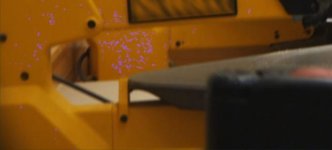
This is the second time I have seen this effect. Both times it has appeared against glossy orange/yellow materials. It looks like pink digital breakup. The pink shimmers strangely with the shot.

I don't understand what is happening here.

Perhaps someone can provide me with a quick fix. If not I can upload the original R3D file.

This was shot in 2k 2:1. ISO 320. Reconformed to prores.

Any ideas?

 

Attachments

  • pink1.jpg
    pink1.jpg
    17.7 KB · Views: 0
  • pink2.jpg
    pink2.jpg
    12.4 KB · Views: 0
James - if you can arrange with me graeme@red.com to send me the R3D and also tell me which of the RED tools you used to create the image, I'll be happy to try to track down the source of the problem.

Graeme
 
If you have not already: perform a black shading, making sure no light hits the sensor during this process. Let me know if I can help further.

Sean Ruggeri
sean at red com
949-206-7900 ext. 7922
 
Are you decoding into Rec.709? I've had that problem before - changed to RedSpace in RedCine-X and it went away.

Graeme, if you guys need help tracking this down, I can send you some files? Or this is a known thing and I'd just be wasting your time?

Bruce Allen
www.boacinema.com
 
same issue

same issue

Hi guys,
Been experiencing this same issue with footage taken a few days ago. Camera R3D file including all QT proxies show no artifacting, but this problem arises for me when converting to QT1080 through both RC-X and RC.

best
joe
 
Which software are you using and what version?
 
I use to always get that or similar when processing (r3d > Prores) thru RedCine... thus I never used RedCine again. Strictly RA & RR... it has even jaded my use of RedCineX but I am trying to get over it because I love the X!!!
 
Rob,
I've had this problem with the 2 previous builds of RC-X and the older RC Beta. Will test outputting same clips with build 84 and see how I go.

Thanks, please let us know! I seem to remember there was a bug like this in an earlier build of RC-X that should've been fixed.
 
So, if I'm understanding ok this pink stuff only appears on the recording material and not in the monitor, I'm right?
 
Back
Top