Welcome to our community

Be a part of something great, join today!

  • Hey all, just changed over the backend after 15 years I figured time to give it a bit of an update, its probably gonna be a bit weird for most of you and i am sure there is a few bugs to work out but it should kinda work the same as before... hopefully :)

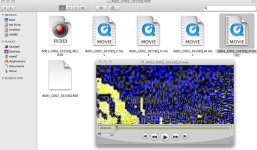
PROBLEM WITH PROXY - BETA Build 21 (v21.0.2)

21.0.2 just gives you support for Cooke S4/i lenses, so maybe roll back to 21.0.0 if the problem persists (unless you really need the S4/i thing)? You could also try a re-install of the firmware (never hurts).
 
Proxies

Proxies

There are no known issues with camera generated proxies on Build 21.

What version of the RED QuickTime codec do you have on your computer ?

If you recreate proxies in REDAlert! do you see the same problem?
 
I was having proxy problems this weekend too, the look was set to 709 however the proxys on the two cameras i was using were different. One kept coming back redspace. Also when i powered down the camera it would occasionally switch back to raw look rather than staying 709.

I did have the cameras connected via USB so i could use the dual turn over function, one thing i noticed was that if the menu was open on the slave camera settings could not be changed from the master, bit of a glitch.
 
I'm having the same problem. I also reinstalled the REDQT codec and it is still not working. I also deleted the proxies and recreated them after I reinstalled the REDQT codec and it recreates them with the same issues.

Any suggestions?

I appreciate the help. My client was with me when I found this out. They are shook! R3D files are cool in RA though so Im not worried.... yet.

***UPDATE*** Proxies are working now. I checked for software updates for Quicktime and then restarted and it was all good. Weird. B.21 4.5k proxies havent been a problem before. Not sure what caused it. Thanks for posting your problem with this, Nano.
 
Back
Top