Welcome to our community

Be a part of something great, join today!

  • Hey all, just changed over the backend after 15 years I figured time to give it a bit of an update, its probably gonna be a bit weird for most of you and i am sure there is a few bugs to work out but it should kinda work the same as before... hopefully :)

Learning proper exposure!!!

Ah, yes. Got it. So leave the hilights because they are exposed properly. Pull up the mids in curves, and do what you like with the blacks.

Yes?

Thanks for the clarification. Color correction is such an important part of shooting RED, it's good to achieve a basic understanding, even if I'm not planning to become a colorist.

Thanks for that.

Jim

Ted didn't pull the mids down, he pulled the exposure down.

You only need primary grading to pull your mids back up and create an appropriate gamma curve with good contrast.

To fully understand how this works you need to have a play with some footage and see how much detail you can retain in your highlights whilst lifting your mid-tones to the correct level and maintaining good solid blacks.
 
I have requested Ted to comment on this thread. He is off work at present, but will enlighten us as soon as he is back.
 
Thanks Joon. I took would love to see how then worked with that shot (or one like it) in post because my tests are not providing good results.

I know it's something that I'm doing wrong or not doing. This would be great info to know.
 
There was at least one comparison shot, it was right at the end. For me, just seeing the position of the histogram was enough. That was all I needed, found the second video extremely helpful. Thanks for the link.
 
... For me, just seeing the position of the histogram was enough. That was all I needed, found the second video extremely helpful. Thanks for the link.

Agreed! These are the kinds of videos that I've been looking for! As someone who has just a little experience with shooting DSLR stills, and not even in RAW for that matter, its very eye-opening to see how different it is shooting RED. I'm taking notes so that I'll be able to best utilize the camera when I can actually get my hands on one, whether it be a RED One or Scarlet. Thank you!
 
I have requested Ted to comment on this thread. He is off work at present, but will enlighten us as soon as he is back.

Thank you sir, glad someone is doing something about this thread still. I'd love to see the 3rd video, post production on the images he got.
 
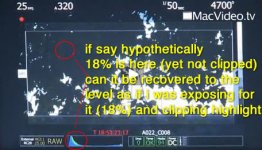
i have a question (see attached screenshot).
if say hypothetically
18% or talent's face were in the red circles on the image. (nothing clipped in histogram though), can it be recovered to the level as if i was exposing for it (18%)??
 

Attachments

  • 1.jpg
    1.jpg
    55.4 KB · Views: 0
As someone who has just a little experience with shooting DSLR stills, ... its very eye-opening to see how different it is shooting RED.

Surely shooting with the Red should be the same as shooting RAW on a DSLR?

Both have CMOS chips.

Both you need to avoid clipping highlights.

What are the differences?
 
Surely shooting with the Red should be the same as shooting RAW on a DSLR?

Both have CMOS chips.

Both you need to avoid clipping highlights.

What are the differences?

I should have also mentioned the difference from shooting consumer DV as well. Also, I've never shot RAW on my DSLR. Just didn't have the time to do all the work grading and editing, not to mention the extra disk space it requires, though I've been trying to use it since realizing I might be actually be able to buy a Scarlet. In all honesty, RED opened my eyes to why I should shoot RAW stills in the first place.

I guess it is also nice to see how the camera is actually operated. I still haven't seen one in person yet, let alone tried shooting on one, and I would need to do so before the whole process makes sense.
 
I too am confused by the anaolgy of treating RED like film and "protecting the highlights".

Protecting highlights is something I have only ever worried about in video/hd and digital.

I almost always "overexpose" negative and pull it back in the telecine. You get a much cleaner, richer image.

Negative also tends to roll off nicer if you do blow things out. Another reason why I don't worry so much about highlights going on negative.

However, if I want to create a blown out look in hd/digital I would tend to try to protect the highlights a little and control the level of blow out in post. It just looks cleaner that way.

I find that using a look over top the raw image to be the only similarity between red and film. It is like putting an extreme look on your dailies when shooting negative, but having your negative (RAW) to go back to.

As far as exposure is concerned film and RED are different beasts.
 
I too am confused by the anaolgy of treating RED like film and "protecting the highlights".

Protecting highlights is something I have only ever worried about in video/hd and digital.
I'm also a bit confused by that. I shoot entirely in RAW for my stills, and like almost everyone else who does so I follow the well-accepted 'Expose to the Right advice.'

As long as the highlights aren't blown you're better off over-exposing and then correcting in post. Right?
 
Like Peter Franzen, I'm confused by this video. What happened to expose to the right? From what I understand, underexposing an image will result in noise if you pull it back up in post. I haven't shot Red yet, but I get the best results with my DSLR if I overexpose (but with no clipping) and then correcting in post.

On a side note, the website states that the Red records "4K resolution - 4 million pixels - the resolution of 35mm film" :-D
 
I think the overall point is the same. IN RED when you OVER expose to the right (and do not protect the highlights) then you are NEVER going to recover those white pixels. Once a pixel is exposed to it's maximum then there is no recovery point.

With film highlights blow out but there is still visible image area.

I think that what TED tries to teach (and I am not Ted but I am interpreting his teaching) is that you protect the highlights if you want them. Obviously you can blow out the image if you want to but RED's lattitude curve from bottom to top is much like film (EXCEPT at the TOP end) this is where the BIG difference occurs.

So if you protect the highlights and expose properly then you can recover very pleasing images in the dark and mid area's of the with a lot of room to play and stretch the images in post.

To me it's best to give the RED as much light as possibe (that fits your aesthetic) but I have seen to many DP's light starve the camera and it results in muddy images that are hard to recover. The RED is not a very fast sensor, it likes to be hit hard, but don't blow things over.

To me this is the line that everyone has to ride (to their own taste of course) with this tool.

David
 
Makes sense David.

I think I'm probably using a slightly different definition of what constitutes a highlight than Ted. Generally when I have a gigantic nuclear fireball in the frame I don't worry that it's blowing out at 255:255:255. ;)

I haven't had too many chances to play with the post processing on Red footage though, so it would probably help my understanding to experiment with pulling detail out of the shadows on what looks to me like underexposed footage.
 
From my experience, the RED handles much like RAW on a DSLR rather than film. If you want to overexpose for a specific look (music vids, etc) you can. And with careful direction, you can get it to look fantastic. In other situations, a blown highlight can ruin your day. Depends on the look you're going for, and careful preparation.

It would be a mistake to think you can treat the RED like film. Sure it offers more flexibility compared to video...but that doesn't mean you can get sloppy.

To me, it's like saying a Porsche Boxster is more Ferrari-like than a station wagon. Sure... but it's still not a Ferrari.
 
so if a talent's face is in the dark area of histogram, but not blacks yet, and nothing is clipping. when exposing on RED one in this scenario, should one avoid all clippings; or try to place the talent's exposure to the middle. (considering no particular creative look is needed, just good talent exposure after all post)?
 
so if a talent's face is in the dark area of histogram, but not blacks yet, and nothing is clipping. when exposing on RED one in this scenario, should one avoid all clippings; or try to place the talent's exposure to the middle. (considering no particular creative look is needed, just good talent exposure after all post)?

Here is an example of when you might want to expose to the right to pul what you can out of that face. You can always make it darker, but it's harder to pull out of the blacks if it is not there.

David
 
I haven't had too many chances to play with the post processing on Red footage though, so it would probably help my understanding to experiment with pulling detail out of the shadows on what looks to me like underexposed footage.

Yes,

The way Ted explained this to me is as follows.

Up to a certain point, RED and film respond about the same (up to the last two stops where the RED camera will just clip while film would still have some exposure latitude.

The lower end of the curve in the blacks and shadows is much more similar to film, so you can tend to have more range to pull images from there than you would the top two (over exposed) stops.

The RED sensor just clamps out at a certain part of the top end of the curve, but up to that point it performs very much like film.

David
 
Back
Top