Welcome to our community

Be a part of something great, join today!

  • Hey all, just changed over the backend after 15 years I figured time to give it a bit of an update, its probably gonna be a bit weird for most of you and i am sure there is a few bugs to work out but it should kinda work the same as before... hopefully :)

SSD's for OS drives

SSD's for OS drives

  • I use disk drive/s

    Votes: 10 55.6%
  • I use a single SSD (MLC)

    Votes: 3 16.7%
  • I use two SSD's in RAID-1 (MLC)

    Votes: 0 0.0%
  • I use a single SSD (SLC)

    Votes: 3 16.7%
  • I use two SSD's in RAID-1 (SLC)

    Votes: 1 5.6%
  • What is an SSDOSMLCSLCRAID-1?!? Typewriters FTW!

    Votes: 1 5.6%

  • Total voters
    18

Roberto Lequeux

Well-known member
Joined
Jan 3, 2007
Messages
5,403
Reaction score
0
Points
0
Location
Los Angeles
Even with everything backed up properly if the OS drive gets corrupted you could be down for most or at least a large portion of an important/expensive day.
And you could look like a dummy in front of the wrong people. A RAID-1 would let you keep working through like nothing failed.

I am itching to switch, but every so often I hear a naysayer preach that if you use SSD's for your OS the world will end, locust will rain from the sky and something about flying pigs...

...so, here is a poll.
 
Well, if you can afford a good SLC NAND SSD, that would ideally be better for the OS. Something like an Intel X25-E or OCZ Vertex EX. But, the Intel X25-M G2 does have incredible small file read / write performance, which would be mighty valuable for an OS / App drive. And cheaper.

http://anandtech.com/cpuchipsets/showdoc.aspx?i=3607&p=4

But the OCZ Vertex has an Indilinx controller that allows for TRIM / wiping of unused memory pages, fully maximizing performance every time the utility program is run.

http://www.hardwarecanucks.com/foru...iews/18195-ocz-vertex-120gb-ssd-review-6.html

Decisions, decisions.

To RAID or not to RAID, now that is the question...
 
I just saw someone post a build parts list with RAID-0 SSD SLC's for the OS... Would anyone say that is worth the added risk? Sure, they are safe, but taking into account the sheer speed of the darn things alone, why go zero? To me it is a matter of going single or RAID-1 if your motherboard's southbridge controller can keep up to say... 90% of their single drive speed but in RAID-1. Any thoughts?
 
I just saw someone post a build parts list with RAID-0 SSD SLC's for the OS... Would anyone say that is worth the added risk? Sure, they are safe, but taking into account the sheer speed of the darn things alone, why go zero? To me it is a matter of going single or RAID-1 if your motherboard's southbridge controller can keep up to say... 90% of their single drive speed but in RAID-1. Any thoughts?

Paul's a knowledgeable guy and his "Monolith" computer is a beast. I believe that he said he RAID-0'd his OS drives in order to minimize stuttering. If he were using something like the X25-M, he might not have RAID'ed them. But I'll let him speak for himself.

In regards to reliability, you have to keep in mind that SSD's don't have moving mechanical parts. They're much more reliable than an HDD in that regard. When we think of a hard drive crash, we're actually lumping two problems together: a logical error and mechanical error. The logical error can be due to a virus or OS flub. Sometimes an OS registry file can become corrupted, preventing you from booting up off the drive, etc. A problem, but with multiple avenues to recovery. The mechanical error is often far more dangerous, potentially causing physical damage to the drive platters. So, using an SSD essentially minimizes one of those risks. The real problem then is logical errors. Honestly, I'm not sure how to gauge the risk of logical errors alone. When you talk about HDD's, you're typically talking about how long they'll last without accruing lots of bad sectors or suffering some sort of mechanical failure.

Anyhow, I'll give you my best hunch and let others pipe in too: get one X25-M G2 for your OS / app drive. Wait a week or two, for the recently announced price drops to really take effect. Then, get an OCZ Vertex (an MLC, not SLC, unless you have the cash) for your "scratch" drive. A RAID-0 Vertex would probably be bottlenecked by SATA-I throughput speeds, so you'll either need a dedicated RAID controller with SATA-II interface on a PCI slot, or you'll need to wait for the new motherboards coming out in a few months that feature on-board SATA-II RAID capabilities.

Further, TRIM and wiping should be optimized in Windows 7. Also, the Vertex had some software and compatibility problems early on. My understanding is that those were mostly addressed... but I'd double check, especially in relation to what system you're using.
 
Thanks for the vote of confidence Eric! :sifone:

In answer to the "why RAID0?" question, you need to think of SSDs a bit differently to the older HDD paradigm.

SSDs, internally, are ALREADY set up in a sort of RAID0 situation. This is how they achieve their high speeds, especially for reads.

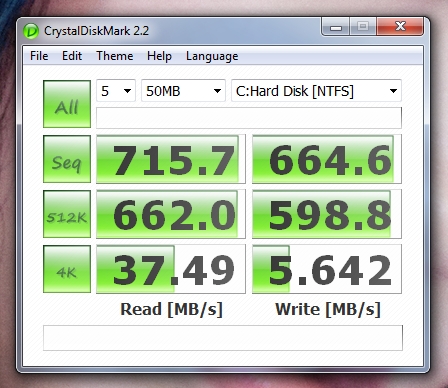
Aside from the micro-stuttering issue I eliminate by attaching my drives to a hardware RAID card, with RAID0 I double my throughput without saturating the SATA bus since I'm using a PCIe RAID card, leading to these sorts of scores:

Monolith_CrystalDiskMark_SamsungSSD_RAID0_50MB.jpg


Those sorts of numbers exceed the upcoming SATA3 standard already (which delivers a theoretical maximum of 600MB/s throughput).

The extremely high read numbers here are what deliver the OS the speed it needs to open a program almost instantaneously. I can open Premiere 4.1, After Effects etc in roughly one second or less. When the CPU doesn't have to wait for application access, it can perform other tasks much quicker as well leading to a system-wide boost.

Lastly, since there are no moving parts on SSDs, your only concern with losing data would be if the actual silicon had an issue. With wear leveling and the fact that most products with chips inside them either fail at the start of their lifespan or at the end of it, I am not worried that any data corruption is likely to occur (remember, I stress tested my machine after building it to find out this sort of info too).

Not to mention, using RAID0, I've effectively doubled the lifespan of my SSDs since each only accesses and writes half the data it would have needed to access or write, were they in RAID1 or single drives.

If I was asked today what to buy, I'd suggest the 2nd Generation Intel X-25M SSDs, either as a single or in RAID0 configuration. Look for the silver ones and check for G2 as the last two characters to make sure you aren't buying the first generation drives (which are black in colour, though they themselves are no slouches).

Since these drives also have onboard cache RAM (to alleviate stutter issues) you could easily run them directly off the motherboard's ICH10R chipset, plus that option gives the operating system full access to the upcoming TRIM command in Windows 7 to help preserve write speeds. That isn't the case with my system, in which neither the drives, nor the RAID hardware card, support TRIM. But then in my case, the hardware RAID card compensates for this with its own onboard CPU and RAM....

HTH!!

Paul
 
Eric, I am only worried about reliability of SSDs due to their controller issues which I know little to nothing about. I am planning on getting two 128GB drives and pick the best of what's around atm we buy, in hopes that the last generation will be the safest, and fastest. Which also minimizes the need for raid-0.

Paul, so all of that to open apps faster? I can wait for that. :)

I understand there isn't a need for higher read/write speeds than what you would get through SATA since RedCode is quite amazing. Also I was thinking about doing a little research regarding some sort of internal card that would allow me to pipe through the higher numbers that I would get from the external 16-bay RAID-6 with a fast hardware RAID card which would be numbers like yours.

Lifespan is not a worry given that by the time they would die they would he about as useful as a 128MB HDD, give or take a few.

I do see a benefit in rendering, since I would be using the southbridge for both my scratch 3 x 7200 RAID-0 and to ingest the footage through the SATA port, right? So you might get a little boost if you plan to render like mad. Being for a long form project I am not incredibly worried about that. It will also be my only project for a very long time... but it might be nice to throw in there a little RAID card, though I would probably go with a 3 x 2TB RAID-0 anyway to have more space... if I can manage to free up an other bay or two I'd go with an internal RAID-5 so I don't have to worry about storing important stuff in there.

So many things can go wrong anyway... I was just worried about the first generations of SSD's which built up a bad name in my mind... but I guess we might be well past that. I haven't read enough about them, I should take the time and read some reviews here and there...
 
Make an .img of your OS and be up and running in 15 minutes!!

SSD's are investments and I'm trying really hard to not buy anymore Disk Drives
 
Back
Top