Welcome to our community

Be a part of something great, join today!

  • Hey all, just changed over the backend after 15 years I figured time to give it a bit of an update, its probably gonna be a bit weird for most of you and i am sure there is a few bugs to work out but it should kinda work the same as before... hopefully :)

False Color & Stop's Question-

False Color 2.0

False Color 2.0

If you've followed the thread this far you probably love the concept but have issues with the implementation. Like a lot of features on modern electronics there is a sweet spot of customizability vs ease of use that the Red Team will have to ultimately determine.

Our job on this forum is to propose the most elegant solutions we can and subject them to the marketplace of ideas. That said...

The impact of the gamma encoding of a view space has the potential to mis-lead so I think limiting false color to RAW only makes the most sense. BUT - (and it might be the reason that hasn't already been done) the RAW linear light image is very dark and the distribution of code values might be problematic. Perhaps a transform (LUT) specifically built for false color is the answer?

In terms of the actual colors how about: zebra hatch 100 IRE + (clipped), red 90-100 IRE (Zone X), orange 80-90 IRE (Zone IX), yellow 70-80 IRE (Zone VIII), flat grey 50-70 IRE (Zone VI & VII), primary green 40-50 IRE (Zone V), blue 20-40 IRE (Zones III & IV), purple for under 20 IRE (Zones I & II). That funky pink for skin tone would be a good candidate for a settable value with a default for quick set ups.

I agree with David that 10 colors might be too much. I would prefer a system that would be consistent from rig to rig for multi-cam shows so I do not support any protocol that would be unique to an individual camera unless it could be easily toggled off.

Cheers-

Blair S. Paulsen
4K Ninja, RedOne #19
San Diego, CA
 
In terms of the actual colors how about: zebra hatch 100 IRE + (clipped), red 90-100 IRE (Zone X), orange 80-90 IRE (Zone IX), yellow 70-80 IRE (Zone VIII), flat grey 50-70 IRE (Zone VI & VII), primary green 40-50 IRE (Zone V), blue 20-40 IRE (Zones III & IV), purple for under 20 IRE (Zones I & II). That funky pink for skin tone would be a good candidate for a settable value with a default for quick set ups.

Now that would be a GREAT system / setup- I'd be all for that. :)
 
Originally Posted by Blair S. Paulsen
In terms of the actual colors how about:
zebra hatch 100 IRE + (clipped), red 90-100 IRE (Zone X), orange 80-90 IRE (Zone IX), yellow 70-80 IRE (Zone VIII), flat grey 50-70 IRE (Zone VI & VII), primary green 40-50 IRE (Zone V), blue 20-40 IRE (Zones III & IV), purple for under 20 IRE (Zones I & II). That funky pink for skin tone would be a good candidate for a settable value with a default for quick set ups.

Very well organized but to reduce further the amount of Colors to follow I do not see a reason to keep zones IX and VIII separate in False color mode, or maybe split zones X, IX and VIII to 2 colors instead of 3.
 
What are the problems associated with using false color while monitoring RAW?

Dave
 
VIEW RAW

VIEW RAW

What are the problems associated with using false color while monitoring RAW?

Only that there is a bug when you switch out of REDspace to RAW via a USER KEY, FALSE COLOR doesn't read back correctly.

However FC is correct when you switch out of REC709 to RAW via a USER KEY.

And FC is correct when you select RAW in the menus VIEW = RAW.


This bug is being addressed.
 
Only that there is a bug when you switch out of REDspace to RAW via a USER KEY, FALSE COLOR doesn't read back correctly.

However FC is correct when you switch out of REC709 to RAW via a USER KEY.

And FC is correct when you select RAW in the menus VIEW = RAW.


This bug is being addressed.

Hi Stuart,

My original understanding was that False Colour in general wasn't accurate in RAW mode, but this appears to have changed (not sure when that announcement was made but I must have missed it):

http://205.234.135.241/forum/showthread.php?p=318287#post318287

Just to be clear about this are you saying false colour basically doesn't read back correctly in RAW...BUT only if you've used a User Key to flick from REDspace to RAW? This seems to suggest that if you flick from REDspace to RAW via the menus rather than the User Keys then False Colour will be accurate/calibrated (which your third point also suggests?). Likewise if you're using Rec709 as your View and you use a User Key to flick to RAW then False Colour IS accurate/calibrated? Is this true for Release Build 17, Beta 18 or Beta 20 or all three?

Can you just double-confirm these things because nailing exposure can be pretty important if you're exposing to the right and trying to get as much out of the RAW image as possible. I have to admit, and I hate to sound like a whiner, but with all these provisos & bugs about False Colour that unfortunately most of us seem to accidentally find buried in other threads, I'm now thinking of avoiding False Colour as a critical exposure guide...too many bugs...too little information trickling out...which is a shame because on paper False Colour is a revolutionary idea. Maybe it's time for a sticky about this sticky situation? Just to clear up the confusion and/or lack of clear information?
 
VIEW RAW

VIEW RAW

Just to be clear about this are you saying false colour basically doesn't read back correctly in RAW...BUT only if you've used a User Key to flick from REDspace to RAW? This seems to suggest that if you flick from REDspace to RAW via the menus rather than the User Keys then False Colour will be accurate/calibrated (which your third point also suggests?). Likewise if you're using Rec709 as your View and you use a User Key to flick to RAW then False Colour IS accurate/calibrated? Is this true for Release Build 17, Beta 18 or Beta 20 or all three?

That's correct - all three builds.

Give it a try yourself - Enable FALSE COLOR and shoot an 18" Grey card at a slight angle so that you can see green and pink color bands.

Now switch the VIEW menu between REC 709 and RAW, and then REDpace and RAW. The color bands in RAW are at the same position.

Now set a USER key to VIEW RAW. Go back to the VIEW menu. Select REC 709 and then press the USER key. Observe the band position.

Press the USER key again and change to REDspace. Press the USER key one more time and observe the band position.

You will see that the "VIEW RAW" following that key sequence isn't the same as the "VIEW RAW" following the earlier key sequences..

.. hence my "it's a bug, we will fix that" comment.
 
This is a good thread. I, too, love false color as a tool but wish for a more logical implementation, one that mirrors the zone system and has some customization.
Thanks for the tip on the redspace user button bug. I was unaware of that.
Cheers,
Harry
 
That's correct - all three builds.

Give it a try yourself - Enable FALSE COLOR and shoot an 18" Grey card at a slight angle so that you can see green and pink color bands.

Now switch the VIEW menu between REC 709 and RAW, and then REDpace and RAW. The color bands in RAW are at the same position.

Now set a USER key to VIEW RAW. Go back to the VIEW menu. Select REC 709 and then press the USER key. Observe the band position.

Press the USER key again and change to REDspace. Press the USER key one more time and observe the band position.

You will see that the "VIEW RAW" following that key sequence isn't the same as the "VIEW RAW" following the earlier key sequences..

.. hence my "it's a bug, we will fix that" comment.

The thing that confuses me is that now you're saying False Colour IS calibrated/accurate in RAW mode (as long as you avoid the User Key bug), whereas by earlier posts I was lead to believe False Colour was NOT accurate/calibrated in RAW view (however you accessed it):

Well to avoid going round in circles on this, lets just say this then - NO, its not calibrated, and YES I agree it should be.

Meanwhile its accurate enough that you probably haven't had any footage come back from post because of clipping.
 
False Color in RAW

False Color in RAW

Well, it is calibrated now.... i.e has been since Build 18. Can't recall offhand for 17 or 16...
 
Hmmm, interesting- I'll have to check it out. It is good to know that it is calibrated when in RAW now. That is VERY helpful.

Now if it was just possible to have it reflect the zone system ...
 
False Colors

False Colors

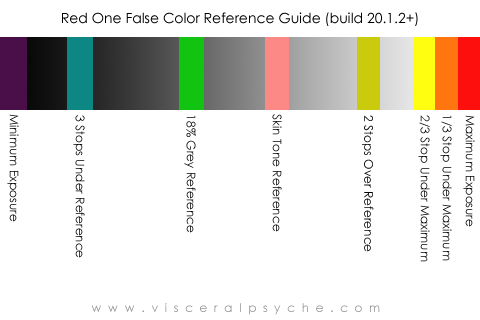
The latest version of Build 20 includes new False Color overlay - see

http://reduser.net/forum/showthread.php?t=32891

The modified False Color overlay provides the following information:

Purple
Minimum Exposure

Teal
3 stops under reference

Green
Reference Exposure for 18% Grey Card

Pink
Reference Exposure for Caucasian Skin

Straw
2 stops over reference

Yellow
2/3 stop under maximum exposure

Orange
1/3 stop under maximum exposure

Red Maximum Exposure
 
Thanks- this is a big help. :)
 
Thanks

Thanks

I deeply appreciate the efforts of Stuart, Rob and everyone else on the Red Team who found the time to improve false color. In some ways its a small thing but in my day to day work with the camera it is such a tremendous assist. I often have a stressed DP, director or producer looking at me to confirm that the exposure is right and by checking false color I can tell in less than 5 seconds. Gold.

Tip for those of you who have not done so, the false color mapping is a fabulous way to check how evenly a green screen is lit. I often repo the monitor for the gaffer or CLT during set up so they can massage the lighting. Makes keying so much easier & faster.

Cheers- #19
 
Zebras on Build 20

Zebras on Build 20

Thanks for that Blair.

A note on Zebra operation in this version 20.1.2 of Build 20.

As you probably recall Zebra settings can be adjusted by the user and are remembered over power cycles.

Zebra settings are also stored as part of a USER PREFERENCES file.


In this Build the defaults were adjusted so that -

a) They are both enabled - so that's what the diagonal lines in the image are.

b) Shadow Zebra falls on the Purple false color bar

c) Highlight Zebra falls on the Yellow / Orange / Red false color bars.


Again, these are just default values, these settings can be adjusted to taste.

And you can turn them off if you wish - your choice.
 
I posted this in the main Release thread but in case anyone missed it there, here is a useful guide for use on your iPhone to show DPs the new False Color steppings:

RedFalseColor_build20.1.2_iPhone_Reference_Chart.png


HTH

Paul
 
Back
Top