Welcome to our community

Be a part of something great, join today!

  • Hey all, just changed over the backend after 15 years I figured time to give it a bit of an update, its probably gonna be a bit weird for most of you and i am sure there is a few bugs to work out but it should kinda work the same as before... hopefully :)

Processing 2K Images : No Texture at all

Gabriele Turchi

Well-known member
Joined
Mar 10, 2008
Messages
844
Reaction score
0
Points
0
Location
New York City
I am having big problem processing 2K 2:1 RC36 Max Mode...

Basically using Red Rushes and processing at full Res the image have no texture at all (like plastic)...Processing at Half Res (so getting 1k res , the image have texture ...

Is this a famous issue?

I am using the very last RedAlert/Rushes

Thanks

g
 
Gabriele, what is the codec you're rendering to?
 
Not sure why they would have a plastic feel. I wouldn't have been surprised if you had said soft, perhaps noisy. Those are traits that have been used to describe Red 2K footage, although I think results vary based on lens selection, processing, etc.

Are you using noise reduction? That can make things plastic in certain high dosages.

But just coming straight out of Red Alert at Full quality should not render them plastic. They will have less noise then half res. Is it the noise you are perceiving as texture in the half res versions?
 
i am rendering out ProRes HQ,

just a little adjustment in red alert creating RSX and render in RedRushes.

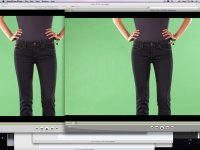
see the image to see what i mean for plastic....

But i just got the answer from another test is the OLPF

with 4k source decoding 2k high the OLPF can stay On....But with 2K source decoding full res the OLPF on generate a Mess...

So:

4k footage--->decode 2K --->OLPF ON HIGH(fine..)
2K footage--->decode 2K (full)---> OLPF ON HIGH (plastic no texture)
2K footage--->decode half res (1K)---> OLPF ON HIGH(fine with details)
2K footage--->decode half res---> OLPF OFF ( very soft...)

any thoughts ?

Thanks

G
 

Attachments

  • Picture 1.jpg
    Picture 1.jpg
    82.5 KB · Views: 0
updated now...

it's bad quality compression jpeg, but you can see the differences....

left 2k with 2k debayer and OLPF
right is 2k with 1k debayer with OLPF...

so having full res debayer on 2k source with OLPF one is worse than debayer 1k ....


g
 
How big are your R3D source files? Any chance of posting this sample shot to an FTP? Hard to tell exactly what's going on with JPEG compression thrown into the mix, and a screen capture. If you can post the R3D I'll take a look on my broadcast monitor to see what exactly is happening on the debayer.
 
those 2K R3D are pretty big...


no need to have a broadcast monitor to see that there is no texture in the right pictures ...i mean the jpec compression made even the left one not so good looking but you can see how more details there is on the jeans...

so i guess that the OLPF is not designed to work on a 2k full debayer source...

g
 
it's a rendering issue...

Dabayering at 1k the same shots there is texture...

My guess is that the OLPF filter combined to the full debayer it's expecting 4k data to work well...or something like that...

any word from RED?

PS:a good shot to test this would be a closup or something like that

thanks

g
 
Nobody from red on this???

Guy literally processing the same footage at full resolution produce images with lot less details than process at half resolution...(with 2K source and OLPF at max..)

thanks

g
 
Quad pixel vs. interpolation

Quad pixel vs. interpolation

...processing the same footage at full resolution produce images with lot less details than process at half resolution...

When you make a 1K image from a 2K Bayer data you can use four pixel groups one red, one blue, and two green divided by 2. This is sometimes used in Quad-HD cameras to get HD without having to do interoplation. It can give "sharp" results, but without an OLPF in the camera will still show aliasing and chroma moire.

To get a 2K image from 2K Bayer data you need to interoplate the "missing" pixels since red and blue are only 25% fill each and green only 50% fill. To suppress chroma moire and other artifacts from the wavelets used in REDCODE low pass filtering is needed.

What you may be seeing is the result of two ways to processing the data, pixel grouping for fast 1K processing, and interpolation for so called "2K" results.

It would be better to shoot in 4K mode and then down size the images to 2K if that is what you need with a down sizer that uses 100% of the 4K image data (if it is blur plus sample you can get extra noise and aliasing).

These issues are not unique to the RED ONE (except for REDCODE artifacts), any Bayer sensor camera would probably process 1K and 2K output using optimized code to get the best speed.

Once the final edit gets re-encoded (double encoded, for double encoding losses) these small issues will probably not matter much, one problem with having a good monitor is that you see things that will not be a big issue in the end use.

My Brother was always complaining that he could not see the eye lashes on our negatives for medium shots, so I got him a 5x magnifier and told him to stop using the 20x magnifier because on a projected print the lens in the projector cannot project details that small, and so now with the 5x magnifier the grain looks much better and the images look much sharper! Try standing back 6 feet from the monitor.
 
Back
Top