

michael_lucid
Active member
- Joined
- Aug 12, 2008
- Messages
- 36
- Reaction score
- 0
- Points
- 6
- Age
- 48
- Location
- Burbank, CA
- Website
- www.michaelkammes.com
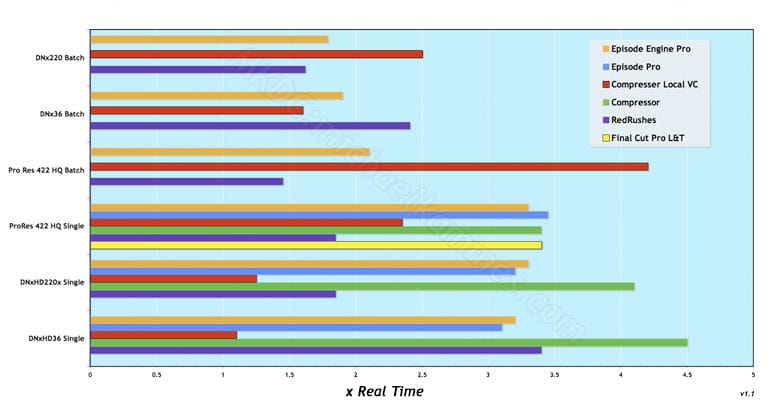
(Shorter is Better)
**v. 1.1, RedRushes added for batch encoding, horizontal axis value added.
Extensive analysis at http://michaelkammes.com/encoding/more-extensive-red-benchmarks/
Or...continue reading!
Specs, standards and universal notes:
2.93 GHz MacPro, 6GB RAM.
10.5.6 / QT 7.6
Avid Codecs 2.0 (shipped with Media Composer family 3.5+)
All media local on OS Drive.
R3D Proxy _H quality was used for all tests.
Builds tested: 16, 17, 18.
10 clips ranged from 00:26 seconds to 04:31. Median was 02:19. Since every editor's batch will be different, this was a ballpark for an average shoot.
All clips were resized to full frame HD frame sizes during encoding. As a side note, the frame resizing from the native 2048 x 1024 to HD frame sizes was not a significant factor in the delta for encode times.
No LUTs or image adjustments (aside from resizing) were used.
Pro Res 422 HQ -The highest quality compressed HD codec that Apple offers. Exceeds Broadcast standards.
DNx36 is 1080i/29.97 8bit. The lowest resolution of HD Avid offers. Used for offline editorial.
DNx220x is 720p/59.94 10bit - One of the highest quality compressed HD codecs that Avid offers; typically for broadcast with no offline/online workflow.
REDCODE RAW Quicktime Codec: 3.5.0
FCP: v6.05 (FCStudio 2)
RED Final Cut Studio installer 1.0
RedRushes: v3.60
Compressor: v3.05
Compressor Local Virtual Cluster: 16 instances, all local.
Episode Pro (Desktop): v5.1
Episode Engine (16 Processor License): 5.1.2. Split and Stitch disabled, as there seems to be a bug in the stitch process.
Final Cut Pro L&T: Batch not applicable; Log & Transfer only processes 1 file at a time. DNxHD codecs are not traditionally used within FCP.
Red Rushes: Batch not applicable, only 1 file processed at a time. Quarter Res Debayer Quality.
Compressor: Batch not applicable, only 1 file processed at a time.
Episode Pro: Batch not applicable, only 1 file processed at a time.
Findings:
Amazingly, those of you who use Final Cut Pro as your editor will find you have the seemingly fastest encoder out of the bunch - and free. It does require some basic setup to get the cluster working - and is known to be flakey, but seemed to be a rockstar during my testing.
It should be noted that the free RED codec for Mac OS - REDCODE - is *still* a Quicktime component. That means no matter what encoder you use, the QT component will be the bottleneck. In addition, whatever bottleneck Redcode with QT causes, it's only part of the equation: The codec (in this case, ProRes and DNxHD) you are encoding to must be written to be able to take advantage of multi threading.
RedRushes utilizes REDline as their encoder, and seems to be the best at utilizing available CPU horsepower. It averaged 15-20% more processor usage at any given moment then any other non batch encoder (FCP L&T, non VC Compressor, and Episode Pro). That being said, this was usually only around 50-55% at best. Batch encoders seemed to be able to take advantage of the remaining processor cycles, although Compressor with a VC seemed to be average 95-100%, whereas Episode Engine lagged behind between 80-85%. Unfortunately, the Stitch function of Telestream's Split & Stitch technology seemed create a playable but greenscreen media file after stitching, so that feature had to be omitted. This feature may yield better results.
Pro Res 422 HQ, across the board, yielded slower encode times. Avid DNx220 would be the Avid equivalent to ProRes 422 HQ (although, technically, it should be vice versa) and was always done quicker. This is by no means a visual quality test, this was raw speed.
Although I cannot prove it (aside from my results here) it seems some encoders just "play well" with some codecs and data rates (i.e. high compression/low data rate DNx36 vs. lower compression / high data rate DNx220 & ProRes 422 HQ). This contrasts with the Episode Family, whose encode times were pretty similar across codecs.
All testing was done local (internal OS drive), as the differences in mass high speed storage varies from user to user and therefore difficult to baseline. I define mass high speed storage as RAID sets with Firewire eSATA, Fibre, or SCSI connection. While I expect times to be similar when Firewire/USB drives are used as the source drive (as most batch encoders write locally to a cache for processing, then write back out to the destination drive), I certainly expect encode times to decrease when mass high speed storage is used, as larger files require more time to write after the encode is done and the cache has to copy out to the destination drive. I do not expect this to be drastic, but it may save a few minutes each hour.
I attribute the increased times with batch encoding with Compressor with VC to this. (I know there is a Cluster option setting for this, however altering it seems to break the Virtual Cluster) I could have decreased the encode time by up to 20% if the application did not have to write out locally, as the merging of the distributed quicktime segments took almost as long as the length of the clips (RT) themselves.
When batch encoding with Compressor, it's important to remember that the application is splitting the transcode up to the available processors. This is great if a batch of 2 clips are the same length, but if one clip is, lets say, 1 minute longer than the other, then the longer clip will no longer benefit from the distributed encoding when the first is finished. Normally this is only an issue at the tail end of a batch encode (as once one encode finished, another will start). For long encodes, this bares mentioning.
Across the board, encode times are cut in 1/2 to 3/4 from the last gen of Mac Pro (Harpertown, 3.2Ghz 8 core)..making the new Mac Pro, in the RED realm, a great investment for high volume encoding.
It should also be noted that even though some of the more expensive encoders (Episode Family) are not the fastest, the increased encoding options and variables, codec support, templates, watch folders, and bells and whistles they contain may be worth the investment.
http://www.telestream.net/pdfs/datasheets/EpisodeSeries_Format_Support.pdf
As of this writing,Telestream's Desktop Products: Episode & Episode Pro will run you $495 / $995, based on options and their Enterprise line Episode Engine & Episode Engine Pro runs $3950 / $8450.
Final Cut Studio 2 (with compressor) is $1299.
RedRushes is a free download from red.com.
Last edited:


