Welcome to our community

Be a part of something great, join today!

  • Hey all, just changed over the backend after 15 years I figured time to give it a bit of an update, its probably gonna be a bit weird for most of you and i am sure there is a few bugs to work out but it should kinda work the same as before... hopefully :)

CineForm Officially Supports Red One

Im sure this questions has been asked but I havnt been able to find it nor its answer.
Cineform is awesome but why doesnt it have an option to selectively convert full resolution files based upon an EDL. It seems a huge waste of time making this second high grade master for all the footage. Why not just render at full res what you need to use?

I was going to write the same. Just edited an express project of 243GB. I'm now in the process of hand picking the single r3ds ...
Something a la crimson would be easier.

Also, how can i download the p4k version showing redspace?
 
Guys (At Cineform)

I just want to thank you for the product you've created. I had to do a small SD project yesterday, and i wanted to use a little editing program called "SpeedEdit" it's great for corporate work. The Aja files were not working well so I converted to Cineform.

I'll be damned they opened right up in SpeedEdit and off I went..

I'm very exciting about the concept of using the Xena card with Cineform.. I was wondering, can I also CAPTURE directly to Cineform via the Xena 2k?

There's so much good stuff here, and it's only the beginnig.

Thanks again

Your friend,

Jay
 
EDL Batch

EDL Batch

I've been waiting for this feedback, and expecting it, why did you take so long? :) Of course having selects to batch a 4K/HD is good idea, we just needed the feedback fo know how many are editing with Express files vs just onlining at HD/2K/4K (as CineForm does by default with all other cameras.) Notice Jay's request for audio syncing upon conversion, this is the type of feedback that helps define the products we create. So bring it on.

Jay, That project has been slowed, the BWFs from Thor (thank you) are quite different then the Cantar's output, so we need to pass the data in a different way than expected. Plus they are many other thing happening right now, like CS4, Xena 2K support, Mac NEO 4K, more speed, etc.
 
Guys (At Cineform)

I'll be damned they opened right up in SpeedEdit and off I went..

I'm very exciting about the concept of using the Xena card with Cineform.. I was wondering, can I also CAPTURE directly to Cineform via the Xena 2k?
Jay, thanks for the comments about SpeedEdit. That's why we chose to use standard wrapper formats like AVI and MOV.

Re Xena 2K, the first release (soon now) will offer single-link timeline monitoring from PPro/Windows for projects up to 4K, with any CineForm media on the timeline: 422, 444, RAW. Initially the monitoring will be single link, so this means timeline media is properly converted in our playout engine for single-link output. In most customer scenarios this is the proper model anyway as most people don't have dual-link monitors because they are very expensive.

Coming in subsequent driver releases will be: single-link then dual-link capture followed by dual-link monitoring of the timeline. We may change the order a bit, but you should expect multiple releases over time.
 
I dont understand what the alternative to an on-line/off-line strategy would be. Perhaps I dont fully understand the workflow. Is there already a means to have Adobe work on 4k files in a down res fashion and then to get cineform to just punch out the necessary full res files?

I just know bein able to render only an EDL would save me days of processing when I am doing music videos...
 
Oogabooga (cool handle name), our recommended workflow if you're staying in PPro is to use CineForm Express files as being "similar" to the proxy edit you refer to. But because CineForm Express files are color-perfect "Mini-me" versions of CineForm full-res (Master) files, you can apply color correction, transitions, Active Metadata, etc with them. Then at the proper time you can unlink the Express files and relink the full-res CineForm media, and your effects will remain intact.

In summary, by using Express files you don't need to generate an EDL and perform a later conform.

Either today or tomorrow we'll be posting a video created by Chris Harvey that demonstrates exactly this workflow.
 
In summary, by using Express files you don't need to generate an EDL and perform a later conform.

But i still have to render all my r3ds to cf4k. I wouldlike to do it only with the takes edited.

Either today or tomorrow we'll be posting a video created by Chris Harvey that demonstrates exactly this workflow.

I'll wait for it
 
But i still have to render all my r3ds to cf4k. I wouldlike to do it only with the takes edited.
It's exactly what I think. Anyway I'm very impressed about the quality of the codec.
 
Will it be possible to get the original timecode from the R3Ds to transfer over to our Express files and other CF transcodes?
 
EDL Batch is here

EDL Batch is here

Cineform is awesome but why doesnt it have an option to selectively convert full resolution files based upon an EDL. It seems a huge waste of time making this second high grade master for all the footage. Why not just render at full res what you need to use?

EDL Batch of R3D to CineForm AVI is now ready. Only took an hour or so of scripting. See, it is worth asking as somethings are "low hanging fruit", it is faster to just do it than put it on a to-do list.

Here is the new R2CF distribution: download http://www.miscdata.com/red/R2CFv168.zip. Unzip the contents into: C:\Program Files\CineForm\Tools. To use this you must have NEO 4K or Prospect 4K installed on your Windows OS (trial version also works.)

Now for how easy it is to use:

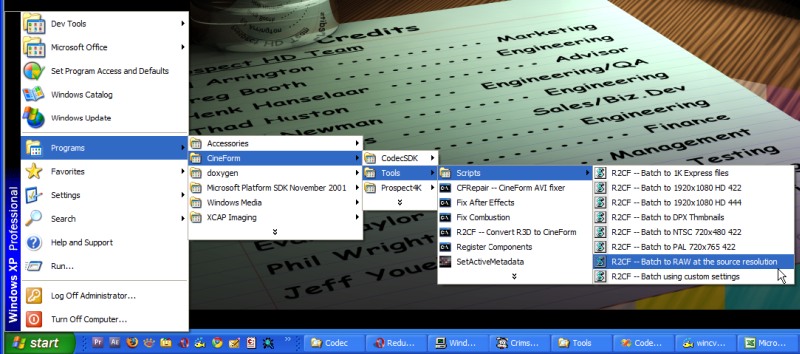
You start as usually selecting the type of conversion from the start menu:
R2CFStep0.jpg


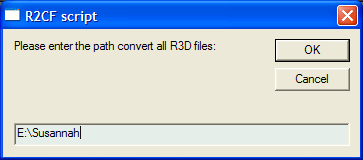
Then you pick the volume or folder that contains all your source R3D files:
R2CFStep1.png


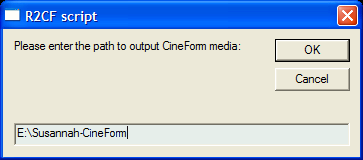
And where to place your CineForm AVI or MOV Express or Master files:
R2CFStep2.png


Now you are prompted to filter the list of R3Ds using a EDL or TXT file:
R2CFStep3-EDL.png


If you answer 'No', conversion occurs as before, converting everything that hasn't been converted before.

If you answer 'Yes' you can select the EDL or TXT file within the presented file dialog. Now only the R3Ds names in the EDL, ALE or freeform Text file will be converted (if it hasn't been already.) The EDL can the stock CMX 3600 export from Premiere Pro or just a plan text file list the names of the R3D, it is pretty flexible.

So a .txt file with just a list like this:
A029_C007_071216_001.R3D
A001_C002_071215_001.R3D
A001_C010_071215_001.R3D
A002_C001_071215_001.R3D
A029_C004_071216_001.R3D
...


or CMX file like this:
TITLE: Susannah

001 UNKNOWN V C 17:18:52:13 17:19:06:13 00:00:00:00 00:00:14:00
REEL UNKNOWN IS CLIP A029_C007_071216_001.R3D.avi

002 UNKNOWN V C 09:24:08:00 09:24:21:16 00:00:14:00 00:00:27:16
REEL UNKNOWN IS CLIP A001_C002_071215_001.R3D.avi

003 UNKNOWN V C 10:27:10:08 10:27:39:04 00:00:27:16 00:00:56:12
REEL UNKNOWN IS CLIP A001_C010_071215_001.R3D.avi
...


Let me know if this works well on your setup.
 
Back
Top