Welcome to our community

Be a part of something great, join today!

  • Hey all, just changed over the backend after 15 years I figured time to give it a bit of an update, its probably gonna be a bit weird for most of you and i am sure there is a few bugs to work out but it should kinda work the same as before... hopefully :)

Colour Banding Problem: FCP -> AE / ProResHQ -> Animation

sixswitch

Member
Joined
May 20, 2008
Messages
16
Reaction score
0
Points
0
Hi all,

I'm hoping someone can shed some light on a problem I'm having.

Workflow so far: 2K RED footage -> 1080p ProRes HQ using Red Alert.

Edited online in FCP, using only effects/transitions that support 10-bit or higher rendering (many don't, as I learned early on!). Colour corrected in FCP.

So I've successfully (against many challenges) kept the footage at 10-bit. My eventual destination is dual: broadcast SD in the short term, but I'd like to have a 10bit/1080p master for the medium and long term.

Now, going to After Effects for FX, I'm getting colour banding. I've used the Animation codec at best quality (Millions of Colours). Pictures below. I'm not sure where along the way I'm losing the bit-depth. My project file in AE is set to 16-bpc.

Can anyone offer insight or suggest further tests (possibly using clever gradient tricks?) to pinpoint the problem? I've drawn a blank but it seems like there must be some way to narrow it down. Does the Animation codec, for sure sure, support 16-bit colour? Am I misunderstanding something basic? Is it the YUV-RGB transition?

Any help is greatly appreciated.

Regards,
Jake

FCP: http://sixswitch.googlepages.com/FCP-Canvas.png
AE (preview): http://sixswitch.googlepages.com/AE-Screencap.png
AE (render out): http://sixswitch.googlepages.com/AE-RenderOut.png
 
Your Animation codec needs to be set to Trillions of Colors, not Millions, to get 16-bit.

Yes, FCP could very likely be adding banding in the YUV -> RGB transition.

I think FCP is messing something up. What you have in AE is lower than a high-quality 8-bit conversion. I would usually suggest adding 1-2% noise before converting if you get banding problems but I think something more fundamental is wrong.

Since your project is ProRes, why don't you try rendering out your ProRes timeline using sequence settings and bring a chunk of that straight into After Effects?

Bruce Allen
www.boacinema.com
 
Hm. The options in the Animation codec only go up to Millions. Am I looking in the wrong place?
 
Haha no worries. I'm just testing your other suggestion...
 
AE reads ProRes in 8bit rather than 10bit. Same with shake.
 
I think his banding is worse than 8-bit banding? EG FCP is screwing something up and if we just load a ProRes render of his timeline he'll be okay?

EG if it were a 10-bit vs 8-bit thing we wouldn't be able to see the difference in his examples (which are all 8-bit JPEGs).

Personally I'm betting if you've been doing a stack of color correction on 10-bit files in FCP, there's not really more than 8 bits of real data left over. So I wouldn't stress about the 10 bit thing too much.

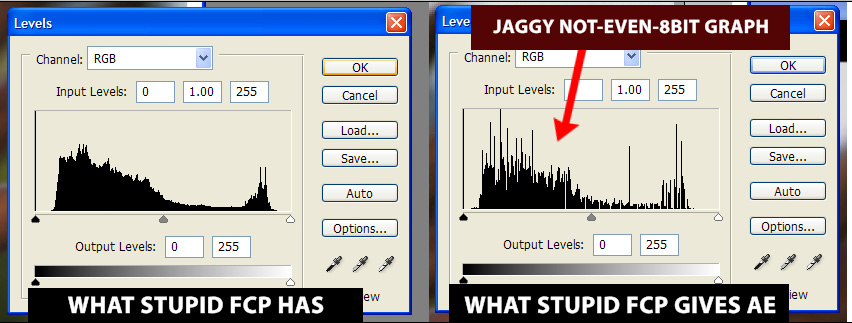
The problem is, FCP isn't even giving the full 8 bits! Maybe there is some weird setting somewhere where it is set to render effects internally at 32-bit high precision but go down to low precision rendering when you export. I have no idea. I moved to Avid after FCP drove me nuts with unreliability, gamma issues, etc.

EDIT:
fcp_is_stupid.jpg


My graph is inaccurate (FCP actually has a smoother graph than on the left, because it has full 10-bit data, not 8-bit) but it's obvious FCP is really messing something up, right?

To get a full 10-bit Quicktime pipeline, you should use a codec such as AJA, Blackmagic, or Sheervideo? Or just export a stack of tiffs or sgi files...

Be aware that After Effects / Quicktime has a nasty tendency to not actually render 10-bit even when it tells you it is.

See Mike Curtis's seminal (and long) "After Effects Stuff: Workflow tips and QT NOT always 10bit when you render " article:
http://www.hdforindies.com/2006/06/after-effects-stuff-workflow-tips-and.html

Bruce Allen
www.boacinema.com
 
Deanan: what about using Uncompressed 10-bit to and from AE?
 
Google pages is mysteriously turning PNGs into tiny jpegs, so I can email images to anyone interested.

Just tried Bruce's test: exporting from FCP in ProRes HQ. Footage looked good on import into AE, but when rendered using 10-bit HQ at Trillions, looked lousy again.
 
Okay, rendered the ProRes file from AE as a TIFF image sequence at Trillions. Looks good. I go back to FCP to re-export as an image sequence, and I can't find any options that support depth at Trillions. Any ideas?
 
EDIT:

Okay, here's my bet so far:

Download Blackmagic codecs:
http://www.blackmagic-design.com/downloads/codecs/Blackmagic_Codec_OSX.zip
Try export from FCP->AE using BlackMagic 10 bit RGB setting or Blackmagic 10 bit YUV setting. Then export from AE -> FCP using the same settings, with Trillions of colors. Drop into your timeline and render. Cross fingers?

Again, I am not too into this because at some point I realized that for me:

(hours spent wasting time on FCP or QT issues) x (hourly rate) > cost of Avid

Just tried Bruce's test: exporting from FCP in ProRes HQ. Footage looked good on import into AE, but when rendered using 10-bit HQ at Trillions, looked lousy again.

Oh boy, that's Quicktime, AE or something screwing up again and taking it to below 8-bit level, I think?

Okay, rendered the ProRes file from AE as a TIFF image sequence at Trillions. Looks good. I go back to FCP to re-export as an image sequence, and I can't find any options that support depth at Trillions. Any ideas?

AJA or Blackmagic codecs?
http://www.aja.com/ajashare/AJA_SoftwareCodec.zip - you'll have to edit AE prefs manually
http://www.blackmagic-design.com/downloads/codecs/Blackmagic_Codec_OSX.zip - supposedly automatic

If you want to keep the full 10-bit pipeline between FCP and AE, you are in for some hacking. The AJA or Blackmagic codecs might definitely help you out because those companies care more than Apple does.

I can't help you much with getting it back into FCP because I usually just export 16-bit frame sequences and bring into (10 bit) Avid DNxHD codec, or go straight to the DNxHD codec. Both of those work beautifully.

EDIT: BTW, I don't know why FCP can't export 16 bit TIFF sequences. I think this was another reason I moved to Avid.

If I spot any cool links, I'll PM you. But seriously, read Mike Curtis's page I linked to. What ver of AE are you on?

Bruce Allen
www.boacinema.com
 
Try the Sheer codec from Bitjazz, it works very well for me, even cross-platform.
 
Update for anyone with similar problems: Blackmagic 10 bit is working well, although the RGB version does not work coming from After Effects. Thanks all.
 
If you are going from FCP to AE and you can swing the cash, get Automatic Duck, it will save you a huge headache and you won't have to do any codec exports out of FCP.
 
Back
Top