Welcome to our community

Be a part of something great, join today!

  • Hey all, just changed over the backend after 15 years I figured time to give it a bit of an update, its probably gonna be a bit weird for most of you and i am sure there is a few bugs to work out but it should kinda work the same as before... hopefully :)

Harddisk problems

Rick van den Berg

Well-known member
Joined
Dec 20, 2011
Messages
45
Reaction score
0
Points
0
Hi,

I already googled a lot about this, and it seems to be a common problem. i just couldnt find a fast solution.

Im using docking stations connected mostly with firewire to a mac pro. (osx 10.8.4)

when i inserted a harddisk earlier today, the mac gave me a popup with the message: ''the disk you inserted was not readable by this computer'' although it was working perfectly yesterday.

I tried disk warrior, but it didnt even see the disk. disk utility did see it, but couldnt do anything, it just said it was not partitioned.

i cant think of something i did wrong that caused it. this was not the first time it happened. and its driving me crazy !

last time i used a program called stellarphoenix, and that did work. but it takes like a day or so to fix everything. And since i have a tight deadline, i dont really have the time for that. well, at least it works.

any suggestions/idea's?
 
Last edited:
Docking stations are fine , but should not be used without great care to always unmount and fully depower before disconnecting a drive, and never connecting when powered. The ease and speed of inserting and removing drives can lead to sloppy habits and not double checking things. I bricked a drive once by accidentally disconnecting without depowering, because I thought I had while in a rush.

Also, the lack of locking mechanisms can mean it's more susceptible to shock like when the table gets jogged.

For all these reasons I never use docks for production work, only for non-time critical controlled environment/"lab" type work.
 
If the drive won't mount, and Disk Warrior doesn't see it, you'll probably have to do a recovery with Stellarphoenix again.
 
Docking stations are fine , but should not be used without great care to always unmount and fully depower before disconnecting a drive, and never connecting when powered. The ease and speed of inserting and removing drives can lead to sloppy habits and not double checking things. I bricked a drive once by accidentally disconnecting without depowering, because I thought I had while in a rush.

Also, the lack of locking mechanisms can mean it's more susceptible to shock like when the table gets jogged.

For all these reasons I never use docks for production work, only for non-time critical controlled environment/"lab" type work.


thanks for the reply, so what do you use? a RAID-system?
 
What kind of Docking/Disk system is this?
 
What kind of Docking/Disk system is this?

NewerTech_Voyager_Q.jpg


^voyager
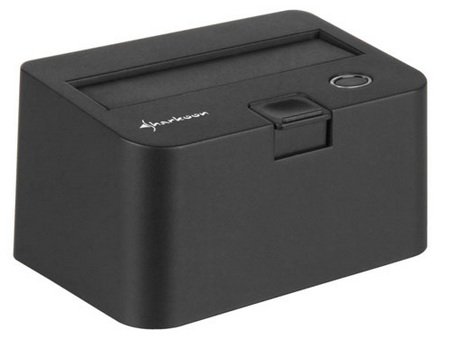
Sharkoon-QuickPort-Mini-USB-3.0-Docking-Station-for-2.5-inch-Drives.jpg

^sharkoon

i mostly have 2 voyagers and one of this sharkoon connected.
 
So its an SSD.

Does the SSD come in a special housing?

If its bare bones can you just put it on a sled and boot up the Mac Pro?

I hear a lot off issues with these docs mostly from the Black Magic folks.

The I/O on computers (PC and Mac) dont seem to like these things.
 
well actually no, these are for standard HDD's. (like this one : http://images.bit-tech.net/content_images/2009/03/western-digital-2tb-green-wd20eads-review/1.jpg)
anyway, can you recommend me an alternative workflow? i've read some things about RAID, which sounded pretty interesting. but i really dont know alot about this stuff.
most of our projects are like 400/500 gb after grading / compositing and exporting. some recent projects are alot bigger though..

what's the ''right'' way regarding file management?
 
Last edited:
I use these docks all the time, pretty much without incident. I agree that you have to be very careful when changing them out; eject disk, turn off, gently press the release lever.
 
Plenty of decent options if you have a Mac Pro.

You can populate the drive bays with SSD or big SATA drives.

I use a few options like a Sonnet Tempo SSD card with two 512GB SSDs for current projects at home and at work an ATTO SAS RAID card with G-Tech eS Pro 12TB RAID system.

But now that I have home ROCKET card I place the R3Ds almost anywhere on my workstation e.g Firewire G-Tech GRAIDs.

Almost always keep your R3Ds or work files on the fastest drive and not on the system drive.

And if you have the budget, you can also go FIBER for backup or an LTO.
 
Back
Top