Filip Vandoorne
Well-known member
- Joined
- Jan 21, 2007
- Messages
- 193
- Reaction score
- 0
- Points
- 0
Because it was difficult to get the Seiki in europ, i turned to my uncle in China - really, i do have a uncle living in China - to have a look for the 4K monitor. But it seems that the Seiki is not sold in China itself. We could find the Skyworth 39E780U for a resonable price with shipping to europ. So the monitor was ordered and we received it monday. So here some first impressions :
The monitor is 220VAC, 50Hz, so in europ, i only need to change the 220V connector as the cable is fixed to the screen.
The most difficult was to find in Chinese menu's the way to change to English.
No batteries AAA for remote and neither a hdmi cable is included, but you get 2 3d glasses.
The hdmi cable was less than a problem than i anticipated with all the stories on the Seiki cabling: i tested 3 brands of decent 3m high-speed hdmi cables and they all worked fine.
The monitor has a slim bezel design, and is also very thin. The back of the screen is white plastic, the front is with a small 1cm black border which is nice. From the front the monitor is my liking, but the back.., well its not Apple.. The screenpanel itself semiglossy, which i like. not a mirror and not too much coating so all details are still visible in the image even from close.
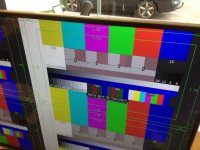
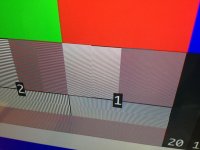
The 39" size is very usable on the desktop: i need to be at less than 39" to see all details with comfort. No pixels to see at that distance, except of course when using the belle-nuit testchart - see photo's. The blacks seem to very good and dark, and the standard setting - for once - shows the best range - using this testchart - https://developer.apple.com/quicktime/
of course you still have to disable all other tricks as DNR, dreampanel and Matix BL. I you have HD images, you also turn off Magic Pic II, MEMC, 120, ... Whatever they do, best to turn them off..
The panel claim to be 10 bit and when i try a known 10bit testimage - a gray ramp with half in 8bit , half in 10 bit : in the 8bit half, i can see the banding, and much less in the 10bit half... so it could be true..
When shown a white even image, i can see some vignetting on the borders, especially the right side, but with a panel and border this thin, it was to be expected, and with most images it's not visible or distracting.
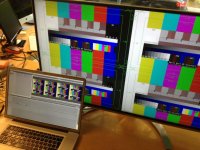
to get the image in quadHD, we already had our Blackmagic UltraStudio 4K ready. drivers are now 9.7.5. I first tried it with Finalcutpro X, but till now, all we get is a green image in 4K. BUT in Finalcutpro 7 the 4K settings at 25fps works fine for prores 444 and 422. Also the Blackmagic Media express works fine to playback the images. The full version of Davinci resolve shows also the display and show all pixels when asked. nice.
i will try in the next days how Adobe behaves in the combination Skyworth and Ultrastudio 4K.
using the display as a computer display should also be possible and its size makes it even not a so stupid idea...
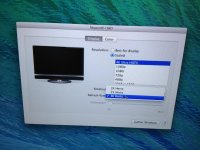
On a plain 10.8.4 or 10.7.5 mac os, the display goes up to HD, but i hope with Maverick or some tools/patches to get the full resolution soon. to be continued...
I also did some testing with HD images, but it seems that the scaler give me trouble to get a decent image. some work will be needed there, but who want HD when he can have 4K ( ultraHD) ;-)
i'm very happy with the quality and the price ratio. a real winner and 4K show-off...
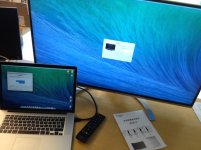
attached some crapy iphone photo's - the pixels in the 1-block of the testchart are perfect on the real display
The monitor is 220VAC, 50Hz, so in europ, i only need to change the 220V connector as the cable is fixed to the screen.
The most difficult was to find in Chinese menu's the way to change to English.
No batteries AAA for remote and neither a hdmi cable is included, but you get 2 3d glasses.
The hdmi cable was less than a problem than i anticipated with all the stories on the Seiki cabling: i tested 3 brands of decent 3m high-speed hdmi cables and they all worked fine.
The monitor has a slim bezel design, and is also very thin. The back of the screen is white plastic, the front is with a small 1cm black border which is nice. From the front the monitor is my liking, but the back.., well its not Apple.. The screenpanel itself semiglossy, which i like. not a mirror and not too much coating so all details are still visible in the image even from close.
The 39" size is very usable on the desktop: i need to be at less than 39" to see all details with comfort. No pixels to see at that distance, except of course when using the belle-nuit testchart - see photo's. The blacks seem to very good and dark, and the standard setting - for once - shows the best range - using this testchart - https://developer.apple.com/quicktime/
of course you still have to disable all other tricks as DNR, dreampanel and Matix BL. I you have HD images, you also turn off Magic Pic II, MEMC, 120, ... Whatever they do, best to turn them off..
The panel claim to be 10 bit and when i try a known 10bit testimage - a gray ramp with half in 8bit , half in 10 bit : in the 8bit half, i can see the banding, and much less in the 10bit half... so it could be true..
When shown a white even image, i can see some vignetting on the borders, especially the right side, but with a panel and border this thin, it was to be expected, and with most images it's not visible or distracting.
to get the image in quadHD, we already had our Blackmagic UltraStudio 4K ready. drivers are now 9.7.5. I first tried it with Finalcutpro X, but till now, all we get is a green image in 4K. BUT in Finalcutpro 7 the 4K settings at 25fps works fine for prores 444 and 422. Also the Blackmagic Media express works fine to playback the images. The full version of Davinci resolve shows also the display and show all pixels when asked. nice.
i will try in the next days how Adobe behaves in the combination Skyworth and Ultrastudio 4K.
using the display as a computer display should also be possible and its size makes it even not a so stupid idea...
On a plain 10.8.4 or 10.7.5 mac os, the display goes up to HD, but i hope with Maverick or some tools/patches to get the full resolution soon. to be continued...
I also did some testing with HD images, but it seems that the scaler give me trouble to get a decent image. some work will be needed there, but who want HD when he can have 4K ( ultraHD) ;-)
i'm very happy with the quality and the price ratio. a real winner and 4K show-off...
attached some crapy iphone photo's - the pixels in the 1-block of the testchart are perfect on the real display