Welcome to our community

Be a part of something great, join today!

  • Hey all, just changed over the backend after 15 years I figured time to give it a bit of an update, its probably gonna be a bit weird for most of you and i am sure there is a few bugs to work out but it should kinda work the same as before... hopefully :)

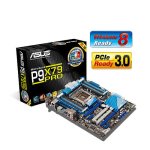
Adding RAID card to ASUS P9X79 PRO Motherboard

Danai Chutinaton

Well-known member
Joined
Feb 7, 2011
Messages
396
Reaction score
0
Points
0
Location
Bangkok, Thailand
Website
www.bluepano.com
I'm currently running an ASUS P9X79 PRO motherboard in my PC for Davinci Resolve with a 4 drive RAID-0 using the onboard RAID controller. I would like to build a bigger internal RAID-5 with 6-8 drives. My current hardware config is this:

Slot 1 = nVidia Quadro 600
Slot 2 = empty
Slot 3 = empty
Slot 4 = empty
Slot 5 = nVidia GTX 690 2GB of RAM
USB 3 = UltraStudio SDI

Can I put a RAID card such as one for Areca into Slot 4 that's normally reserved for a Red Rocket (according to the Resolve Config guide)? Will this slow down my GPU performance? My understanding is that my motherboard can only run 2 16x slots or

Also I'm having a hard time making sense/deciding which Areca RAID card to get.
 
Last edited:
The P9X79 is one of those funky boards with very strange PCIe implementation and a legacy slot for ???

1: gen3 X16 -- Put your GTX690 here if it will fit - or put it in slot 4 - the next X16 slot down, there it will cover the legacy slot I believe.

2: gen3 X1 -- Covered by the 690 if you put it in the top slot. Not sure what you'd use this slot for anyway....

3: gen3 X1 -- Two of these X1 slots... What were they smoking?

4: gen3 X16 -- Possibly the 690 or the Quadro 600 or a Rocket card... Any of which could go in that top slot, however it fits best.

5: Legacy PCI - Ugh.

6: gen3 X8 -- Your RAID card would work well here. So would a current RED Rocket, so would anything actually. Even the GTX690 being dual GPUs on one card isn't going to fully saturate all 7.4GB/s of potential bandwidth in that slot.


When it comes down to it, it's not going to matter where you put what, based on what you currently have. If you decide to add a Rocket-X at some point, you may have to re-evaluate as we don't know the full specs yet. But this system really only has 3 usable slots.


For a good internal RAID card, I recommend the ATTO R608 (not the R680 as that one has only external ports, R608 has internal ports). Or if you go with the Areca card, which is also an excellent choice, take a look at the ARC-1882i model. It also provides two internal 8087 mini-SAS ports for a total of 8 discrete 6Gbps SAS/SATA channels. On the Areca cards, the model numbers have either i or x (or both letters). I stands for internal ports, x for external ports, ix for internal+external.

If you want both internal and external SAS/SATA connectivity, there are the ATTO R644 and R688 models. For Areca, there are the ARC-1882-ix-nn models. Where nn can be 12, 16 or 24 to represent the number of discrete internal channels so 12 = 12 channels, 3 ports, 16 = 16 channels, 4 ports. They all have one 4-channel mini-SAS port externally. The Areca ARC-1882 series was just updated recently to be PCIe gen3 compliant. They are X8 cards and would work fine in any of the 3 large PCIe slots on your motherboard.
 
Jeff,

Thank you for your detailed reply. I'm still a little confused about my PCI slots. I must be missing something, but your comments on the slots don't seem to match my actual mother board. But to be honest, I'm not really sure what each type of slot looks like. I've attached a picture from Asus' website for your reference. In your list of slots, is slot 1 closest to the CPU?
 

Attachments

  • P9X79_PRO.jpg
    P9X79_PRO.jpg
    63.6 KB · Views: 0
Great answer, Jeff! That's useful background knowledge!
 
Sorry guys, I was referencing the P9X79 standard board and not the "PRO" board. I'm not familiar with the PRO model here and didn't catch that little detail in Danai's initial post. Anyway, looking at the board and its specs, the PCIe slot arrangement is this:

Slot 1 - PCIe gen3 X16 @ X16
Slot 2 - PCIe X1
Slot 3 - PCIe gen3 X16 @ X16 or X8
Slot 4 - PCIe gen3 X16 @ X8
Slot 5 - PCIe gen3 X16 @ X8 or Off
Slot 6 - PCIe X1

That arrangement is from the top down, so Slot 1 is closest to the CPU, Slot 6 at the bottom or closest to the edge of the board.

Slot 1 is a full X16 slot, runs at full X16 bandwidth. Slots 2 and 6 are X1 slots and I believe they are PCIe gen2, but I don't know for sure, I haven't used one of these boards myself and the specs I have are not clear on that. Worthless slots anyway, IMO.

Slot 4 is an X16 slot physically, but operates in X8 mode. Slot 3 is an X16 slot physically and can operate as an X16 or X8 slot, depending on the configuration of Slot 5. If Slot 5 is disabled, then Slot 3 operates as X16. If Slot 5 is enabled, then both Slot 3 and Slot 5 operate as X8 slots. Slot 5 is also an X16 physical slot.

So, going on that, you have an optimal configuration of 3 or 4 truly usable PCIe slots. So you can have 3 slots @ X16 plus two X1 small slots. Or you can have 2 slots @ X16 and 2 slots at X8 with the remaining two X1 slots.

As for which card placement order works best, that is a best-fit scenario. Slot 6 would be a good place for add-in brackets like the Rocket SDI connectors because you're probably not going to use that X1 slot for anything. Slot 1 is the ideal location for the GPU as most are double width and that would cover up slot 2, the other mostly worthless X1 slot.
 
In the Resolve Lite recommendation, it indicates the following for the P9X79 Pro

Slot 1 - PCIe x16 - Rocket or HBA Raid card
Slot 2 - PCIe x1 - I would use a BM mini monitor out (1080p)
Slot 3 - PCIe x16/8 - but do not use so Slot 5 runs at x16
Slot 4 - PCIe x8 - Rocket or HBA Raid card
Slot 5 - PCIe x16/8 - Graphics card (GTX 770 or 780 or Titan)
Slot 6 - PCIe x1 - covered by graphics card
 
Perhaps I'm missing something, but after reviewing the specs and details for my post above, the BMD Resolve guide seems to be in conflict. I don't have one of these boards here to see for sure, but if BMD is correct, then the motherboard specs I have are wrong. According to my specs, Slot 3 is active no matter what. It runs at X16 if Slot 5 is unused. It runs at X8 if Slot 5 is used. When Slot 5 is used, it also operates at X8. So based on that, I would probably put the GPU in Slot 1 so it can run at full X16 and it would cover the X1 Slot 2. Then put the mini monitor in Slot 6.

The current Rocket plus all the good RAID cards out there only need an X8 slot, so put those cards in Slots 3 and 4 at X8. Rocket X is an X16 slot, we don't know if it's PCIe v2 or v3 or if it is full X16 for data or not. But it seems logical that we could put it in Slot 3 and have the option to run it at X16 bandwidth if we leave Slot 5 unused....


So now i have to wonder. Is my assumption correct, based on the specs/ docs from ASUS? Or is BMD correct, meaning they have used the board in-house in their testing and found it to conflict with the ASUS docs? ...I hate it when this happens. ;(
 
The BM guide suggested that layout to maximize performance on the P9X79 Pro, as one of the few boards they support and recommend at x16 x8 x16, but I'm sure it would work fine to put the graphics card in slot 1 and fill the remaining slots with three PCIe x8 cards (x16 x8 x8 x8 x8).

Some of the other specs noted for the rocket-x indicate a physical x16 but electrical x8.
 
Last edited:
Thanks for all the responses. Very useful information indeed. I guess I will just have to get the card and do some testing to find out if Jeff's way or BMD's way works best.

Actually I've never been very happy with my ASUS P9X79 Pro motherboard. USB has been very finicky/unstable from day one. I constantly get the BSOD when attaching a USB3 drive and the Ultrastudio SDI (USB3) while running resolve. If I'm running Resolve, I actually have to restart the computer and unplug the Ultrastudio SDI before I can use a USB3 drive.

Is there a better board you guys can recommend? I'm running the i7 3930k processor.
 
Back
Top