Welcome to our community

Be a part of something great, join today!

  • Hey all, just changed over the backend after 15 years I figured time to give it a bit of an update, its probably gonna be a bit weird for most of you and i am sure there is a few bugs to work out but it should kinda work the same as before... hopefully :)

Difficulty with Sin City Look

Linda Barzini

Well-known member
Joined
Dec 30, 2009
Messages
269
Reaction score
0
Points
16
Location
Chicago
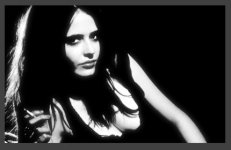
I am having tremendous difficulty replicating the Sin City look, not the leave 1 color part, but the high contrast graphic novel look. I am shooting my talent on green screen and importing on a solid background plate in After Effects, but I can't seem to get the look in the movie.

It seems that Frank Miller's graphic novel is mostly black and white with an absence of mid-tones. Sounds simply, but when I crank the contrast too high, I lose all the definition in my talent. The best I have achieved is with some pre-sets in Magic Bullet Looks, but I would like more control.

How is this achieved? Any suggestions would be appreciated.

 

Attachments

  • sc1.jpg
    sc1.jpg
    49.5 KB · Views: 0
  • sc2.jpg
    sc2.jpg
    63.2 KB · Views: 0
attachment.php


it's really just a matter of where and how much you want to push it in the curve... you can do additional passes for just the skin or just the face or just highlights
 
The magic is all in the lighting Linda. Check out film noir lighting setups. Getting contrast in post is always going to disappoint as you will loose all mid-tones and detail. Check out the trailer and see where the highlights fall. '
http://www.youtube.com/watch?v=1rwPmJP2GcQ

 
Building on what Bob said, here's some Behind the Scenes video from Sin City that shows what it looked like on set:

 
Lighting is where its at for sure.
 
The folks who did the original went through a lot of experimentation and iterations before they arrived where they did. And they came up with a combination of a lot of techniques to achieve it, many of which differed from shot to shot, depending on what production did and what was desired.

Look creation and visual effects are never as simple as looking at something and trying to copy it. But it's interesting to note that Magic Bullet Looks were largely created by Stu Maschwitz, who was the VFX supervisor on Sin City...
 
Hey Linda,
If the lighting is already done, you might need to pull keys (qualifiers) to be able to tread those areas differently and with that, with more precision. Perhaps I would start with the skin tones and red lips as two separations, additionally the eye-colors as well, then anything else that is left is perhaps doable in one step.

Edit: Colorista (as you mentioned Looks) has some nice keying options. Which helps to get a nice initial grading. As I do not know the other footage, you might be able to speed up, after the inital step, to get what you like with the "Black and White filter and a curve.I have attached an Ae Cs6 file. You need to reconnect your sc1.jpg file. I have done two versions in it sc2 and sc4. From my memory of that movie, I had always the feeling there is some tiny little bit glowing which I have integrated. Just a little brainstorming, adjust it to your liking of course. The Cyan filter in the B&W affects here eyes a lot ;o) /edit.

Good luck with the project.

P.S. Stu Maschwitz who worked a lot on RED-Giant-Software (you mentioned it above) was leading large parts of that movie (Studio: The Orphanage)
 

Attachments

  • sc1_drs_01.aep.zip
    sc1_drs_01.aep.zip
    20.2 KB · Views: 0
  • Screen Shot 2013-05-05 at 6.53.57 PM.jpg
    Screen Shot 2013-05-05 at 6.53.57 PM.jpg
    14.1 KB · Views: 0
Last edited:
Couple of things I do that you might try:
1. Do the b/w conversion in the R3D, i.e. saturation to zero on the r3d instead of using AE b/w effect
2. Go linear (do linear in the R3D mode instead of redcolorgama) and set AE to rec709/linear (there are a couple of buttons to do that)
3. Play with gama before you do the more extreme things (so you get a good b/w look before you start playing with the middle luminance )
4. Use laplacians with smoothing to erode/strengthen/smooth edges rather then the mess with the luminance (this is easier in nuke, with ae it's a stack of effects you need to use [ones that are both in photoshop and ae])
5. do log operations on the high end of luminance to "chop" of the top yet give deep shadows rather then "s" curves
 
Couple of things I do that you might try:
1. Do the b/w conversion in the R3D, i.e. saturation to zero on the r3d instead of using AE b/w effect
2. Go linear (do linear in the R3D mode instead of redcolorgama) and set AE to rec709/linear (there are a couple of buttons to do that)
3. Play with gama before you do the more extreme things (so you get a good b/w look before you start playing with the middle luminance )
4. Use laplacians with smoothing to erode/strengthen/smooth edges rather then the mess with the luminance (this is easier in nuke, with ae it's a stack of effects you need to use [ones that are both in photoshop and ae])
5. do log operations on the high end of luminance to "chop" of the top yet give deep shadows rather then "s" curves

patrick, i think you just lost everybody that's not a compositor or colorist...

that being said, if you want professional results you want to seriously think about hiring a compositor/colorist.
but where would you ever find one of those... ;)
 
Thanks for the responses. Its starting to look better, especially after I add some rain. I think the lighting is the most important. I watched the movie again, it looks like they lit many scenes from each side and back lit. The lighting is very unconventional, no Davinci 3-pt lighting.

I definitely think this high contrast look is best achieved with lighting. I agree with the comment that adding contrast in post is disappointing.
 
yeah, in film noir you get a lot of punchy, single-source lighting (plus overblown rim/backlighting). if you're literally trying to allude to the film, look at the golds/muted skintones that give the skin a bit of a sepia touch, but if you're not specifically doing work related to that film i would look at graphic novels, film noir, & westerns to begin crafting your own stylistic choices driven by your story and your characters... i.e. it's a poor choice to be a copycat unless you're doing a fan-film, parody, or otherwise a work that responds to or takes place in that particular world. just sayin' - good luck :)
 
It seems that Frank Miller's graphic novel is mostly black and white with an absence of mid-tones.

Frank Miller's graphic novel have only black or white, nothing else, and this is pretty much how everybody is doing for black and white graphic novel. Now for movie this is not the case, it is nearly impossible not to have some shades of gray in there.
The lighting is for sure very important to start with, hard light and so on. The big Combo (DoP John Alton) is a very famous example b&w movie (i mean nearly without gray). But for a Sin City look it needs compositing, color grading is not enough ( I mean you need to pull some matte that are not easy in color grading software).
I, for example, love the glasses look you get in comics book, where you don't see the eyes of the person, which had been done in Sin City movie.

Have ton of fun!
 
Back
Top