Jan Zahradníček
Member
Hello, we have a problem with Avid Artist Color wheels.
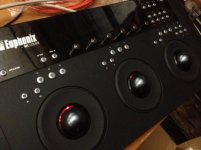
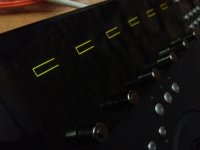
With the Macbook Air and Mac Pro it works well. The problem is with the new Retina Macbook Pro 15": Within the EU Control application (v2.6.2) the rectangles on the Artist Color displays appear larger than when connected to older types of Mac. And what is worse: In Redcine-X and in Davinci Resolve the inscriptions on the displays do not appear at all. See pictures in attachement.
How we tried to fix it:
- connect wheels to Retina via USB2ETH or Thunderbolt2ETH
- connect directly (fixed IP) or via the switch (DHCP)
- reset PRAM
- use new MacOS user (admin)
- use different versions (10.8.2 and 10.8.1) of MAC OS
Unsuccessfully :-(
Can you help, please?
With the Macbook Air and Mac Pro it works well. The problem is with the new Retina Macbook Pro 15": Within the EU Control application (v2.6.2) the rectangles on the Artist Color displays appear larger than when connected to older types of Mac. And what is worse: In Redcine-X and in Davinci Resolve the inscriptions on the displays do not appear at all. See pictures in attachement.
How we tried to fix it:
- connect wheels to Retina via USB2ETH or Thunderbolt2ETH
- connect directly (fixed IP) or via the switch (DHCP)
- reset PRAM
- use new MacOS user (admin)
- use different versions (10.8.2 and 10.8.1) of MAC OS
Unsuccessfully :-(
Can you help, please?