Welcome to our community

Be a part of something great, join today!

  • Hey all, just changed over the backend after 15 years I figured time to give it a bit of an update, its probably gonna be a bit weird for most of you and i am sure there is a few bugs to work out but it should kinda work the same as before... hopefully :)

Diffusion, "Film look", and the Epic

Jon Chema

Well-known member
Joined
Aug 12, 2009
Messages
409
Reaction score
0
Points
0
Location
Los Angeles, CA
Website
www.jonathanchema.com
So I've got mixed feelings about filters with the Epic. With today's post- software, I feel everything but ND can be added in post. However, when one wants to achieve a light film look via diffusion IN CAMERA, my question has always been what type of diffusion works best. In the past I've had lucky with Tiffen 1/8 Black Pro-Mist. Ive found it takes the harsh edge off 5k and doesn't bloom highlights too much.

What is everyone else's experience with this?
 
I personally actually prefer diffused misty highlights, but relatively clean darks. Different optical filters and post enhancements give various results.
 
Tiffen Glimmerglass is one of my favorite looks for certain kinds of shots:

No Filter LR.jpg
Glimmerglass 4 LR.jpg


http://www.tiffen.com/Glimmerglass.htm
 
I just spent a weekend with some glimmer glass and my Epic and LOVE them! I wouldn't say they are the perfect diffusion, but they were definitely right for this project.

Edit: Other diffusion I like:

- Black Pro-mist
- Classic Soft
- Hollywood Black Magic
- Soft FX
- Digitial Diffusion FX

They all do something a little bit different which makes different ones right for different projects.
 
Note that you have to really commit to using filters like this in production. There's always a danger of going too far and getting stuck with a look that the client or director doesn't want. In that respect, it's sometimes better to do an extreme look in post (particularly grads), because you can always back off on them in final color-correction. Or consider an effects pass and use plug-in filters in After Effects or your editing program; that might be a more effective way of achieving the same look with greater control.

No question, though, my gut feeling is you get a more organic look doing it in the camera. But I get nervous when people use harsh straw or chocolate or tobacco filters. I know of a well-known feature where the DP chose to use them on a digital camera, and it wreaked havoc on certain effects shots. Many, many expensive hours in post were needed to "undo" the damage caused by the in-camera filters. So it's a case of knowing when and where to use them, and when you can fully commit to that look without fear of needing to change it later.
 
Note that you have to really commit to using filters like this in production. There's always a danger of going too far and getting stuck with a look that the client or director doesn't want. In that respect, it's sometimes better to do an extreme look in post (particularly grads), because you can always back off on them in final color-correction. Or consider an effects pass and use plug-in filters in After Effects or your editing program; that might be a more effective way of achieving the same look with greater control.

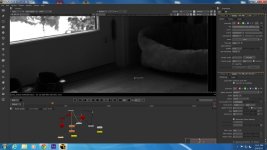
I perty much follow what Marc is saying, and I don't want to commit to a look in camera. For example in post I first rebuild the lens optics from the shot, then re-apply what lens optics I like. In this example I create a depth map of the shot(z-depth of all pixels), then reapply a new T stop to the shot using the depth map. I then run the "new" lens t-stop through mix of laplacians and gausian blurs to simulate an older type lens.

This also is the way to do it with vfx integration, because then the vfx added images come through that "simulated" lens with the exact contrast, lens errors and T stop. here's some before/after and nukex shots (this is in linear at the pre-graded, pre-vfx composite stage). [actually the order is ... After ... before ... nukex screen] ... a good tutorial of all this is at http://www.digitaltutors.com "Photorealistic Camera Lens Effects in NUKE" ... goes over camera physics in detail with the nodes.
 

Attachments

  • pudl_base.jpg
    pudl_base.jpg
    64.9 KB · Views: 0
  • pudl_laplace_z.jpg
    pudl_laplace_z.jpg
    43.8 KB · Views: 0
  • pudl_laplace_zbuf_screen.jpg
    pudl_laplace_zbuf_screen.jpg
    89.1 KB · Views: 0
Last edited:
I basically use my 1/2 classic black soft for just about everything. It's basically a 1/2 black pro mist and 1/2 classic soft combo filter. Great with highlights and very nice with skin tones. They are hard to find as I pretty much had to take it from Stan at the filter gallery cause it was his only one he had.
 
Note that you have to really commit to using filters like this in production. There's always a danger of going too far and getting stuck with a look that the client or director doesn't want. In that respect, it's sometimes better to do an extreme look in post (particularly grads), because you can always back off on them in final color-correction. Or consider an effects pass and use plug-in filters in After Effects or your editing program; that might be a more effective way of achieving the same look with greater control.

No question, though, my gut feeling is you get a more organic look doing it in the camera. But I get nervous when people use harsh straw or chocolate or tobacco filters. I know of a well-known feature where the DP chose to use them on a digital camera, and it wreaked havoc on certain effects shots. Many, many expensive hours in post were needed to "undo" the damage caused by the in-camera filters. So it's a case of knowing when and where to use them, and when you can fully commit to that look without fear of needing to change it later.

True. I think Haze also works wonders...but can easily be over used.
 
How would you compare black pro mist to Hollywood black magic?
 
The Schneider Hollywood Black Magic has a base diffusion of an 1/8 Black Frost plus whatever strength of HD Classic Soft you pick. The Schneider Black Frost is similar to the Tiffen Black ProMist. Since most people use a 1/4 Black ProMist or higher, the Hollywood Black Magics are a bit less misty but have greater degrees of softening. There is less of that "grain" texture from the mist particles with Hollywood Black Magics compared to, let's say, a 1/4 Black ProMist, and less loss of contrast.
 
Which makes me think its safest / best (?) to do as much in post as possible.
Im all about in camera fx that can't be had another way, but wondering how many professional post tools like plug ins (mac PP cs6) offer credible emulation of traditional film filters & what filters the pros use often that can't be emulated in post.

Thanks for any ideas...

Note that you have to really commit to using filters like this in production. There's always a danger of going too far and getting stuck with a look that the client or director doesn't want. In that respect, it's sometimes better to do an extreme look in post (particularly grads), because you can always back off on them in final color-correction. Or consider an effects pass and use plug-in filters in After Effects or your editing program; that might be a more effective way of achieving the same look with greater control.

No question, though, my gut feeling is you get a more organic look doing it in the camera. But I get nervous when people use harsh straw or chocolate or tobacco filters. I know of a well-known feature where the DP chose to use them on a digital camera, and it wreaked havoc on certain effects shots. Many, many expensive hours in post were needed to "undo" the damage caused by the in-camera filters. So it's a case of knowing when and where to use them, and when you can fully commit to that look without fear of needing to change it later.
 
I perty much follow what Marc is saying, and I don't want to commit to a look in camera. For example in post I first rebuild the lens optics from the shot, then re-apply what lens optics I like. In this example I create a depth map of the shot(z-depth of all pixels), then reapply a new T stop to the shot using the depth map. I then run the "new" lens t-stop through mix of laplacians and gausian blurs to simulate an older type lens.

This also is the way to do it with vfx integration, because then the vfx added images come through that "simulated" lens with the exact contrast, lens errors and T stop. here's some before/after and nukex shots (this is in linear at the pre-graded, pre-vfx composite stage). [actually the order is ... After ... before ... nukex screen] ... a good tutorial of all this is at http://www.digitaltutors.com "Photorealistic Camera Lens Effects in NUKE" ... goes over camera physics in detail with the nodes.

This is a very nice effort but to me it just doesn't cut it. It looks like plastic and unnatural. Even with the biggest compositing tour de force it looks like it was done in the computer. It looks like what it is - a gaussian blur. I understand people don't want to commit in camera and that is why movies nowadays look the way they do. Everybody is a cinematographer these days - they use power windows instead of flags and gaussian blurs instead of filters! Where's the fun (art) in that?? ..and it looks fake.
 
Everybody is a cinematographer these days - they use power windows instead of flags and gaussian blurs instead of filters! Where's the fun (art) in that?? ..and it looks fake.

Every movie is a fake. The clarity,color, flatness,dimentionality, it's all a rectangular window big fat fake. So the style of fakeness is changing. Get used to it.
 
Through reading American Cinematographer faithfully over the years, I have been struck time and time again by how committed the world's greatest DP's are to diffusion & filtration in their cinema and broadcast work...whether they are shooting digitally or not. From the simplicity of adding a 1/8 Black Promist on Iron Man, to the complexity of layering Coral and Classic Soft on Warhorse, to all the spellbinding "warming" mists Burgess used on 42, it's clear to me that a mastery of our craft also requires a mastery of filtration.

I now regard filtration as important a choice as the camera, lenses and lights we're using. If the masters take it seriously, then as far as I'm concerned...so should I.
 
The Schneider Hollywood Black Magic has a base diffusion of an 1/8 Black Frost plus whatever strength of HD Classic Soft you pick. The Schneider Black Frost is similar to the Tiffen Black ProMist. Since most people use a 1/4 Black ProMist or higher, the Hollywood Black Magics are a bit less misty but have greater degrees of softening. There is less of that "grain" texture from the mist particles with Hollywood Black Magics compared to, let's say, a 1/4 Black ProMist, and less loss of contrast.

Thanks for the tip. What filter do you feel rolls off the highlights most comparable to a film stock? Thats the biggest "giveaway" I see when shooting digital.
 
Optical filters can lift blacks and shadows through halation but they don't do much to just darken highlights only, you'll have to do that with exposure and lighting. Black particles in filters like Tiffen Soft Con (an older filter) or Schneider DigiCons (similar to an UltraCon but with black particles that suppress highlights slightly) can help a little but I don't think the improvement in highlight roll off is significant enough to make the image behave like film negative.

I think modern digital cameras are not that far off in terms of highlight protection compared to film, and of course rating the raw or log cameras faster will give you more highlight information to work with.
 
Optical filters can lift blacks and shadows through halation but they don't do much to just darken highlights only, you'll have to do that with exposure and lighting. Black particles in filters like Tiffen Soft Con (an older filter) or Schneider DigiCons (similar to an UltraCon but with black particles that suppress highlights slightly) can help a little but I don't think the improvement in highlight roll off is significant enough to make the image behave like film negative.

I think modern digital cameras are not that far off in terms of highlight protection compared to film, and of course rating the raw or log cameras faster will give you more highlight information to work with.

Thanks for the response. I love working with the Epic and Alexa. I feel they're getting pretty darn close.
 
This is a very nice effort but to me it just doesn't cut it. It looks like plastic and unnatural. Even with the biggest compositing tour de force it looks like it was done in the computer. It looks like what it is - a gaussian blur. I understand people don't want to commit in camera and that is why movies nowadays look the way they do. Everybody is a cinematographer these days - they use power windows instead of flags and gaussian blurs instead of filters! Where's the fun (art) in that?? ..and it looks fake.
You'd be surprised. 90% of the color-correction I've done in features has revolved around overall contrast and brightness levels, and also sneaking in what I call "electronic flags" to add a shadow or knock down a highlight where it would've been impossible to put a physical flag in due to camera position and set issues. To me, the color-correction and the filtration (and physical lighting) all have to work in tandem together. The art comes from the cinematographer who made the initial decisions on set and then goes in and supervises the touch-ups later on.

Ideally, all we do in the final color-correction process is just to put the icing on the cake, rather than put stitches and tourniquets on a dying patient. A band-aid or two is expected. And again, I think a visual issue like a grad filter is pretty basic in color-correction, because we can draw one out precisely and cut a tracking hole for the actors to shine through, which you can't easily do with an in-camera filter.
 
Back
Top