Welcome to our community

Be a part of something great, join today!

  • Hey all, just changed over the backend after 15 years I figured time to give it a bit of an update, its probably gonna be a bit weird for most of you and i am sure there is a few bugs to work out but it should kinda work the same as before... hopefully :)

Epic+Sennheiser G3 Audio advice

Ketch Rossi

Well-known member
Joined
Jan 10, 2007
Messages
15,041
Reaction score
9
Points
38
Location
Sardinia, Italy
Website
www.afroditefilms.com
EDIT: Thanks every one, problem solved... Got to love this great community of ours...

Then people ask me why I spend so much time sharing and helping others on here, this is why...

Every time I have the need for it, I find help, its just fair, to also give when one can, and not just pretend to receive...;)


Hey guys,

I'm in need to record half decent audio in camera, which will be Bare Bone Brain with Side Handle & LCD, via a Sennheiser ew 100 G3 Lavalier wireless system thru the Channel 1 port in front of camera, since I never use on board recording I like to see what your best Audio setting would be in camera so that I can get some usable background Audio form a Female screaming and some ambient Noise for an indoor shoot.

Thanks in advance... ;)
 
Ketch, not sure if you're aware, but the cable that is supplied with the system (the one that can screw into the receiver and goes into the front mini jack) is not compatible with Epic. Mine gave me no signal at all and then I found the solution here on RU (of course) I used a cheap 3.5mm patch cable I had laying around to run from the receiver into the Epic and presto I had audio. If you're using their XLR cable to go into the Pro I/O Module, you're probably already good on connections.

Not sure about best settings, though.
CB
 
No, as I said, never used in camera recording, so no, I was not aware of this, thanks, now I got to find a cable that will work... :(

I am using the Bare Bone Brain only, so I need the 3.5mm cable option, just hope to find one here in Rome Historic Center without the need to go to the other end of the city.


EDIT: What do you know... I had one in my bag of cables, problem solved as signal now enters the camera and the green line on Ch1 shows the progressive bar... Thank Christopher!

Got to love our community!!


Now, back to the first question, what are the actual Audio settings in the Menu? And, can I get audio in to my Headset, out of the headset jack in the back of the Brain before recording to check signal? Because I am not getting any... :(
 
Hey Ketch,

I recently DPed a short where we had the audio sent to Epic via a G3 hop as scratch track for dailies. The cable we used was a 'MONO' 3.5mm ($3 value or something). As far as settings go, here are some tips:

1. In your audio menu, under 'Gain In', select a Camera Analog gain that lets your audio meters reach about -12dB on the scale. I recall that the Epic doesn't have audio meters marked, so that would be about 3/4th way in on the meter. I would try to make sure my levels don't go over that as general dialogue is in that range for a natural sounding audio piece.

2. Volume out can be adjusted to need based on your hearing preference from the headphone jack.

3. In 'Camera Mix', since you are using only 1 channel, you could keep the dial centered, which you would do later on anyway. If you are using 2 channels and want to monitor via headphones while shooting, it might be better to pan Ch1 left and Ch2 right so that you can sort of hear the voices in different sides and keep an ear out for any problems and will know which channel has problems. But with that said you are using 1 channel and not receiving 2 hops.

4. In the audio setup (I don't have my Epic in hand and sending these based on the manual), you can select 'Camera Analog' and then 'Unbalanced'. I tried 'Balanced' but I think it didn't let me do that since I was using a mono cable, can't remember. Also select the limiter and you can uncheck the link if you are using 1 channel (this should give you a single track).

Other than that, the audio might still be not that great, because it doesn't have any good limiters and you can't mix on the fly. Again, as long as your general dialogue speaking meters stay close to -12dB, you might get usable audio, if your talent is too soft spoken and you up the gain in post, you will hear the big noise floor on the Epic.

Hope some of this helps, let me know if you have any specific question that I can answer on this topic..

Good luck!
 
Thanks Ayan,

but how do I get Audio out thru the headphone jack, cause I am not getting any.

I'm plugged in via a Mono 3.5mm jack on channel one and made the settings as suggested, audio also adjusted on Headphones out, yet nothing.

Would it make any difference if I use a two in one 3.5mm so to use both Left and Right channel 1 & 2?


I hate having to record even Background sound without a Sound man... ;)
 
NO, I haven't recorded anything yet, prepping for a shoot, and i left my 512GB SSD's at the other place, so can't even try to record for now, what I am doing is making sure that the Audio gets in to the camera, and for this I have been testing with no results, till thanks to Christopher I found out that it was because of the Sennheiser cable, now that I have one that works, I do see the Green bar leveling accordingly to Audio level, but I can't get anything out of the Headphone Jack on to my headphones.
 
Ketch make sure you check the Output settings in the A/V menu make sure the Brain it is set to headphone and adjust the output level until you hear something. It should work even in standby mode. I don't have a camera in front of me, just going from memory right now. Also with the mic I suggest you select Balanced in the Mic level input for the Sennheiser.
 
Thanks Brian,

done just that, which I had already done but staid at 12db, which usually on my Sound guy's Mixer is already super loud, but had to take the ones in the Epic all the way up to 60db in order to finally get that audio out, and there is a bazz under it, but for the purpose at end will twist it on location and will do just fine... ;)


THANKS again to you all guys, much appreciated the help, and then people tell me I do too much, see here you and there was one thing I wasn't doing... And hope to never have to do again, as I much appreciate giving the Job to a Pro Sound guy/girl... ;)
 
Hi Ketch.
Do you remember witch cable you bought?
Looking for one to use with my older EW100 receiver.
Thanks
 
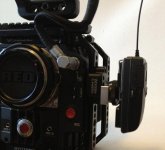
Also, here is a nice way to mount the G3. I bought the kit with the camera mount (hot shoe) for the receiver. Then I got a WC 1/4 20 mounted hotshoe adapter and rail clamp. Receiver quick release, BAMM, no more Velcro.
 

Attachments

  • G3Mount.jpg
    G3Mount.jpg
    110 KB · Views: 0
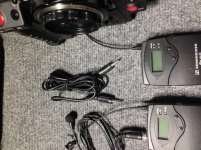
Actually the cable needed to go form the Audio IN of the Epic to the Receiver is a Male to Male standard Stereo 3.5mm cable.


attachment.php
 

Attachments

  • 3.5mm.jpg
    3.5mm.jpg
    96.8 KB · Views: 0
Headphone Audio

Headphone Audio

Did you ever figure out why your headphone audio wasn't working? I am having the same issue.
 
The W00d3n Cam3ra A-box works well for this unit, with the camera's preamp inputs set to balanced.
No phantom power required (obviously).
Set Sensitvity on the transmitter at -21dB, set AF out of the receiver to -18dB. The Epic input sliders should be at the bottom. No more amplification is required.

However, the original 3.5mm jack can also be used by setting the camera's preamp inputs to 'unbalanced', and bumping up the AF out of the receiver to around -6dB.
 
Back
Top