Welcome to our community

Be a part of something great, join today!

  • Hey all, just changed over the backend after 15 years I figured time to give it a bit of an update, its probably gonna be a bit weird for most of you and i am sure there is a few bugs to work out but it should kinda work the same as before... hopefully :)

Hack Pro Computer Build

Brennan Robideaux

Well-known member
Joined
Nov 3, 2012
Messages
112
Reaction score
0
Points
16
Location
Louisiana
After getting my BT R1MX and shooting some incredible footage, I brought them onto my iMac to learn that there is simply no way that I could ever edit anything from RED on it. Slow as molasses. Not too surprising.

So, I looked into the NoFilmSchool's updated hackintosh and modified it a bit for my liking. For those who are interested, here is the link to the wishlist that will be my hackintosh: http://secure.newegg.com/WishList/PublicWishDetail.aspx?WishListNumber=22278146 (couple pieces missing)

At around $2200, I think this is a pretty incredible computer. It shipped today, so if anyone would like me to post the results when it comes in, let me know.
 
I have the same motherboard and processor. I love mine. Your PSU may be over kill. But looks like a good build to me! I have a very similar build and it works great. Its more stable than my late 2009 Mac Pro.
 
I'm giving this one two thumbs up. I think you'll be pleased. Hate to say it, but you'll still have a better time with it running Windows... not saying you won't still want to boot into OSX as well.
 
From my guru tech friend:

We're going to install the 4x 2TB's into a RAID 6 setup. If I fill up the RAID setup too fast, at least by the time it happens, then more storage will be significantly cheaper. The extra 250Gb drive pretty much for time machine.

In addition, I'm ordering two Dell U2312HM flat panel monitors. (http://www.newegg.com/Product/Product.aspx?Item=N82E16824260055&Tpk=u2312gm)
 
Thanks for posting. This is what makes this filmmakers community different (E :-)
 
Thanks Brennan.
 
What do I need in addition to run a Resolve?
What about temperature in this monster??
Thanks a lot.
Cheers
 
Thank you all for the responses. I will make sure to take pictures and maybe even take some video when we are setting it up.

Ev, it doesn't come in brushed aluminium but you can get the same case in white or military green.

Raphael, I can't answer the question about Resolve. I am not too sure. But the temperature should not get that hot. The case has fans on pretty much everything and a hydro cooler for the CPU. I am interested to see how loud it gets. I will definitely post results on that.

Any more questions?
 
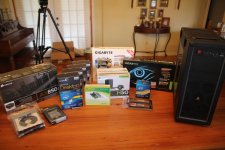
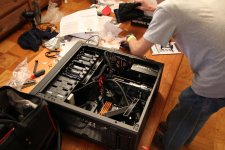
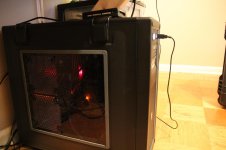
Ok, the parts came in and the computer is officially built. Running like a champion so far. Please take a look at the pictures and the timelapse video of the build.


The build was relatively easy. The whole unit went together like legos. It's all just a matter of knowing the correct order to install the parts in.
(The only thing we messed up on was installing the video card before connecting the hard drives to the SATA ports.)

The case is pretty remarkable. Being a nice case, it gives you the option to remove the opposite side panel to route wires behind the motherboard. This really cleans up the interior of the case and helps with air circulation.
In addition, the fact that the case has hard drive trays makes it really simple to add or remove more drives.

As far as heat and power consumption, this machine does not get hot. Seriously. The processor is running at about 110º F and the hard drives around 100º. With that stated, it's probably safe to push the processor a little bit and overclock.

It benchmarked a score of 12766 on GeekBench with 32-Bit processing. Other machines with this similar setup seem to be getting around 15000, but i think it is the memory I chose that's slowing me down.

The OS X installation was very smooth. While the RAID setup on the motherboard wouldn't be recognized by OS X, installing to the SSD, setting up the Time Machine backup, and setting up RAID with disk utility was a breeze. If you want to know the setup procedure for this system, please PM me. I will not be openly posting how I specifically got OS X to run.

The only thing I have left to wait on is my monitors. The man from eBay has been "Sick", so until then, i've been making due with my HP 2311x.


I will also be uploading a video showcasing the insane restart speed as well as the integration of RED footage with Premiere Pro CS6. Please ask any questions. Thanks!
 

Attachments

  • IMG_7608.jpg
    IMG_7608.jpg
    92.7 KB · Views: 0
  • IMG_7645.jpg
    IMG_7645.jpg
    95.6 KB · Views: 0
  • IMG_7652.jpg
    IMG_7652.jpg
    87.8 KB · Views: 0
Thanks Brenan, what about Red CineXPro? Smooth?

Cheers
 
Super smooth. I can scrub through 4k files at full res with no problems but I can only view playback at half res. Not too bad in my opinion.
 
how are the usb 3 and thunderbolt ports working for you?
 
[FONT=Tahoma, Calibri, Verdana, Geneva, sans-serif]Mike - I am not too familiar but a quick google search delivered something that might give you promising results: [/FONT]http://www.macbreaker.com/2012/04/ultimate-xeon-hackintosh-server.html - ratings on newegg are not looking too hot though. Someone else may need to pitch in for me here.

Zul - Haven't tested the thunderbolt ports yet but I can only imagine them being great. Really utilizing the USB 3 ports, though. Insane transfer speeds. I copied 35Gb of footage off a REDMAG through the RED Station MINI (USB 3.0) in about 2 and a half minutes. Before, I was copying through USB 2.0 and it was taking about 45 min. Pretty significant difference.
 
Ok, the parts came in and the computer is officially built. Running like a champion so far. Please take a look at the pictures and the timelapse video of the build.


The build was relatively easy. The whole unit went together like legos. It's all just a matter of knowing the correct order to install the parts in.
(The only thing we messed up on was installing the video card before connecting the hard drives to the SATA ports.)

The case is pretty remarkable. Being a nice case, it gives you the option to remove the opposite side panel to route wires behind the motherboard. This really cleans up the interior of the case and helps with air circulation.
In addition, the fact that the case has hard drive trays makes it really simple to add or remove more drives.

As far as heat and power consumption, this machine does not get hot. Seriously. The processor is running at about 110º F and the hard drives around 100º. With that stated, it's probably safe to push the processor a little bit and overclock.

It benchmarked a score of 12766 on GeekBench with 32-Bit processing. Other machines with this similar setup seem to be getting around 15000, but i think it is the memory I chose that's slowing me down.

The OS X installation was very smooth. While the RAID setup on the motherboard wouldn't be recognized by OS X, installing to the SSD, setting up the Time Machine backup, and setting up RAID with disk utility was a breeze. If you want to know the setup procedure for this system, please PM me. I will not be openly posting how I specifically got OS X to run.

The only thing I have left to wait on is my monitors. The man from eBay has been "Sick", so until then, i've been making due with my HP 2311x.


I will also be uploading a video showcasing the insane restart speed as well as the integration of RED footage with Premiere Pro CS6. Please ask any questions. Thanks!


Bravo Brennan ;)
nice setup.


Luigi
 
And here is my workflow with Premiere Pro CS6:


Hope this can help some people.
 
Back
Top