John Schick
Well-known member
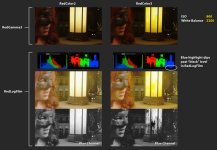
Hey, I noticed an interesting color artifact when using RedColor3. Basically the highlight saturation is very strong and, in certain cases, causes some of the color channels to clip (even in RedLogFilm with all default settings). When I switch to RedColor2 (since it's more desaturated overall) the clipping is less extreme.
The main solution I've found is to desaturate the raw data (or use RedColor2), and then re-saturate the image further down the pipe.
It's not a huge issue, but I mainly wanted to bring this to RED's attention and maybe there could be an adjustment to the highlight saturation rolloff in the next version of RedColor.
NOTE: Turning on DRX doesn't seem to help in this particular case.
You can download a r3d snapshot here:
https://dl.dropbox.com/u/26939196/r3d/A001_C006_1218A8.0003866F.R3D

The main solution I've found is to desaturate the raw data (or use RedColor2), and then re-saturate the image further down the pipe.
It's not a huge issue, but I mainly wanted to bring this to RED's attention and maybe there could be an adjustment to the highlight saturation rolloff in the next version of RedColor.
NOTE: Turning on DRX doesn't seem to help in this particular case.
You can download a r3d snapshot here:
https://dl.dropbox.com/u/26939196/r3d/A001_C006_1218A8.0003866F.R3D