Welcome to our community

Be a part of something great, join today!

  • Hey all, just changed over the backend after 15 years I figured time to give it a bit of an update, its probably gonna be a bit weird for most of you and i am sure there is a few bugs to work out but it should kinda work the same as before... hopefully :)

Compressor 4.0.6 Export Times - WoW

Johnny Friday

Well-known member
Joined
Feb 11, 2007
Messages
3,367
Reaction score
0
Points
36
Location
La Paz, Baja Ca. Sur, Mexico
Website
bajaproductions.com
My setup: Edit, cut, add effects in FCPX (all as 5k 2:1, 23.98footage), then send to compressor.....Set output as 1080p 422HQprores in compressor. i only have a 3.5 minute timeline i'm exporting with one track of audio and getting estimated times of 10+hours for trascode....WTF??
I also have a red rocket card installed, BUT it's quite obvious that Compressor does not seem to use the Rocket Card for this?? is that true?

And i thought FCPX with R3d reading was a nice addition....i think so far there's a way to go yet.

**anyone else have some experience here? This is a waste of time.....
 
AME actually does use the RR card.....at least according to Adobe Dave on this forum. I thought it was NOT using it when i cut a 52min doc with a TON of effects in 4k/5k/P2 footage, and exported out to Prores 422HQ and took 22hours.....but that's actually far better than my 3.5min cut in FCPX taking 12hours....or showing ETA of 12 hours.

So, i went to share and setup a master file, but that is now transcoding in background of FCPX---so is this what you guys mean? It does not allow me of course R3d cut...but any flavor of Prores etc....so i chose Prores4444. I assume from here i drop next into compressor? Not sure how long this transdode will take or what benefits are?
 
The big benefit doing this in two steps is that it is way faster to make different movies at different resolutions and codecs. There are times where I'm not happy with the compression and I can them spit out another one way faster from the master output.
 
Johnny, I actually noticed since you are only looking to create a ProResHQ movie, you can just do this by choosing Share/Master File/Settings and choosing the ProResHQ codec. However, if you try Send to Compressor and choose the same codec settings, it takes much, much longer to render to ProRes.
What I was pointing out is that you canʻt get FCPXʻs Send to Compressor command to utilize a QMaster Cluster once in Compressor for speedy rendering. The workaround is to send out a Master File first, then go through Compressor and use the Cluster.
For you, it might be better to just go straight out of FCPX using Share/Master File anyway, unless you wanted to apply some of the render settings only available in Compressor or take advantage of a Quick Cluster when rendering to other codecs.

If it helps with other workflows, hereʻs what I do to get a self-contained file and send it through Compressor with a cluster enabled.

1. First, share a Master File to your drive from FCPX or other NLE.
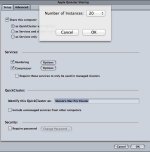
2. Next, open Compressor, go to Apple QMaster in the menu, and choose Share this Computer. Name your Cluster and set it up to look like the graphic I attached below.
I have a 24 core machine, but I only use 20 of them so it doesnʻt take over too much of my system resources, so scale your choice of utilized cores according to your number of cores on your system.
cluster.jpg
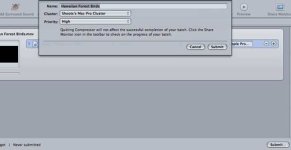
3. Close Compressor, relaunch and configure the video file/settings as usual, then when you hit Submit, change your cluster to the one you just set up, like this:
cluster2.jpg
4. Now hit Submit, and Compressor will use all your cores to render the job, which is much, much faster.

I just wish Apple would fix the bug that prevents using a Quick Cluster in Compressor when using Send to Compressor in FCPX. That would be ideal because it would eliminate the Share/Master File step entirely.

Hope it helps.
Jeff
 
Ok, so I spent some time testing a few scenarios rendering out of FCPX 10.0.7 tonight, and my findings were interesting. Using Menu Meters to monitor my individual CPU core usage, I found that when sending a 4K project out of FCPX via Send to Compressor, Compressor 4.0.6 does in fact now use all my cores even though the cluster I have set up is not available when hitting submit. Compressor definitely did not use all my cores in previous builds when using FCPX/Send to Compressor, so maybe the issues I described earlier have been fixed, which is great news to me. However, I also tried the FCPX Share/Master File method, and then brought this 4K file into Compressor and rendered it with my Cluster, and the render to ProRes was still around twice as fast as it was to send it via Send to Compressor directly from FCPX. Strange because both methods seemed to be maxing the CPU. Finally, I tried resizing from 4K down to 1080 using both methods, and the render times for both were about the same as exporting simply rendering to 4K.

My test was with a 7 min. 4K 29.97 1 track audio project, and the slowest method above took well under 30 mins to render out to ProResHQ file. So why does your 3.5 min 5K project indicate 10 hours? I can only offer these guesses. Do you have your FCPX project rendered before you export? If you have some complicated effects like NeatVideo that are unrendered itʻs going to kill your export times. Also, when I first sent my files to Compressor, the render time estimate was 4-5 hours, but after a few minutes was down to around the actual time it took to finish. Have you waited for a bit to see if things level out on the render and recheck your estimated time?

Hope all this helps you figure things out or sparks an idea of whatʻs wrong. Even though you are rendering 5K, it still seems like something is off to take 10 hours to render 3.5 mins of footage.
 
Just because you see all the meters for your cores as actively processing, doesn't mean Compressor is utilizing the full multi-threaded/multi-core capability of the processors. When you output to Compressor from within FCP you cannot get Compressor to run multiple threads or segments of a single file or multiple files at one time when performing multiple jobs simultaneously. When you export out of FCP first, then go through Compressor utilizing the cluster, you can see in Share Monitor that on output types/jobs that allow segmentation that Compressor will divide the job into multiple threads for each core and run multiple parts of the job simultaneously, utilizing more CPU power than without the cluster. If you run multiple jobs that don't allow segmentation (such as for iPod/iPad/iPhone) you'll see Compressor run multiple jobs at the same time when using the cluster and only one at a time when not using the cluster (such as when you output to Compressor from within FCP).
 
Just because you see all the meters for your cores as actively processing, doesn't mean Compressor is utilizing the full multi-threaded/multi-core capability of the processors. When you output to Compressor from within FCP you cannot get Compressor to run multiple threads or segments of a single file or multiple files at one time when performing multiple jobs simultaneously. When you export out of FCP first, then go through Compressor utilizing the cluster, you can see in Share Monitor that on output types/jobs that allow segmentation that Compressor will divide the job into multiple threads for each core and run multiple parts of the job simultaneously, utilizing more CPU power than without the cluster. If you run multiple jobs that don't allow segmentation (such as for iPod/iPad/iPhone) you'll see Compressor run multiple jobs at the same time when using the cluster and only one at a time when not using the cluster (such as when you output to Compressor from within FCP).

Thanks Mike for the clarification. I just ran a render directly from Compressor using the cluster, then checked out the Share Monitor/Cluster Activity, and do see 48 segments processing simultaneously. Ran a test project straight from FCPX/Share to Compressor, and the only activity is under My Computer, no Cluster Activity. That explains why it is taking so much longer to render directly from FCPX, but still wondering why Johnnyʻs short export is so slow. There most be something else bogging him down for 3.5 min to take 10 hours.
 
Don't take the estimates given in FCP, Compressor, or Share Monitor (or the older Batch Monitor) seriously. They are notoriously inaccurate. Even when a job is running and it says 2 hours remaining, go back 30 minutes later and it might be done or it will say 4 hours remaining.
 
Great input. Well, the job i started last night failed. Might have to do with the fact i also tried to share out of FCPX to make a master file at same time. So i started my job again on its own...sent from FCPX to compressor my 3.5min file (it's all 5k footage AND it is all rendered--it had LOTS of neat video effects within it, but that was all rendered yesterday)....So, it's now been 3hours and the render bar still shows about 60% to go....and more or less 5 hours remaining.

...Very strange indeed. I'm going to let this go on all day today to see if it will render out. By the way, this is my FIRST EVER render out of the new FCPX & Compressor.
My system is as follows:
2x2.26ghz Quad core Intel Xeon
32gb 1066mhz ddr3 ecc memory
NVIDIA Quadro 4000, 2048 mb Graphics Card

Running OSX 10.8.2

**interestingly when i was having issues with neat video as it was brining up a BLANK frame to view....i had emailed their support---that was resolved by moving Neat Video to stop of the effects Stack---ask me how if you don't know....But in that conversation, Vlad at NeatVideo told me they have far better luck using the original Mac Graphics cards and my Quadra 4000 was not a good card for FCPX ---he didn't quite say it like that, but he said they had much better results with rendering etc...with the Radeon cards.
 
Hi Johnny,

I am no expert here but from what I understand the Nvidia Cards are the Cuda Awesomeness, Stuff that the Mercury Playback engine/vectoring etc likes.
However the ATI cards use OpenCL and as far as I understand that is what apple uses in Final Cut is OpenCL not Cuda? I am unsure why they did not do both? They seem to be on the ATI bandwagon in most cases though. I see really no increase in render times between a GTX 470 and ATI that came with my mac pro though this is curious?

However the power draw of the Nivida card does seem to make my computer unstable?

2x2.93ghz 6core
64gb Ram
ATI 5870 Thinger
10.8.2

I am not rendering my RED video yet but I am scared..
 
Ok....many may know this and some may not....FIRST...FCPX is OpenCL...and only supports CERTAIN graphics cards....my NVIDIA Quado 4000 card is NOT supported....and i'm screwed if using FCPX....i can't work a 3.5min video 5k workflow w/out spinning beach ball and more....it's a mess....I've not tried a supported card yet, but sure would be nice if Apple would suppport more graphics cards.


Yes....with NVIDIA cards....your computer will DIE....
 
This thread should be a sticky for FCPX workflow. Great info guys. I've practically migrated from my 2008 Macpro with quadro 4000 to a Retina Macbookpro 15" maxed out. Its almost as fast as the tower but much more practical, and i bought a lot of thunderbolt gear. I'm waiting for the new Macpro generation. Will do my first, proper FCPX project this coming week on the laptop, and this thread has been a great help!
 
Back
Top