Welcome to our community

Be a part of something great, join today!

  • Hey all, just changed over the backend after 15 years I figured time to give it a bit of an update, its probably gonna be a bit weird for most of you and i am sure there is a few bugs to work out but it should kinda work the same as before... hopefully :)

What's up with Premiere CS6?

Luke Kokinos

Well-known member
Joined
Oct 21, 2012
Messages
84
Reaction score
0
Points
6
So, I started editing together some stuff in Premiere, and whenever I pause the images just get stretched out and funky. When I hit the spacebar, it starts playing just fine. This was just a little annoying up until I needed to make credits. When I put my credits page on the timeline and rendered, the credits get scrambled even during motion. It's fine when it's not rendered, but once it is, everything's gone to hell. I link to a screengrab of what I'm talking about, let me know if you have anything to add to this.

http://www.reduser.net/forum/attachment.php?attachmentid=32961&stc=1&d=1356646774

Thanks,
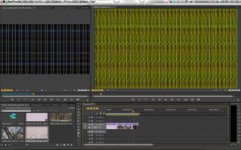
 

Attachments

  • Screen Shot 2012-12-27 at 2.36.15 PM.jpg
    Screen Shot 2012-12-27 at 2.36.15 PM.jpg
    19.6 KB · Views: 0
No plugins or driver installations. I tried a new project at 24fps, as apposed to 23.976. Still scrambling whenever I pause. This never happened to me when I used DSLR footage, is there some sort of plugin for R3D files that I overlooked?
 
Which graphics card do you have in that machine? How much VRAM?
 
Yes, you need to download the R3D importer from Adobe to fix that issue. And every time you update your software you need to do it again.
 
Oh, yes! That worked! Thank you so much.
 
This is pretty handy tip - should be reposted in Workflow Forum for archive...

Stu Aull
SX 199
Alaska
 
Back
Top