Welcome to our community

Be a part of something great, join today!

  • Hey all, just changed over the backend after 15 years I figured time to give it a bit of an update, its probably gonna be a bit weird for most of you and i am sure there is a few bugs to work out but it should kinda work the same as before... hopefully :)

FCPX fills up the start volume...

Marc Berger

Well-known member
Joined
Dec 13, 2007
Messages
884
Reaction score
0
Points
16
Location
France
Website
www.mabcine.com
Hi,
Somehow I don´t get it right here: I´m running a FCPX project from a external Raid (all the data is on it). The program start´s from my start volume, internal SSD. Now, I want to create proxies from R3D files. The directory for those is also the external drive, but...after a while my start volume is filled up. Can´t find any files from FCPX on it (guess it´s a kind of temporary files stored somewhere on it), but the program stops. Then I have to shut down the computer to empty this "not existent temporary files". Could not find an answer in the white papers.
Anybody experience the same issue? Where can I change the settings for this?
Thanks a lot!
Marc
 
Hi Marc,

Not sure if this will help but I would turn the 'background rendering off' especially if you are constantly making changes to things that need rendered. You can erase the rendered files in the "File" window. Don't have the analysed settings on. You can analyze the individual files later.

I know that the Startup disk needs plenty of space to play around (and eats it up when in use). It is crazy.
 
Just to make sure, both your project and your event is on the External Raid, and in your preferences you have 'Copy to FCP X Event' off?
If so, I wouldn't know where the problem could be.

As a fast tip: if you can't solve it, give feedback to Apple.
They listen. I reported a bug, and got contacted to give more details. I know of many similar reports.
 
Hi Marc,

Not sure if this will help but I would turn the 'background rendering off' especially if you are constantly making changes to things that need rendered. You can erase the rendered files in the "File" window. Don't have the analysed settings on. You can analyze the individual files later.

I know that the Startup disk needs plenty of space to play around (and eats it up when in use). It is crazy.

Hi Will,
"Background rendering off"doesn´t change anything.
Would be nice if Apple could state how much startup disk space is needed.
 
Just to make sure, both your project and your event is on the External Raid, and in your preferences you have 'Copy to FCP X Event' off?
If so, I wouldn't know where the problem could be.

As a fast tip: if you can't solve it, give feedback to Apple.
They listen. I reported a bug, and got contacted to give more details. I know of many similar reports.

Hi Mathieu,
I have everything on the External Raid already.
I´ll give Apple feedback about this. Good idea.
I like FCPX, but not knowing where it stores the temp files is a bit of a pain.
Marc
 
I dunno man,

If the projects and the event are on external drives, all render and temp files should be written there as well. If that were the case I can think of no reason why FCPX would be filling up your system drive, unless you are sharing movies to your movies folder and/or iTunes.

Hi Mathieu,
I have everything on the External Raid already.
I´ll give Apple feedback about this. Good idea.
I like FCPX, but not knowing where it stores the temp files is a bit of a pain.
Marc
 
Even though all media is living on an external raid, the project file can easily and accidentally be created on the internal drive. Just look at the project and events browser to make sure nothing was created on the home drive. Otherwise I'm not sure why you're having this issue.
 
It only happens while FCPX is encoding proxies from R3D. And yes, all the media is living on the external raid, including project file.
It fills up the startup disk completely with no visible data. The proxies created until the startup disk is full are all on the external raid. Once the startup disk is filled up (0KB left), only a forced shut down of the program is possible. Then I have to shut down the computer, restart and the startup disk is free again of those (for me) not visible files...after this procedure I can transcode the proxies from next batch.
 
Perhaps it is virtual memory usage. Does anyone know if OSX Mtn Lion uses virtual memory in the same way as prior versions?

You really should keep 10-20% of your system drive free, BTW.

How much RAM do you have in there?
 
check under the file menu....delete project render files....they might have piled up....i BELIEVE these are handled by the scratch disc which is probably your startup....you might be able to set that in prefs.....
fcpx is a ram hog...the latest version is much better then previous ones but still....but regardless that should not be the issue....that would just give you spinning beach ball (in my experience)...
 
Perhaps it is virtual memory usage. Does anyone know if OSX Mtn Lion uses virtual memory in the same way as prior versions?

You really should keep 10-20% of your system drive free, BTW.

How much RAM do you have in there?

Sorry this late answer.
I´m still with OSX Lion. 8core, 24GB Ram, RR. Around 10% system drive free. Looks like this is not enough.
 
check under the file menu....delete project render files....they might have piled up....i BELIEVE these are handled by the scratch disc which is probably your startup....you might be able to set that in prefs.....
fcpx is a ram hog...the latest version is much better then previous ones but still....but regardless that should not be the issue....that would just give you spinning beach ball (in my experience)...

Paul, I guess it´s virtual memory usage, because it´s empty after a computer restart. I really don´t know where to set it in prefs. Can´t find anything to influence it myself.
 
Hi marc,

I'm seeing the same thing ('though on snow leopard). My 20GB of free space got eaten up when I generated proxies. I've freed up another 30GB, which works at least enough to present another problem: now I'm suffering from the RAM issue (only got 12GB!) which means I need to restart the software for pretty much every clip i play back.

Really annoying 'cause i like the software a lot...

Ross
 
p.s. I've got a rocket in too - which makes it even more annoying.
 
Hi Ross,

I really don´t understand why generating proxies is using such a lot of RAM and startup disk space.Especially with a Rocket in it.
I´ll contact the support. Maybe you could too to fasten the process, because I think it´s a bug.
Cheers
Marc
 
Hi Marc -

Just to confirm, is the "Event" that references the media on your SSD - I understand that the media itself is on a different drive, but is the Event on your SSD. Transcoded media and proxies get stored in the event folder...

Please join me in submitting feedback to apple for a preference to define a "persistent folder" for storing render files and a setting for where to store proxies... :-)
 
Hi Marc -

Just to confirm, is the "Event" that references the media on your SSD - I understand that the media itself is on a different drive, but is the Event on your SSD. Transcoded media and proxies get stored in the event folder...

Please join me in submitting feedback to apple for a preference to define a "persistent folder" for storing render files and a setting for where to store proxies... :-)

Hi Matthew,
no everything is on a external raid, except the application itself.
Could you post the link to join you submitting feedback?
Thanks,
Marc
 
Hi Marc - it sounds like you might have a memory leak issue then - I don't run into issues on my mac pro / 120 ssd boot volume - but I don't have a rocket.

I actually dont use proxies because... surprise, sometimes they take up more space than the r3d.

The feedback link should be in the application menu "Provide final cut pro feedback"
 
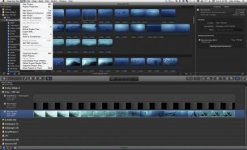
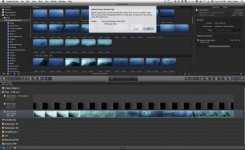
Here's what i found that helps a LOT....go to your project bin at bottom--the reel at far left side click on it so all your projects open out....then go to top of program and choose File, then Delete Render files towards bottom of that list...then choose Unused Render Files Only....this made my system sing and scream after i did this.
 

Attachments

  • Screen Shot 2012-12-09 at 6.16.28 PM.jpg
    Screen Shot 2012-12-09 at 6.16.28 PM.jpg
    19.4 KB · Views: 0
  • Screen Shot 2012-12-09 at 6.16.41 PM.jpg
    Screen Shot 2012-12-09 at 6.16.41 PM.jpg
    20.1 KB · Views: 0
Back
Top