Welcome to our community

Be a part of something great, join today!

  • Hey all, just changed over the backend after 15 years I figured time to give it a bit of an update, its probably gonna be a bit weird for most of you and i am sure there is a few bugs to work out but it should kinda work the same as before... hopefully :)

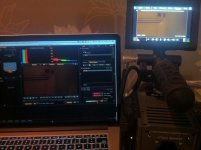
Huge exposure difference LCD / REDCINE-X

Stephane Marino

Well-known member
Joined
Jan 22, 2012
Messages
67
Reaction score
0
Points
6
Location
Nice, France
Website
www.stephanemarino.com
I just updated my Scarlet with the latest firmware and after a little test I noticed that I have a huge difference between what I see on camera and what I really get !!Am I the only one ? Is there a setting to change ?
 

Attachments

  • IMG_1886.jpg
    IMG_1886.jpg
    95.4 KB · Views: 0
Last edited:
I just updated my Scarlet with the latest firmware and after a little test I noticed that I have a huge difference between what I see on camera and what I really get !!Am I the only one ? Is there a setting to change ?

ISO different on LCD?
 
First off all it's unlikely you'll ever be able to get the two to match unless you calibrate the laptop LCD to match the camera LCD. But what's the point of that? You can turn the brightness down on the camera LCD a few clicks and then play with the shadow control to darken it to match the laptop. But then that may affect the way you expose the shot (not that you should really be exposing by eye...)

I reckon it's just easier to accept that the two will always look different.

Looking at the histogram on both monitors it seems the shot is very underexposed. I'd say that the laptop is probably a more accurate representation of what has actually been captured.
 
they make on board lcds for cameras extra bright for focus pulling, especially in low light situations. if they were actually hyper accurate and you were shooting a very low exposure scene, you'd barely be able to see your subject to pull on. same with framing and watching the action etc. look at your histogram on the red lcd and look at it in RCX, identical. you're getting the same image. you should never expose with monitors, they always lie to you. the only empirical thing you have are your exposure tools.
 
Last edited:
I probably sound like an ass, but this is what I try to say to flabbergast sad people ("WHY IS THE CAMERA LYING ??")

exposing an image with a viewfinder or monitor is like flying at 30,000 feet.

a pilot can see out the windows, but he's flying with instruments.

exposing tungsten, or night exteriors, honestly exposing anything in the black box of digital signal processing... you're flying in fog.

four years ago I had a real distaste for working with a little ****ing wave of color but you get over that.

I think most people expose film with judgement, a meter and intuition. but we have to shoot digital with judgement, a meter and a histogram. calibrating a monitor can be hard, but harder still is flying with intuition when you have a monitor.
 
calibrated monitor is a starting point, but a monitor will always lie to you eventually. lighting conditions, staring at it too long. it won't look the same in every situation. set is the worst place to critically evaluate a image on a good calibrated monitor. you stick with on camera exposure tools, and a scope if you have it. it's a pure measurement of the signal, you look at true values that don't lie to you. added bonus in RED workflow you can easily double check your files as well at full raster. histogram can be a little wonky on the camera, maybe u don't trust the sdi tap all the way. but you can still get down and dirty with the file itself. NEVER use just a monitor to expose for. monitor should be for ballparking and overall feel, exposure tools are for where you are really at. I haven't seen too many DP's that have thrown out their light meters. the tools are there for a reason.
 
they make on board lcds for cameras extra bright for focus pulling, especially in low light situations. if they were actually hyper accurate and you were shooting a very low exposure seen, you'd barely be able to see your subject to pull on.

Somebody please tell Nikon. The D800 live view is totally useless because it is set to simulate your real exposure (especially helpful when you're shooting with strobes and ambient light is so dim the monitor shows solid black -.- ).
 
Thank you all for your help.
In the histogram I was mostly verifying that I didn't crush the blacks nor clip the whites, but I guess I have to work more seriously with it.
But, not trusting the monitor seems to me very tricky !!

And Tom, your color reel is great :)
 
Trust your metering tools, not your lying eyes.

Use your histogram, lightmeter or false colour, they'll tell you the real story - I found that once I stopped judging anything but composition on my monitors the quality of my images went up considerably - just as using your lightmeter with film always tended to work out okay.

Digital monitoring has made many, if not most, of us lazier with our exposures. But once you build up the discipline again, the problem genuinely does start to go away.
 
Like others said, the histogram. The histogram is the best way to expose. Here's a good spot to start. http://www.red.com/learn/red-101/red-camera-exposure-tools
Sorry, but I don't think this is correct for RED cameras.

From what I understand, since the histogram is dependent upon metadata, you should use it to ballpark or get a general sense of your images but not take it as the last word unless you are recording from the SDI or HDMI outputs.

As the tutorial you link to points out, the exposure tools (goal posts, traffic lights and exposure check) are the truest indicators of exposure, as they're not affected by metadata settings (i.e. REDcolor, REDgamma, ISO, color temp, etc.).
 
Back
Top