Welcome to our community

Be a part of something great, join today!

  • Hey all, just changed over the backend after 15 years I figured time to give it a bit of an update, its probably gonna be a bit weird for most of you and i am sure there is a few bugs to work out but it should kinda work the same as before... hopefully :)

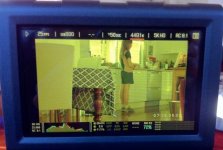
Epic touchscreen output turns yellow

Geoff McLeod

Well-known member
Joined
Sep 2, 2009
Messages
108
Reaction score
0
Points
0
Location
Brisbane, Australia
Website
www.sputnikcampaigns.com.au
I have a new Epic x camera. I was on location and the screen turned yellow, dropping a channel. I doesn't record yellow, it's just the monitoring. I have tried changing the cables but it still happens. I have plugged in another monitor but it still happens. I have updated firmware but it still happens. any thoughts I what I could do? I does it regardless of temperature. Sometimes I reboot the camera and it good for a few minutes but then it turns yellow. If I plug in a hdsdi monitor from the back it doesn't turn yellow. It seems to be with the output from the front of the camera.
 

Attachments

  • epicyellow.jpg
    epicyellow.jpg
    19.8 KB · Views: 2
Hi Geoff,

First off, I recommend putting in a support ticket with RED.

In the meantime - Weird one.

So you've tried multiple cables and even multiple touchscreens?

Tell me this, when you updated the firmware, did you have a side handle attached?

I recently updated firmware with the side handle on and my HDMI port stopped working. Took it off and repeated the process and it was fine. The only reason I mention it is they warn against having it on during a firmware upgrade as strange things seem to happen.

If this isn't the case the only thing it seems you haven't tried is plugging in an EVF to see if anything is different.

Sorry about your troubles, this can be frustrating, especially when we're so far from RED.
 
I don't have a side handle. But the strange thing is, when I plug in my old red one EVF it doesn't turn yellow, but it does eventually say 'evf not selected v.80821b' and turns black (I'm guessing that's just a compatibility issue with old evf and new epic). Yet when I plug my old Red One LCD in the epic, it also turns yellow.
 
Last edited:
Okay, I found the problem. I was on another shoot today and with much help by my assistant, we we discovered that it was the module adapter the connects the Epic to the Redvolt module. The bottom left hand screw, that screws in to the Epic, seems to trigger the screen going yellow when it is tightened (we didn't tighten it that hard). Anyway there must be some kind of connection in that area of the Epic that could be getting effected by the screw. I still don't know if the fault is in the Epic body or the adapter module itself. But loosening the screw bought back a full colour monitor... Yay!
 
Geoff, please feel free to contact RED SUPPORT directly by sending us a tech support ticket here http://www.red.com/contact_us and a log file from your EPIC-X if you experience any other issues.

NICK
Thanks Nick. I should be okay now. I'll contact Red support if the problem occurs again. I've got the redvolt module back on and it's working fine with the screw loosened a small amount.
 
I doubt that it has much to do with the screw.
I was going to say check the pins in the connections but probably something else now you mention the screw switch.
I often find that I forget to plug the viewfinder or monitor cable all the way in and it gives me the same kind of problem. But I usually have to reboot to fix it.
Good luck.
 
I have a new Epic x camera. I was on location and the screen turned yellow, dropping a channel. I doesn't record yellow, it's just the monitoring. I have tried changing the cables but it still happens. I have plugged in another monitor but it still happens. I have updated firmware but it still happens. any thoughts I what I could do? I does it regardless of temperature. Sometimes I reboot the camera and it good for a few minutes but then it turns yellow. If I plug in a hdsdi monitor from the back it doesn't turn yellow. It seems to be with the output from the front of the camera.

I've had this same problem with our Scarlet Dragon today. What was your solution? Loosening the screws?
 
Hello there, just had the same issue. It's the small screws on the back of the camera - they are holding the power board inside the camera, which itself has a layered processor on it and there's also some thermopaste between the boards inside. Overtightening those can cause a situation, in which the processor is under pressure from a blown-up thermopaste (it widens a bit under temperature), making the screen going totally black, or - loosing the blue channel.

The screws I'm talking about are the smaller ones on the back of the camera, where the module attachment plate is located. There's two sets of screws - the M4 ones for module/V-mount plate attachment and smaller ones that hold the board inside. In case you have this issue try unscrewing the smaller ones.

Warning - don't unscrew them totally - they still hold the board inside the camera! Just try loosing them a bit.
 
Back
Top