Welcome to our community

Be a part of something great, join today!

  • Hey all, just changed over the backend after 15 years I figured time to give it a bit of an update, its probably gonna be a bit weird for most of you and i am sure there is a few bugs to work out but it should kinda work the same as before... hopefully :)

Footage Distortion from Scarlet-X

Ryan Sauve

Well-known member
Joined
Oct 21, 2011
Messages
896
Reaction score
0
Points
0
Location
Calgary, AB
Website
www.t2iforum.com
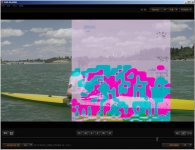
Feeling a little disheartened right now. I first got my Scarlet a few months ago and had to return it because of an issue where the LCD screen was all messed up and the brain wouldn't recognize media. It was returned and seemed to work fine for the first few days of its first shoot and now I'm seeing footage coming out like the following:

xpvu5y.jpg


Anyone have any idea what could be causing this? We lost a bit of good footage today, man this sucks.
 

Attachments

  • red_uh_oh.jpg
    red_uh_oh.jpg
    86.8 KB · Views: 0
Hmm, thats not great. I had a similar problem a few years back on the RED-1. This was ultimately attributed to a bad Firewire cable used in the transfer process.

Id say play back in camera if possible, if that works then try the transfer again using a new cable and after all that, flash the firmware.
 
I got that EXACT problem with my sensor, thinking it was an actual hardware problem.

Do a blackshade at your shooting temperature and it should go away.

I haven't had the same problem since.
 
Thanks Nick, support ticket filled out. And Andrew, I tried reloading the card in the camera and now get a "Playback Error loading Clip" message. Hopefully I didn't get a lemon! All I can do now is wait and hope for the best, again.
 
Andrew, I tried reloading the card in the camera and now get a "Playback Error loading Clip" message. Hopefully I didn't get a lemon! All I can do now is wait and hope for the best, again.

Oh dear. Kind of suggests it isn't the transfer but rather the footage. Did it playback ok on the day?

Well, lets wait and see what red say. You never know.....

best of luck.
 
Make sure all the screw are tight (but not too much) on the ssd side module. If it's lose the connection may be poor between camera and ssd.
 
So I found this issue on footage earlier in the day too. I thought it might be because my battery was low when it happened but now I'm not sure since it wasn't low when it happened that first time earlier in the day. I tried replicating the issue today and was able to for one shot then not again after, even in warmer temperatures so I don't think it's heat related. I've since rolled back from 3.3.3 to 3.2.19 and I'll do further testing. I'm hoping it's just the beta firmware. Otherwise, the intermittent nature if this issue will really have me concerned.
 
I have had the exact same issue. Please look at some examples of the corrupt frames in my thread http://www.reduser.net/forum/showthread.php?78839-Corrupt-frames-please-help&highlight= also more example frames in post number 21 on page three of the thread.

The issue happened for me on one day of a two day TV commercial shoot. Without changing any camera setting or anything the camera did not make any corrupt frames on the second day. The temperature was similar on both days as it was a studio shoot. I was using batteries, both Red Bricks and redvolts at the same time. My camera went to Red for evaluation. While at Red the fault was not able to be reproduced.

Please let me know if you sort it out

Cheers, Tim.
 
Happened a lot on a corporate video shoot over the last few days running 3.2.19. Tried multiple cards and batteries. Heat wasn't an issue at all. I've sent in the logs. Kind of embarrassing when going over the footage with the client. I am seriously considering other camera options going forward if I can't get a final fix as I expect a little more from a professional camera. It's been headaches since the start and I just want something that works and that I can depend on.
 
I have the exact same problem too. Lost some great takes from a film and my reputation has suffered as a result, but so has RED's!
 
I had similar problems but my gut over time lead me to believe that it might have been the express 34 esata card adapter I was using. You might want to plug in the Redstation to the 800 firewire and double check if you are not already using this configuration.
Good luck.
 
I had similar problems but my gut over time lead me to believe that it might have been the express 34 esata card adapter I was using. You might want to plug in the Redstation to the 800 firewire and double check if you are not already using this configuration.
Good luck.

I think its a camera issue as after sending camera logs to Red when my Epic did the same sort of corrupted frame, Red techs requested I return my camera for repair. If it was not a camera issue the camera log file would not have prompted Red to ask for the camera to be sent in.
 
Just a heads up for anyone with the same issue. I have been able to replicate it with AC power on a stable firmware release so I would assume at this point that my sensor or something in the brain itself is defective.
 
Back
Top