Welcome to our community

Be a part of something great, join today!

  • Hey all, just changed over the backend after 15 years I figured time to give it a bit of an update, its probably gonna be a bit weird for most of you and i am sure there is a few bugs to work out but it should kinda work the same as before... hopefully :)

Any computer guys out there can help with Windows 7?

Kyle Gentz

Well-known member
Joined
Jun 7, 2011
Messages
537
Reaction score
0
Points
16
Location
Fresno, CA
Website
www.motionpicweddings.com
I built my computer a year a go. Worked great until a few days ago.

Issue: Windows 7 is loaded and after about an hour of use the screen goes black then ask for a boot drive and it completely locked up. Then i reboot, windows loads and runs, then about an hour goes by and it does it again. There seems to be no rhyme or reason to it. I reinstalled windows on the OS SSD drive but that didn't solve the problem. This leads me to think hardware but I have no idea what part to replace. Any Ideas?

Any insight would be awesome.
 
Try replacing the SATA cable, and the port on the MoBo.
 
I had a heat pipe leak and a fan problem, that did the same exact thing. Double check for bad fan, blocked port, low air flow cause it's next to something, or any overheating (blocked lint, etc ... ). If your in a apt. complex, use a battery base power conditioner (there might be low voltage in your area). It's probably something way simpler then you think it is. I'm kind of near you, it's been perty hot, with a lot of air conditioners and stuff running ... so my bet is on power and/or heat.
 
Windows has an event log. You can access it by right-clicking on Computer and choosing Manage and then Event Viewer. Poke around the various subfolders and see if you find anything worthwhile. Also, your mobo should have come with performance and temp monitoring software that hopefully you installed. Check the logs in that app for any power or temp problem. Also your BIOS should have an event log as well. Check that out too.

Hope that all helps. Good luck!


P.S. You also might want run the program Memtest86+ to see if you have a memory issue.
 
Eric Z, I tired that very first thing.

Patrick Faith, Yeah its been 109ish lately but its in an air conditioned home. All the Fans seem to be working when its on. I put in extra fans in also a bigger fan for the processor when i built it.


Ill check your suggestions and post back later, Ive got a shoot all weekend. So ill dive into it more sunday. Thanks for the advice. I installed all the drivers with the Mobo when i got it.
 
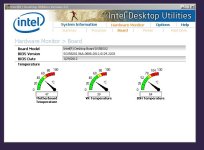
Kyle, the temp and power monitoring software is not a driver. It sould be a separate utility that you can launch manually or automatically upon startup.

I've attached a screen capture of what the Intel one looks like.

Also, please realize that most of the errors or warnings in the Windows Event Viewer are non-issues, so don't freakout too much when you start poking around in there. But there should be something indicating that your system stopped working.

Good luck!
 

Attachments

  • IntelMonitor.JPG
    IntelMonitor.JPG
    62.7 KB · Views: 0
Back
Top