Welcome to our community

Be a part of something great, join today!

  • Hey all, just changed over the backend after 15 years I figured time to give it a bit of an update, its probably gonna be a bit weird for most of you and i am sure there is a few bugs to work out but it should kinda work the same as before... hopefully :)

Black and white screen on startup

Mark Kuczewski

Well-known member
Joined
Mar 25, 2012
Messages
67
Reaction score
0
Points
0
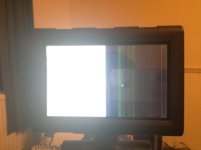
Don't know if anyone has experienced this, can't seem to find anything on the net. My red shows a black and white screen, I have only noticed this after uploading to the new beta firmware so maybe it could be something to do with that?

It displays the normal picture on my EVF, sometimes it goes normal if you hit some of the buttons on the side handle?

Any ideas?
 

Attachments

  • photo.jpg
    photo.jpg
    106.7 KB · Views: 0
Don't know if anyone has experienced this, can't seem to find anything on the net. My red shows a black and white screen, I have only noticed this after uploading to the new beta firmware so maybe it could be something to do with that?

It displays the normal picture on my EVF, sometimes it goes normal if you hit some of the buttons on the side handle?

Any ideas?

Mark -- if you hot unplug/re-insert the LCD does it correct the issue?
 
Hi Matthew, yea if you unplug and re-insert the LCD it returns to normal

One more question, is it happening every time you start up the camera now or was this just after the upgrade?
 
One more question, is it happening every time you start up the camera now or was this just after the upgrade?

Its only been happening since the update, but it doesn't happen every time you turn on the camera, probably around 85% of the time.
 
Its only been happening since the update, but it doesn't happen every time you turn on the camera, probably around 85% of the time.

Thanks for the info. When you get a chance, can you please open a support ticket and send in a log file from that camera? We'll need to get some more detailed information from there.
 
Hi Matthew, no worries. I have never submitted a ticked before, any info on what the process is and how you get a log file from the camera? Cheers
 
If you do a clean power down with an SSD in the camera, the log will be saved to the SSD on shutdown.

You can contact support here:
http://www.red.com/contact_us

You'll receive a message back from the support team and you'll be able to send them the log.
 
After speaking to Kris at Red I followed the procedure to force upgrade back to firmwear 3.0.0. Seems to have sort of fixed it, after booting up 5 times in a row, it and maybe 2 out of the 5 would go to the black and white screen for a second but then jump back to normal view. Its funny because before when on the beta firmware if you left the update folder on the SSD it would go black and white but then when it came to the 'do you want to upgrade option' it would jump back to the normal screen?
 
I also have this problem. Do you need more log-files? Or have you pinpointed the problem?
 
Experiencing the same problem after updating my scarlet. I've opened a support ticket for this, still waiting for the reply. Currently on build 3.0.7, downgraded from the BETA 3.2.8. New problem occur though, aperture not working on all my Canon lenses, including the Tokina 11-16mm.
 
Seen this a couple of times on startup, each time it was returning back to normal in a matter of seconds, but in both situations the camera was really hot (I had to limit record fan speed manually for a long periods of shooting).

Didn't happen to me when a camera is at a normal operating temperature.
 
Yep. Have the black and white issue

Yep. Have the black and white issue

Looks like this is an ongoing issue on my camera too. Unplugging the monitor seems to fix it but man is it hard to unplug. It does come on sometimes (I think when the camera is warm) but this is not always the case. Huge pain. Had to set a key to "shut down" just so I can shut the camera down if the screen goes black and white. This is a new Scarlet (got it June 11, 2012).
 
Me too, exact same problem and workaround as described above. Started with a firmware upgrade from 3.0.0 to 3.2.16. The Scarlet hardware was acquired around March 2012.
 
Oh, and I should mention that even after applying the workaround (plug cycling the touchscreen monitor), there is still a very faint vertical line down the exact middle of the screen. Or perhaps it is the left half of the screen being a bit brighter or dimmer than the right half. This latter effect is very subtle.
 
BTW, there is a better workaround that does the trick for me. Press the magnify-button on the lcd and wait a few seconds.
 
Back
Top