Welcome to our community

Be a part of something great, join today!

  • Hey all, just changed over the backend after 15 years I figured time to give it a bit of an update, its probably gonna be a bit weird for most of you and i am sure there is a few bugs to work out but it should kinda work the same as before... hopefully :)

2x RedRocket not recognized in system

Matthias Stöckl

Active member
Joined
Aug 3, 2011
Messages
27
Reaction score
0
Points
0
Location
Salzburg, Austria
Hi guys,
I have a MacPro and two Red Rocket Cards to choose from. The problem is, none of those show up in the system, in whatever PCI slot, tried different firmwares and drivers, the safety mode with dip switch #8 - nothing.
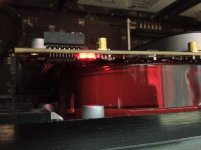
What i realized right after powering up the MacPro, there are two lights on the Rocket Card which show up red.
In my theory red lights always mean something negative. But with the company RED this might be different.
Can anybody tell me what these lights mean?

Thanks in advance!
Matthias


attachment.php
 

Attachments

  • RR.jpg
    RR.jpg
    97.5 KB · Views: 0
just out of curiocity - have you tried pulling one card? does it also happen with only one redrocket installed?
best wishes and kind regards,
martin
 
Hi Martin,
I always used only one card.

In the meantime I installed both cards -separately- in a Z800. Windows 7 recognizes both of them and installing latest driver and firmware is as simple as there was never a problem with this hardware. But none of them is able to transcode or to output, one of them even gives the system a hard time starting. Every second start of Windows fails.
After activating the Rocket in RCX not even the preview loads. Deactivating it causes a crash of RCX.
 
Matthias,

Can you send verbose RCX log files to redcinex at red dot com when this happens please? You can enable verbose from the preferences.

For the Rocket side of things, please contact support at red.com/support.

Cheers,
David
 
So as I expected, the log file from RCX couldn't bring up any big solutions to my Rocket problem.
But thanks for the effort, David!
Still the question: What do the red lights on the board indicate? Does this tell me "Whoa, you got a serious hardware problem"?
 
Back
Top