

Neil Horner
Well-known member
- Joined
- Feb 10, 2011
- Messages
- 71
- Reaction score
- 0
- Points
- 0
- Location
- London
- Website
- www.imageynation.com
Channel 5's Celebrity Big Brother 2012
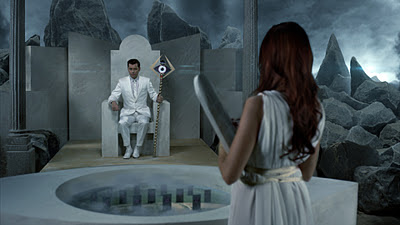
I was recently approached by Channel 5 to create their biggest trailer of the year for their
Celebrity Big Brother 60second promo. The brief was that the promo had to be
‘Epic’ and have a very strong cinematic look and feel to it…with lots of visual
effects and high production values.

I was on set as the technical director for the 3 day shoot and all through the post-production
phase. I quickly put together a plan that would allow us to shoot all the shots
in one small green screen studio. After measuring and positioning the tracking
markers we were ready to start filming.
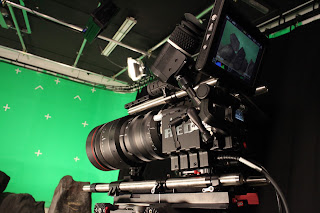
We shot everything on Imageynation’s RED Epic at 5k resolution which
would give us the highest possible quality through the post-production process.
It was important that we had this high resolution (and REDLog REDgamma information) so
that we could achieve perfect keying on the green screen footage and carry this
high level of information right through the compositing stages into the the
final grade (which was handled by Prime Focus).
Once we had all our footage from the live action shoot with Brian Dowling, Amy Childs, Kerry Catona
and Jedward, we created low res proxies for the client to create an offline
edit.
In the meantime my production company (Imageynation) started on the
truly mammoth task of post-production. Firstly we recreated a complete 3D
environment of the live action set.


Then we started to build
the mountain top and opening scene which was completely 3D with CGI lightening
effects.


At the same time while we were creating this opening scene, we also started to create the CGI for
the green screen replacement. I took photo reference of the on-set props so that
we could perfectly match and texture them in 3D.


Then we
created CGI rocks to fit in the background of each shot and as we had already
built a complete virtual replica of the set, we knew exactly which shot had
which rocks in the background. We started by blocking out the scene with low-res
poly models and then refined them later with high-res textures including dusting
them with a sand material to really make them blend into the foreground props.
Once we perfectly keyed out the green screen and corrected all the spill
suppression, we could add the replacement CG background.


This was a fairly straightforward compositing process if the shot was locked-off, but if the
camera moved at all then we needed to use the tracking markers to ‘match-move’
our 3D environment to marry flawlessly with the live action plate. This is a lot
more complicated as the human eye can very easily spot any errors with depth
perception and parallax.
Once we had all our rocks set in place, we
added animated CG clouds with ‘God rays’ from over head which were also animated
to give slightly organic movement to each shot.

As our compositors were creating the final touches to each shot and adding final details, we had also
made a start on the monolith scenes. Channel 5 provided us with library footage
for all the backgrounds of the monolith scenes. So we needed to create 3D models
and add them to the backgrounds.
With some of the shots we needed to create
tracking data from the footage so we could add the monolith stones and make them
move as if they belonged in the footage. We then developed the particle FX as
the monoliths crashed to the ground. We even did some sky replacements and
painted out an entire field of cows (no cows were harmed in this
process!).


Further effects were added to a few additional
shots - distortion maps for when Brain’s staff hits the floor and when he waves
his hand.


Finally we also added a few post-production
anamorphic lens flares and the lighting for when ‘God’ speaks to Brian. With
this effect, we added lens dirt to trigger when the lighting was active, this
helped to sell the idea that the camera had actually captured this
footage.

Once we had created all our shot sequences, we outputted all our files as REDgamma to give the grade artist
maximum control over the files. We also outputted complicated multi-channel mattes so that the artist could grade certain
parts of each image independently.
Channel 5 have been delighted with the work and considereing we only had 3.5 weeks to create
everything before it was on air, I think the final look to the film portrays a
lot of hard work that needed to be executed correctly first time.
You can view the full 60 second promo here:
http://www.youtube.com/watch?v=LyUl2d3h_TI&feature=player_embedded
Let me know what you guys think!
Cheers,
Neil

I was recently approached by Channel 5 to create their biggest trailer of the year for their
Celebrity Big Brother 60second promo. The brief was that the promo had to be
‘Epic’ and have a very strong cinematic look and feel to it…with lots of visual
effects and high production values.

I was on set as the technical director for the 3 day shoot and all through the post-production
phase. I quickly put together a plan that would allow us to shoot all the shots
in one small green screen studio. After measuring and positioning the tracking
markers we were ready to start filming.

We shot everything on Imageynation’s RED Epic at 5k resolution which
would give us the highest possible quality through the post-production process.
It was important that we had this high resolution (and REDLog REDgamma information) so
that we could achieve perfect keying on the green screen footage and carry this
high level of information right through the compositing stages into the the
final grade (which was handled by Prime Focus).
Once we had all our footage from the live action shoot with Brian Dowling, Amy Childs, Kerry Catona
and Jedward, we created low res proxies for the client to create an offline
edit.
In the meantime my production company (Imageynation) started on the
truly mammoth task of post-production. Firstly we recreated a complete 3D
environment of the live action set.


Then we started to build
the mountain top and opening scene which was completely 3D with CGI lightening
effects.


At the same time while we were creating this opening scene, we also started to create the CGI for
the green screen replacement. I took photo reference of the on-set props so that
we could perfectly match and texture them in 3D.


Then we
created CGI rocks to fit in the background of each shot and as we had already
built a complete virtual replica of the set, we knew exactly which shot had
which rocks in the background. We started by blocking out the scene with low-res
poly models and then refined them later with high-res textures including dusting
them with a sand material to really make them blend into the foreground props.
Once we perfectly keyed out the green screen and corrected all the spill
suppression, we could add the replacement CG background.


This was a fairly straightforward compositing process if the shot was locked-off, but if the
camera moved at all then we needed to use the tracking markers to ‘match-move’
our 3D environment to marry flawlessly with the live action plate. This is a lot
more complicated as the human eye can very easily spot any errors with depth
perception and parallax.
Once we had all our rocks set in place, we
added animated CG clouds with ‘God rays’ from over head which were also animated
to give slightly organic movement to each shot.

As our compositors were creating the final touches to each shot and adding final details, we had also
made a start on the monolith scenes. Channel 5 provided us with library footage
for all the backgrounds of the monolith scenes. So we needed to create 3D models
and add them to the backgrounds.
With some of the shots we needed to create
tracking data from the footage so we could add the monolith stones and make them
move as if they belonged in the footage. We then developed the particle FX as
the monoliths crashed to the ground. We even did some sky replacements and
painted out an entire field of cows (no cows were harmed in this
process!).
Further effects were added to a few additional
shots - distortion maps for when Brain’s staff hits the floor and when he waves
his hand.
Finally we also added a few post-production
anamorphic lens flares and the lighting for when ‘God’ speaks to Brian. With
this effect, we added lens dirt to trigger when the lighting was active, this
helped to sell the idea that the camera had actually captured this
footage.
Once we had created all our shot sequences, we outputted all our files as REDgamma to give the grade artist
maximum control over the files. We also outputted complicated multi-channel mattes so that the artist could grade certain
parts of each image independently.
Channel 5 have been delighted with the work and considereing we only had 3.5 weeks to create
everything before it was on air, I think the final look to the film portrays a
lot of hard work that needed to be executed correctly first time.
You can view the full 60 second promo here:
http://www.youtube.com/watch?v=LyUl2d3h_TI&feature=player_embedded
Let me know what you guys think!
Cheers,
Neil


 )
)

