Welcome to our community

Be a part of something great, join today!

  • Hey all, just changed over the backend after 15 years I figured time to give it a bit of an update, its probably gonna be a bit weird for most of you and i am sure there is a few bugs to work out but it should kinda work the same as before... hopefully :)

Optitek Nikon pro lock mount and Shift and tilt

Tom Gleeson

Well-known member
Joined
Nov 7, 2007
Messages
1,405
Reaction score
7
Points
38
Location
Sydney
Website
www.cinematography.net
Was using the Optitek Nikon pro lock mount on an Epic today and had no issues with the 45mm Shift and Tilt but had trouble mounting the 24mm Shift and Tilt. Is there an issue here in regards to the Nikon 24mm Shift and Tilt and the Optitek Nikon pro lock? Has anyone else mounted this lens on the mount?

They were electronic versions of the Shift and Tilts and I was wondering what others have done in regards to the iris control? Many thanks in advance for any help.
 
I don't have the Optitek, but I used to have the 24 PC-E. Of the three PC-E T/S lenses it had the worst physical interference problems with popup flash bodies. It's because the part of the housing toward the camera side is the shortest of the three Nikon PC-E T/S lenses. The housing might also be larger in diameter. So it's not too surprising that you're having problems with the 24 and not the 45. The 85 is probably ok too.

The PC-E aperture only works properly with the D300, D700, D7000 and D3 series. It will also work with most other AF bodies but as I recall, you need to use the stop-down button on the lens and meter manually with those other bodies. On a dumb mount like the Optitek, there will be no power going to the lens's electronic aperture, so there is no way to adjust aperture while mounted in the Optitek. The workaround is to mount the lens on a Nikon body that can power the aperture, set the aperture, and press the stop-down button on the lens (it toggles the iris wide open or stopped down to your setting). With the aperture toggled to the stopped-down position, power the camera off. Remove the lens and mount on the Epic/Scarlet. Then hope it's set the way you want or you'll need to repeat the whole process.

Since the RED mount has all the current Nikon contacts it should deliver power to the electronic iris. Users would need to remember to toggle the stop-down button to the proper setting. However, since it also uses a locking collar I'd be concerned about interference, especially with the 24 PC-E.
 
Last edited:
The Prolock adapter has more clearance than the Nikon Body so you should not have a problem. Send me some pics of the lens back/mount and your setup and I'll try to figure out the issue. The iris should work like on G lenses so that's not an issue either- ProLock is G lens compatible.
 
Iris DOES NOT work like on G lenses. G lenses still use a mechanical linkage. The PC-E's are Nikon's only F-mount electronic aperture lenses.
 
Honestly I'm not familiar with these and not aware of any drive by wire iris on Nikons. But there is always the first time.... I think a picture of the lens mount would definitely be worth a thousand words here...
 
I will get some snaps tomorrow but these lenses definitely have no mechanical coupling. We were running out of light at the time so my initial observation was limited as the lens did mount but could not turn fully to the lock position. Remember "Shoot first ask questions later"
 
24mm Shift and Tilt no go

24mm Shift and Tilt no go

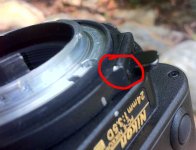
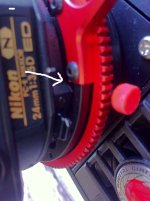
Yes we can confirm that the 45mm and 85mm Nikon Shift and Tilts are all good but the 24mm Shift and Tilt does not work with the Opitek mount. Their is a protrusion on the rear collar for locking the lens rotation that snags on the PL mounts "ears" You could potentially machine down the offending part on the mount?
 

Attachments

  • Protrusion.JPG
    Protrusion.JPG
    50.5 KB · Views: 0
  • COLLISION.JPG
    COLLISION.JPG
    58.7 KB · Views: 0
Thank you for the pic Tom. I think the best solution here would be to move the locking tab to the other side. Or a little up so it never gets to the protrusion on the lens.
Email me and I can give you more detailed explanation. BTW can you email me a picture of the whole lens mount?
 
Epic Nikon ProLock adapter

Epic Nikon ProLock adapter

Here you go Dom,
We've had it out for a couple of months.
RED approved:wink5:
Email me directly for detailed info
 

Attachments

  • marks300mm.jpg
    marks300mm.jpg
    84.9 KB · Views: 0
  • on epic.jpg
    on epic.jpg
    72.4 KB · Views: 0
  • ant riggedweb.jpg
    ant riggedweb.jpg
    40 KB · Views: 0
  • ant rigged1web.jpg
    ant rigged1web.jpg
    38.6 KB · Views: 0
It's great Dom. I've been using it a few weeks now. Rock solid and the aperture control is fantastic!
 
Back
Top