Welcome to our community

Be a part of something great, join today!

  • Hey all, just changed over the backend after 15 years I figured time to give it a bit of an update, its probably gonna be a bit weird for most of you and i am sure there is a few bugs to work out but it should kinda work the same as before... hopefully :)

How much does QUALITY suffer at 6400 ISO ???

George D.

Well-known member
Joined
Oct 22, 2008
Messages
980
Reaction score
0
Points
0
Location
N. California, USA
I realize the sweet spot for the RED-One MysteriumX is 800ISO. But if circumstances force you to go as high as 6400ISO, will the footage be so "substantially" deteriorated in quality that when edited back to back with scenes shot at 800ISO, the viewer will see a serious difference ?

In other words, just how much noisier, or grainier, is it at 6400ISO ?

If it is serious, would it be better to just shoot the scenes at 800ISO (underexposing) and later bump them up to a decent exposure in RedCineX ?

BTW everybody; This is for documentary television, like National Geographic TV, Discovery Channel, Animal Planet, PBS, etc. Not, in any way, shape, or form, for theatrical release.

Thanks.

.
 
It matters not what you set the ISO setting to - for your situation get as much light as you need on the scene and as you say, grade accordingly afterwards. Remember, ISO setting is just metadata.

Graeme
 
I realize the sweet spot for the RED-One MysteriumX is 800ISO. But if circumstances force you to go as high as 6400ISO, will the footage be so "substantially" deteriorated in quality that when edited back to back with scenes shot at 800ISO, the viewer will see a serious difference ?

That depends on a lot of things that come after the photography.

For example, did you add grain in post ... will it be seen in 4K, 2K theatrical? 1080p BluRay? 1080p YouTube? DVD, VHS?

The brief run down IMHO:

If you are finishing for 4K delivery, then ISO 6400 is too grainy unless that is a part of your picture's aesthetic. Even with noise reduction.

If you are finishing for 2K/1080p delivery, ISO 6400 can be a reasonable trade off if you can accept serious noise reduction in post.

Oddly its harder to accept for the lower quality delivery methods, like YouTube. That's because grain has a negative impact on compression.

For 720p you may not be able to see any noise issues in Red 4K footage shot at ISO 6400, what you can see can be gotten rid of with noise reduction done on the 4K masters.

For SD delivery ... A minimal noise reduction pass will eliminate all issues. The big problem you have with Red material for SD is that its often "too clean."

If it is serious, would it be better to just shoot the scenes at 800ISO (underexposing) and later bump them up to a decent exposure in RedCineX ?

This literally makes 0 difference. ISO is just metadata to Red cameras. The camera always records the RAW take from the sensor.

So, if you shoot 800 and bump it up to 6400 in post, its likely to come out the same as if you shot 6400 on set.
 
Graeme,

This may or may not be an intelligent question, but since RED designs its own sensors and RAW conversion software, is there some tuning or optimization involved when debayering with different ISO's? In other words, do you use knowledge of the sensor's behavior at extremely low (and other) light levels to make color balance and color reproduction more consistent? Different still photo raw converters will give different looks when adjusting exposure, and for that reason I'll often use clunky Nikon NX2 instead of ACR. I'm probably not even asking the question properly, but is this intimate knowledge of sensor behavior part of the "secret sauce"?

I'm sure I and others will need to do our own tests in low-light to see if results are acceptable for a given purpose, but I'm just curious how much attention this has been given in RCX.
 
is this intimate knowledge of sensor behavior part of the "secret sauce"?

Secret sauce wouldn't be secret if you gave out the recipe, now would it?

That said, you can probably rest assured that there is some secret sauce.

Just remember that ALL the secret sauce happens in post, because the camera only records RAW images.

Now, here is the other point ... Red doesn't profit by making it hard for third party post software to use Red footage. So, they release a Red SDK that folsk like Adobe and Black Magic Designs (Resolve) use to make their products able to handle Red footage.

Now, most companies release software updates infrequently. Red releases at a breakneck pace. So, if you really need the latest whiz bang, then use RCX Pro. Other vendors use the same digigoodness, but they are just behind the Red team for practical reasons.
 
It matters not what you set the ISO setting to - for your situation get as much light as you need on the scene and as you say, grade accordingly afterwards. Remember, ISO setting is just metadata.

Graeme

Graeme,

Your statement above just reminded me of how incredibly amazing all that code is once something hits the sensor...You and the Red team are the ones that could teach "the rocket scientists"...!

Just thinking of that programming makes my head hurt!

Congrats again on getting Epic to market.

Your response is also insightful as to how alot of folks who are less technically trained in the area of lighting are going to be shooting with Scarlet once it comes out.
 
you'll be fine with some noise reduction. i like neatvideo, check it out. like graeme said, get what light you can on it. it will always be better if you can expose towards 800, but do what you gotta do.
 
The entire raw decode process is optimized based on the decode parameters and we keep precision through the process to give you the best image we can. As for the secrets of the sauce....

Graeme
 
Just knowing the secret sauce is there and constantly evolving is enough. And unlike a lot of free secret sauces, I'll gladly partake of this one.
 
Quick Question. I think that long time ago someone mentioned that the debayer algorithm would apply some denoising/enhancement depending ont he ISOs that are used. Is this true or was that a plan that never happened?
 
Temporal noise reduction

Temporal noise reduction

When shooting at high ISO you can use temporal noise reduction.

I have temporal noise reduction in my "free" program DANCINEC.EXE (tm) for processing RGB files like 48bpp TIF and 10 and 16bpc DPX.

I do not do motion estimation so for my program its best to lock the camera down to get the lowest noise, with a +/- 24 frame window the noise can be reduced quite a bit. With the thresholds set right for the noise level, there are no motion atrifacts due to motion estimation methods. I also have de-noise filters in the RGB to RGB processing for color corrections, so that should be applied maybe both before and after the temporal noise reduction if you need to clean it up.

Other progams like NEATVIDEO (tm) and ARRI (tm) RELATIVITY use motion estimation, but combining camera movements with subject movements and having high noise levels and some banding from shooting at the bottom of the bits range may give you some motion atrifacts.

Another trick you can use is to reduce the image using a program that combines data from all the pixels (not nearest neighbor resize which makes noise much worse). Do a gauss blur then down size the image using data from all the pixels. You gain in bits and reduce both banding and noise if you down scale images that have NOT been noise reduced. Its best to down-size BEFORE appling temporal or other noise reduction since the noise that remains will be lower and it will be easer to discriminate between the moving subject and the random noise movements, if you do it the other way around you can increase the banding and other problems. The more you reduce (using the right methods) the better the images get, going from 5K to DVD size can make higher ISO usable, where they might not be looking at them full resolution, you may gain maybe 2 stops advantage in the reduction. So when you ask about what ISO is usable, you need to also state what the end use size is going to be.

Using fast lenses and then trying to sharpen the images to compensate for the softness of the lens is a bad idea since any use of sharpen can increase the noise, same with color saturation increase bringing up both noise and chroma artifacts. The OLPF compensation should probably be set low, and the color saturation not boosted in grading (at least not without running the chroma through a low pass filter).

Whenever possable some fill lighting and rim should be used to keep the shadow detail out of the muck, even if the absolute light levels are low. You can always grade it darker later if you need to, its better to over light and grade down, than to under light and grade up as the upper mid-tones are generally cleaner than the lower mid-tones.
 
Here's a few Epic test shots we did a month or so back - DP was Juge Heikkilä, our AC Heikki Slåen is the guy seen in these shots... no ISO6400 unfortunately, but the characteristics should be somewhere midway between ISO2500 and ISO 12800.

Shot at f2.8, developed at ISO 320
http://eki.pp.fi/digivideo/RED/ISO_tests/Epic_f2_8_ISO320.jpg

Shot at f4.8, developed at ISO 800
http://eki.pp.fi/digivideo/RED/ISO_tests/Epic_f4_8_ISO800.jpg

Shot at f8, developed at ISO 2500
http://eki.pp.fi/digivideo/RED/ISO_tests/Epic_f8_ISO2500.jpg

Shot at f22, developed at ISO 12800
http://eki.pp.fi/digivideo/RED/ISO_tests/Epic_f22_ISO12800.jpg

All shot with 1/50 shutter. A little warmer than tungsten balance (3100K). No noise reduction, scaled to 2K in Photoshop from 5K original. Based on these tests, for 2K output, i'd have no problems shooting pretty much anything at around ISO 2000 or so, even with tungsten balanced lights, the noise there is can easily be filtered in post if desired. But going ISO 6400 or especially ISO 12800.... only if no other options are available - in addition to being noisy, the image begins to run out of dynamic range in the shadows (see the t-shirt and the loudspeaker in the BG).

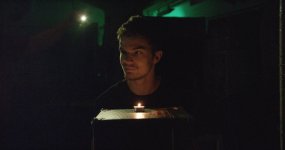
Here's one more, a candlelit scene as a homage to the "Leonardo cigar" shot... the rim light is Nokia E7 cell phone (!). This was shot with the Angenieux zoom fully open at f2.8, developed at ISO 6400. A stream from HDRx:
http://eki.pp.fi/digivideo/RED/ISO_tests/Epic_f2_8_ISO6400_HeikkiLeo.jpg

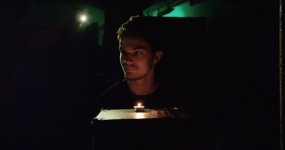
Here's the same shot, with some color correction to bring the blacks down a little, both HDRx channels in use to preserve more highlights (in the color corrected version, there's no big difference - but in the HDRx stream i.e. the reflection if the candle is far from being blown out), and a bit of spatial noise reduction:
http://eki.pp.fi/digivideo/RED/ISO_tests/Epic_f2_8_ISO6400_HDRX_Noisered_HeikkiLeo.jpg

Lower quality previews of all of these are attached (the candle shots in the next message)... the above are 2K jpegs.
 

Attachments

  • Epic_f22_ISO12800.jpg
    Epic_f22_ISO12800.jpg
    92.8 KB · Views: 0
  • Epic_f2_8_ISO320.jpg
    Epic_f2_8_ISO320.jpg
    53.6 KB · Views: 0
  • Epic_f4_8_ISO800.jpg
    Epic_f4_8_ISO800.jpg
    62.3 KB · Views: 0
  • Epic_f8_ISO2500.jpg
    Epic_f8_ISO2500.jpg
    80.5 KB · Views: 0

Attachments

  • Epic_f2_8_ISO6400_HeikkiLeo.jpg
    Epic_f2_8_ISO6400_HeikkiLeo.jpg
    87.3 KB · Views: 0
  • Epic_f2_8_ISO6400_HDRX_Noisered_HeikkiLeo.jpg
    Epic_f2_8_ISO6400_HDRX_Noisered_HeikkiLeo.jpg
    45.3 KB · Views: 0
ISO is just Meta.....but...... none of it matters if you are set at you slowest possible shutter speed and widest available aperture.........
 
If you need noise reduction, try to apply it to the blue channel only. Electronic cameras are most noisy in blue. Humans see the least detail in blue, so the loss of detail from a denoiser doesn't count as much.
 
Back
Top