Welcome to our community

Be a part of something great, join today!

  • Hey all, just changed over the backend after 15 years I figured time to give it a bit of an update, its probably gonna be a bit weird for most of you and i am sure there is a few bugs to work out but it should kinda work the same as before... hopefully :)

Adobe Premiere Pro 5.5.1 + Resolve! (epic users take note)

Hi,

I tried to instal the patch, but it doesn't work "Mise à jour non applicable". Is this patch only for US version of Premiere ?
 
A clarification. I just applied the CS5.5.1 update to PP and it is NOT necessary to re-apply the Epic Labs Update. Either the Epic Labs update is included in CS5.5.1, or the update does not loose the Epic Labs install.

Thank you for that info.....was worried if i downloaded 5.5.1...and loose my EPIC inserts.....You SURE!!! 100% money back guarantee???
 
NEW to PREMIER PRO--as of YESTERDAY---i JUMPED off the FCP bridge to nowhere.....

....total NEWB questions for EPIC & R1 footage: i can drop footage into my timeline & i setup my timeline sequence saying it is RED footage....and to display 1920x1080....that's what i want for final output...----oh, doing this on my MacPro Notebook....for playback in the timeline or viewer---i get Sllllllow playback. HOW or where can i adjust play settings? i tried everything and went into playback settings, but nothing seems to be what i NEED.

.....would like this to work as i do with my FCP method--of droping my prores 422HQ files on timeline and playing them back....

....it's a beginning question i know, but sure would help me if someone could quickly spit that out for me to see....
thanks all
 
A clarification. I just applied the CS5.5.1 update to PP and it is NOT necessary to re-apply the Epic Labs Update. Either the Epic Labs update is included in CS5.5.1, or the update does not loose the Epic Labs install.

PAUL--you sure? this from Adobe patch site:
Note: If you have installed the RED Epic importer plug-in from Adobe Labs, the Premiere Pro CS5.5 (5.5.1) update will overwrite it with the built-in RED importer plug-in. To restore the functionality of the RED Epic importer, just re-install the RED Epic importer plug-in after installing the Premiere Pro CS5.5 (5.5.1) update.
 
DAVID: WHEN can i import 300fps footage? only 120 at moment correct??
....then, back to my orginal newb question:

i can drop footage into my timeline & i setup my timeline sequence saying it is RED footage....and to display 1920x1080....that's what i want for final output...----oh, doing this on my MacPro Notebook....for playback in the timeline or viewer---i get Sllllllow playback. HOW or where can i adjust play settings? i tried everything and went into playback settings, but nothing seems to be what i NEED.

.....would like this to work as i do with my FCP method--of droping my prores 422HQ files on timeline and playing them back....
 
Hi Johnny,

On my MBP 17 2011, it is not so low at all with 4K rushes at 1/4 Res (did you right click on the screen and select 1/4 res ?)


Olivier
 
Hi Johnny,

On my MBP 17 2011, it is not so low at all with 4K rushes at 1/4 Res (did you right click on the screen and select 1/4 res ?)


Olivier
Checking now on my screen......
i did not seem to notice any resolution settings....what place exactly?
 
NOT that i see....Now, i did find on top right viewer/canvas an icon called OUTPUT where i can dial in 1/4; 1/2 & full ONLY>...but seems to have no significance on my playback.
 

Attachments

  • Screen shot 2011-09-18 at 3.07.33 PM.png
    Screen shot 2011-09-18 at 3.07.33 PM.png
    18.5 KB · Views: 0
Hi Johnny,

Should just be able to right click the image (either in source monitor or the program monitor) then select "playback resolution" > then resolution.

You can also do the same for paused resolution :)
 
Did you "import" the R3D ?
Didi you choose the good parameters for your sequence (ie : R3D 24fps 1080 even if you put 4K in it) ?
When you right click on your clip in your project (not in the timeline), do you see a way to access the metadata (flut, gamma, color, etc.) ?
 
I'm a 10 year veteran of FCP. I originally started out on Premiere 5.1 back in my high school days. Forgot most of it now and want to make the jump back in because of the Epic... Any literature or online videos about where to get started for someone like me? I heard you can pretty much match all the same keystrokes in PP that you used in FCP. Also, just trying to get a handle on how to work with R3D files. Is there a place within PP to adjust ISO/Gamma/Color Space and WB?

Thanks ahead, and THANK YOU ADOBE for LISTENING!!!!!
 
Hi,


Exactly the same for me. Made some little films back with Adobe. And I don't regret the move. Last time I used AE, it was AE3...
I tried to keep my fcp shortcut too, but after some time, i prefer to learn the standard set of Premiere to be able to move from a computer to another and be in sync with other peoole.

So, go back to school... A good book : an editor's guide to Adobe premiere, and a great community : adobe online (i put some questions there and always got an answer in 2 hours max)


Olivier
 
Did you "import" the R3D ?
Didi you choose the good parameters for your sequence (ie : R3D 24fps 1080 even if you put 4K in it) ?
When you right click on your clip in your project (not in the timeline), do you see a way to access the metadata (flut, gamma, color, etc.) ?

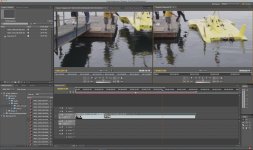
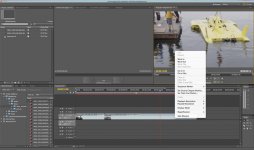
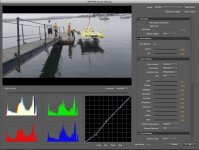
I merely went to the Media Browser in the lower left corner of PP and dragged a few clips to my timeline.....I SEE where we can change PLAYBACK To 1/4 or more....funny that i cannot change to 1/8 or 1/16 though....those are in light gray and you cannot chose those options. ALSO.....to ACCESS all RED RAW data, JUST go to the Project Bin and right click the CLIP and choose source settings---you get a window with ALL RED RAW data---AND yes, EPIC working as well....my screen shots below show BOTH of those two items of which i speak. So far pretty easy. BUT, i cannot get playback to work well....just stuttering HEAVILY.

On first pic attached--look at the white window and see "Playback Settings" & "Paused Settings" set resolution for playback there....i set Play at 1/4 and paused at 1/2
 

Attachments

  • PP-RED1.jpg
    PP-RED1.jpg
    93.8 KB · Views: 0
  • PP-Red.jpg
    PP-Red.jpg
    88 KB · Views: 0
Did someone from Adobe, Avid or whatever software company ever ask why is FCP so damn popular?
Did they blame on stupid users who went on good Apple advertising campaign?
I don't want to flame anyone, but after 15 or more years developing a software if you still didn't deliver easy and intuitive product as FCP is than perhaps you will never will.
I am sorry guys, but the discussion you are making about where is 1/4 debayer or is it working belongs to times some 10 years ago.
But than again at 43 years old I will still have to dig into forums in order to edit my 20second commercial shot on Red and finding a easiest way to make 5 language versions into 5 different delivery formats, making last minute changes into the same client supervised project on a big screen, which is by the way a peace of cake to do into the FCP in other codec than Red.
 
What? Aleksandar, i think any pro software requires us to have to pick up a book, ask questions and peers from time to time.....not sure what you meant to say here, but have you used or looked at Adobe Premier? Anyway, it's rather SOPHISTICATED---you want easy, then use FCP express or I-DVD.....you are missing the point of PP (in my case) I too was using FCP and transcoding to prores etc...but the point is you can stay in RAW till FINAL output. That is a BIG deal.
 
Back
Top