Jan Balster
Well-known member
- Joined
- Apr 15, 2008
- Messages
- 304
- Reaction score
- 1
- Points
- 18
- Location
- Asheville, NC, USA
- Website
- www.jb-photo.net
Just wondering if there is a sticky or some other place to report suspected bugs with REDcine or other products.
Moderators, if this is the wrong place then please mover or delete this thread as you see fit.
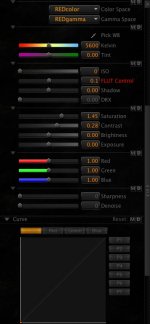
I'm using REDcine build 487 with a RR (driver 1.1.10.0 and firmware 1.1.14.38). The problem happens when a clip in the player is playing back and I press the "O" to set an out point. What happens is that the ISO resets to 0 and the curves are pegged up to the left and bottom. You guys may already be aware of this but I thought I'd point it out.
See the screenshot for an explanation of what I'm talking about with the curves.
- Jan
Moderators, if this is the wrong place then please mover or delete this thread as you see fit.
I'm using REDcine build 487 with a RR (driver 1.1.10.0 and firmware 1.1.14.38). The problem happens when a clip in the player is playing back and I press the "O" to set an out point. What happens is that the ISO resets to 0 and the curves are pegged up to the left and bottom. You guys may already be aware of this but I thought I'd point it out.
See the screenshot for an explanation of what I'm talking about with the curves.
- Jan