Welcome to our community

Be a part of something great, join today!

  • Hey all, just changed over the backend after 15 years I figured time to give it a bit of an update, its probably gonna be a bit weird for most of you and i am sure there is a few bugs to work out but it should kinda work the same as before... hopefully :)

quicktime X drives me insane!!

Tom.Wong

Well-known member
Joined
Jul 21, 2009
Messages
1,975
Reaction score
0
Points
0
Location
New York/New Jersey
Website
www.thewongcut.com
Just need to vent a little bit. I'm color grading a fashion piece, that's only gonna live on the web, and mobile devices. and the director for the piece travels a great deal and has no time to stop in to see what I'm seeing on my monitor. So the exchange of sending off versions goes off, I review it in quicktime 7 and it looks pretty good. never identical but close enough, even at h264 or pro res LT. But he comes back to me saying the images look way too dark and he can't see anything.

and I'm wondering what the hell is going on because my levels look right, i'm riding a good line for that early morning look, and stylized even with pushed blacks. He shows me screen grabs and shows how dark it is, and he's right, they are muddy and too dark. And i realize it's cause he's viewing it in quicktime X, and doesn't have 7 installed. and wouldn't know how to install it with the factory install discs and rosetta. Not to mention his client wouldn't be doing any of that either. So i'm freakin stuck between a rock and a hard place because it looks like pure ass in quicktime X. The levels are industry spec, and are exactly what I see on my monitors, but quicktime X is screwing everything up.

and seriously trying to compensate for a faulty player is asinine. because it's just gonna look like ass everywhere else if i do that. I seriously see no solution, everybody who owns a mac and views it in qt X is gonna be seeing it like ass, including the clients, and if i compensate for the player, then it's gonna look like ass when it releases world wide.

&*^@#*(&Q#(*&#(*!&#)(@$&*(#(&!(*&()*!)(7
 
Using H264 for a review is a bad idea anyway. Motion JPG is what I use....

doesn't really matter, delivery is gonna be in quicktime, even when i export out a pro res, quicktime X does some funky shit to it. they'll just come right back and say, well the review copy looked great! why does the final delivery look so different?

might just have to go the x264 route, does quicktime x play it though? and does it do the same things to it?
 
Hmm, have you tried grading with the "Make Look Like Shit LUT"? I think it's downloadable from Apple.

yeh, it's on the app store as a plugin for fcp x!

as far as i'm concerned, anything apple as made, with the letter/ roman numeral X with it, is an epic POS.

the funny thing is snow leopard shifted it's entire system to be at 2.2 gamma with the rest of the world, and it's own qt player causes gamma shifts. I miss being the "pc guy"
 
Did you:

• on you final cut timeline sequence settings under codec, click on advanced and turn prores gamma correction to OFF ?
• under quicktime 7 preferences check the "use final cut gamma" box?

It doesn't fix everything but it helps clear up a lot. Also you can't judge blacks on a mac screen using snow leopard - it shows a lot of stuff above black as zero black
 
Did you:

• on you final cut timeline sequence settings under codec, click on advanced and turn prores gamma correction to OFF ?
• under quicktime 7 preferences check the "use final cut gamma" box?

It doesn't fix everything but it helps clear up a lot. Also you can't judge blacks on a mac screen using snow leopard - it shows a lot of stuff above black as zero black

it's not about my screen, it's about the director's and client's screen. they just run a every day mac, using qt x. my whole system is color managed. so it looks fine on my computer. the second it gets to them, everything goes to hell.
 
Tom , how do the files look on your system when you check them in Qt X ?
 
Tom , how do the files look on your system when you check them in Qt X ?

everything is pulled down, but it seems to be even more severe when it reaches the client (that is probably a monitor issue on their end) but it's literally different on what conversion step i decide to use, and what software at that too. there's 0 consistency except for out of resolve itself. which does the the best a perfect rendering of it. unfortunately resolve doesn't marry the audio to the video, i need to deliver this with audio. unless tehre is a hidden menu i don't know about .

i usually look at everything in qt 7 on my end cause it's the truest way of viewing the qt on a mac. I think i'm figuring out the work around though, will report back after the client gets a viewing.
 
I just avoid Quicktime like a plague, unless the client specifically requests a codec with a MOV container. No matter which codec you use - H.264, ProRes, gamma issues are round the corner. Uncompressed or MJPEG might be an option, but hardly an ideal one. What is ironic is that MOV files play much better on Windows on MPC-HC than on Quicktime Player on Mac!

But if they really insist on a MOV - I am afraid you just have to make peace with the fact that there's no easy solution. One compromise would be to lower the gamma appropriately, so when it shifts in the player it will be accurate. But what if it doesn't? It will just look too dark, which may be a worse thing than too bright. Perhaps someone should do a study on the occurrences of gamma shift versus non-occurrence. That could help us make the right compromised choice.

Which brings me to the grand question - How, how, how did Quicktime get to be an industry standard container??? It baffles me to no end.
 
I just avoid Quicktime like a plague, unless the client specifically requests a codec with a MOV container.

....

Which brings me to the grand question - How, how, how did Quicktime get to be an industry standard container??? It baffles me to no end.


I think it's because the player is decent. Windows media player is retarded, VLC glitchy. And it's the only one with a decent frame advance, reverse, scrub. (I's got to be some sort of patent thing. Why would Windows media assign Ctrl+P to pause instead of spacebar! And not make arrow key frame advance, play backwards available at all?)

The format may stink and have tons of problems, but I think it's that simple user experience that has made it popular.
 
Last edited:
Apple has really dropped the ball, as in down the sewer, as of late. I've been an Apple fan since 2001-- and was almost ready to upgrade to Final Cut X-- thankfully it kept crashing on the download. Now I'm seriously considering going Avid. Apple does not seem to be serious anymore-- especially when it comes to their codecs-- they're strictly amateur grade. Also, for the first time in a decade, I'm, considering going back to using a PC. With all their success as of late with IPhones and IPads, Apple seems to have lost all interest in the professional computer market to direct their focus on selling toys.
 
there's no way you can patent hotkeys... that's as ridiculous as the gamma issues we're discussing. it really sucks that it's so hard to deliver things accurately. when you send someone a package, you expect them to open it and find it the same way you sent it out, with perhaps a dent or two in the packaging... but we've got a situation where you have absolutely no clue how it will be received. monitors play a certain and important role in this, but people that have monitors that are way off won't know or care about the difference anyways... the real problem is the codecs and players. very frustrating. let us know if anybody comes up with a good solution.
 
I think it's because the player is decent. Windows media player is retarded, VLC glitchy. And it's the only one with a decent frame advance, reverse, scrub. (I's got to be some sort of patent thing. Why would Windows media assign Ctrl+P to pause instead of spacebar! And not make arrow key frame advance, play backwards available at all?)

The format my stink and have tons of problems, but I think it's that simple user experience that has made it popular.

None of the above mentioned players are any good, but that's a different argument. Let's assume that Quicktime Player is decent - but why not use MP4 files in Quicktime? Doesn't explain why everything should use the MOV container!

I think the answer maybe lies with the popularity of FCP and it's very Quicktime/MOV centric nature? However, how a NLE based on the Quicktime architecture got so popular is another baffling issue!
 
Im not defending Apple one little bit.. especially after there FCPX disaster! I'm keen to move on. BUT!!!

Regarding the quicktime X Vs quicktime 7 PRO difference.. One is darker than the other???
Working on a new TVC now, I decided to blast out a quickie quicktime.. :) just to see what people are taling about.
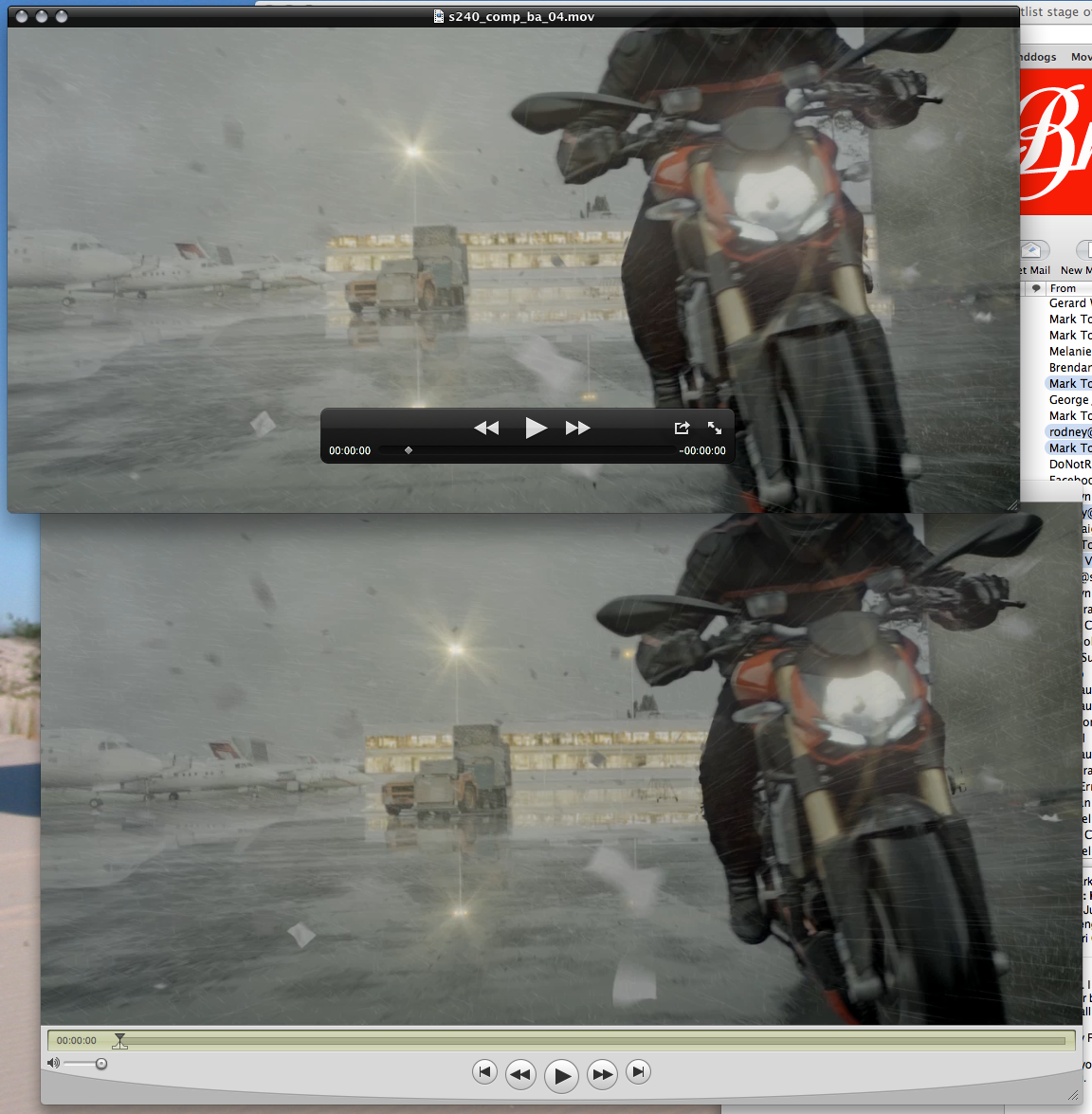
I cannot get them to look different at all. ? they look the same and exactly the same as my FCP sequence preview. All H264's still.. Converted to M4V and still looked the same?
I don't use new quicktime X at all, I hate the interface.. .. but thought to have a look.

Is there something Im missing?...
Heres a screen grab.

Screen%20shot%202011-06-26%20at%205.32.14%20PM.png
 
Sorry.. the slice of frames you grabbed are not the same frame... Wouldn't you use the same exact bit side by side? not section next to each other?
I just did it then.. Must be only 1% different at best.. marginal to say the least.
But I get what your saying.. just.
a.png
 
well that's what i'm talking about, the differences shouldn't even be there. and when I'm grading for a dark scene, that little bit can make it TOO dark. and not to mention there is no consistency across the board. things change from what I encode from, with what I encode. I see differences with uncompressed going to h264, and pro res going to h264. but either way premiere saved my ass, and seemed to manage to carry the color and luminance over a lot closer than the built in quicktime encoder. whatever mojo they used, it got the results like yours mark. marginal difference in qt x, perfect in qt 7. before, i was sending a pro res that looked fine to their editor, and when he encoded it, it looked like it was 3 stop under. explain that one!
 
Back
Top