Welcome to our community

Be a part of something great, join today!

  • Hey all, just changed over the backend after 15 years I figured time to give it a bit of an update, its probably gonna be a bit weird for most of you and i am sure there is a few bugs to work out but it should kinda work the same as before... hopefully :)

EPIC HDRx +6 Stop Test - RedCam Central

Casey Green

Well-known member
Joined
Feb 1, 2007
Messages
2,101
Reaction score
2
Points
38
Location
Los Angeles
Website
www.redcamcentral.com
Hi Everyone,

EPIC HDRx is an amazing tool. We decided to try out a test similar to Jim's Dark Barn right outside of our studio in L.A...

The test shown here was done in harsh lighting conditions: An poorly lit room, and bright sunlight outside the front door, in the same shot... We blended the HDRx track into the original using a quick and dirty keyframed softedge crop in Final Cut... You may see some artifacts from the edges of the garbage matte. Please don't judge the poor comp. :-)

RED 18-50mm f2.8

Under exposed with lens wide open:
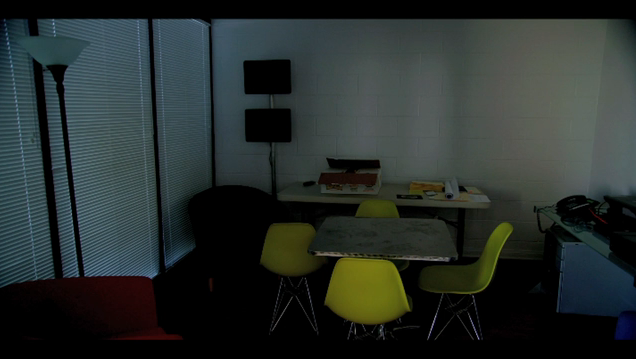
EPIC_HDRx_Under.png


Over exposed with lens still wide open:
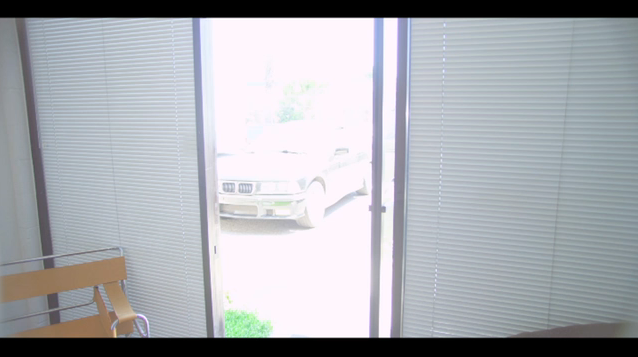
EPIC_HDRx_Over.png


Blended tracks using HDRx +6 and softedge animated crop in FCP:

Again, this was just a quick test we threw together... but shows the power of HDRx! The data is all there! Hope you enjoy the test.
 
Casey, a video is worth thousands of words. Thanks for the demonstration.
 
great job, not criticizing, just curious, something funky is happening at the edge of the door when you pan over. does it have anything to do with the hdrx muxing? and certain parts of the over exposure still seeping through? it's almost like a pulsing flash, not sure if that's normal or not.
 
great job, not criticizing, just curious, something funky is happening at the edge of the door when you pan over. does it have anything to do with the hdrx muxing? and certain parts of the over exposure still seeping through? it's almost like a pulsing flash, not sure if that's normal or not.
Tom, it looks almost like the lens is trying to vignette. Could that be causing what you see from the edge of the frame?

edit: But then, Casey did say it was a crop so probably not.
 
Great score, by the way.
 
Love the test but the music makes it, was it composed for the piece? heheh
 
great job, not criticizing, just curious, something funky is happening at the edge of the door when you pan over. does it have anything to do with the hdrx muxing? and certain parts of the over exposure still seeping through? it's almost like a pulsing flash, not sure if that's normal or not.

That would be the blinds fluttering in the wind. The light from the window is coming through the edges of the blinds.
 
great job, not criticizing, just curious, something funky is happening at the edge of the door when you pan over. does it have anything to do with the hdrx muxing? and certain parts of the over exposure still seeping through? it's almost like a pulsing flash, not sure if that's normal or not.

No worries... I knew people would notice that... As stated above, an animated soft edge crop within Final Cut was used to blend the two together. I did it last night and kinda rushed it... not to mention, I'm not a compositor. So the keyframes on the animated garbage matte are pretty bad... towards the end, you see it jump around a bit. Same thing for how the edges flutter. The lens did vignette a little bit, but mostly, that is the outter edge of the Garbage Matte. Again, my apologies for that.

My point is to show just how much information is in the outdoor area. This was too dramatic for REDCINE-X to do a simple blend. It needed a window / keyframes.

When I get some more free time, I'll make a better version.

Just amazing thinking that all of that would have been clipped in the old days. Thanks for the comments.

[Edit: A much better version of the Comp is now online. See next post...]
 
UPDATE:

I've now uploaded a much better version of the HDRx composite. This should not be nearly as distracting as the previous one, which I will also replace in the original post. Spending a little extra time to do things right always helps... and not doing it when you are too sleepy. :-)

Hope this does a better job of getting across just how amazing HDRx is. Love these Cameras!

 
No worries... I knew people would notice that... As stated above, an animated soft edge crop within Final Cut was used to blend the two together. I did it last night and kinda rushed it... not to mention, I'm not a compositor. So the keyframes on the animated garbage matte are pretty bad... towards the end, you see it jump around a bit. Same thing for how the edges flutter. The lens did vignette a little bit, but mostly, that is the outter edge of the Garbage Matte. Again, my apologies for that.

My point is to show just how much information is in the outdoor area. This was too dramatic for REDCINE-X to do a simple blend. It needed a window / keyframes.

When I get some more free time, I'll make a better version.

Just amazing thinking that all of that would have been clipped in the old days. Thanks for the comments.

[Edit: A much better version of the Comp is now online. See next post...]

I retract my original "blinds fluttering in wind" statement. Whoops. They looked like they moved, to me at least.
 
UPDATE:

I've now uploaded a much better version of the HDRx composite. This should not be nearly as distracting as the previous one, which I will also replace in the original post. Spending a little extra time to do things right always helps... and not doing it when you are too sleepy. :-)

Hope this does a better job of getting across just how amazing HDRx is. Love these Cameras!


Casey, did you attempt to pull a luma matte off the X track? I found this yields better results for blending both tracks.
 
I retract my original "blinds fluttering in wind" statement. Whoops. They looked like they moved, to me at least.

Yes, that artifact should be gone now in the new version... :-)
 
Casey, did you attempt to pull a luma matte off the X track? I found this yields better results for blending both tracks.

I did experiment with that early on, but didn't get the results I wanted due to limitations in the software I was using.

I ended up re-doing the animated Garbage Matte with a soft edge. (Which probably would not be as necessary in a shot with less contrast)
 
Back
Top