C_Westover
Active member
I updated the firmware on the EPIC the day it came out to v1.6.12 and couldn't be more pleased. Along with that update were instructions and files for updating the REDMote too. That's where I'm having trouble.
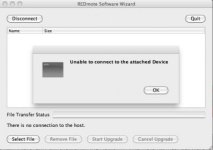
I downloaded the redmote v771 update application a few times now and I've tried running it on a few different computers just in case too. There does not seem to be any problem with the update app, the problem is with this REDMote unit from what I can tell. The computer recognizes the redmote connection, but the update app tries for a few minutes to connect and then gives up.
When I connect it to the computer or power it up on its own, the screen shows what you see in the image attached below. None of the buttons on the redmote are responsive, Menukey1 doesn't do anything. There is no other EPIC within miles except the one powered down and packed away in it's case, so I don't know why the redmote is wanting to link with anything. It seems frozen on that screen and as a result, I assume, it won't update like it should.
Has anyone had similar problems? Is there a key combination to perform some kind of hard reset on the redmote? Any ideas?
I have a ticket opened already, just reading how awesome the new redmote update is and it is making me incredibly impatient.
I downloaded the redmote v771 update application a few times now and I've tried running it on a few different computers just in case too. There does not seem to be any problem with the update app, the problem is with this REDMote unit from what I can tell. The computer recognizes the redmote connection, but the update app tries for a few minutes to connect and then gives up.
When I connect it to the computer or power it up on its own, the screen shows what you see in the image attached below. None of the buttons on the redmote are responsive, Menukey1 doesn't do anything. There is no other EPIC within miles except the one powered down and packed away in it's case, so I don't know why the redmote is wanting to link with anything. It seems frozen on that screen and as a result, I assume, it won't update like it should.
Has anyone had similar problems? Is there a key combination to perform some kind of hard reset on the redmote? Any ideas?
I have a ticket opened already, just reading how awesome the new redmote update is and it is making me incredibly impatient.