Welcome to our community

Be a part of something great, join today!

  • Hey all, just changed over the backend after 15 years I figured time to give it a bit of an update, its probably gonna be a bit weird for most of you and i am sure there is a few bugs to work out but it should kinda work the same as before... hopefully :)

Adding an SSD into my New Mac Book Pro. I need some advice on guys who know the good

BigLu

Well-known member
Joined
Feb 8, 2008
Messages
1,670
Reaction score
0
Points
0
Location
SoCal Camarillo / LA baby
I just purchased a new MBP 2.3 quad core from the apple store w/ 8GB of ram and an AntiGlare screen.
Pretty cool,
I pulled out the 750GB 5400rpm drive and replaced it with a 750GB 7200rpm Segate drive
The price did not bother me and the speed I hope is a slight improvement. I know its likely very minimal but whatever i can get ill take.
I wished for a 1TB or 1.5TB 7200rpm drive but they are not out yet im sure soon.

I have since learned that I can replace the CD/DVD optical drive with another drive like an SSD drive.
I have looked into this and LOVE love love the idea.

1st option is a 240GB OWC SSD drive bundle comes with the toolkit and tray for easy installation. COOL.
http://eshop.macsales.com/item/OWC/DDMBSSD240/

2nd option is also a 240GB drive made by OCZ RevoDrive X2. They say its much faster and looking at the specs it looks much faster than the OWC SSD drive.
http://www.newegg.com/Product/Product.aspx?Item=N82E16820227661

My question.
The price difference does not bother me at all.
I want the better drive and faster of course.

I am asking anyone with experience plz.
Do you prefer the OWC drive or OCZ faster more expensive drive?
I will be buying the Bracket made by OWC so thats not a question.

QUESTION ANSWERED I was comparing in appropriate drives, the OCZ was a PCI-Express x4 MLC so thats a NO GO.
Thanks Roberto sweet catch.

I will be going with the OWC
I still wonder whats a better placement

Where would you recommend the drives go?
My SSD will be my boot up drive with applications, music and photos.
My 750GB 7200rpm drive will contain my video footage.
Should the SSD go in the original drive slot putting my 750GB drive into the optical slot?
Or
Viseversa should my SSD go into the Optical slot leaving my 750GB drive in the normal location.

Thank you many times over in advanced.

Luis Flores Jr
 
Hey Fellas,

I have a couple of the OWC SSD's in my Mac Pro in Raid 0 and they are wicked fast. I get about 500mb/sec (fully saturating the SATA bus). Digilloyd has tested various makes and found the OWC drives to be more reliable... providing more consistent retained performance over time. However... they are about to drop new units that promise up to 600 mb/sec per drive!!! I'd wait just a bit. I plan to get the new quad core soon, though my 17" is pretty new. I'll replace the stock drive with an OWC SSD and the opti drive with another. Haven't decided whether to mirror or stripe the two, tho. Technology is freakin awesome nowadays. Now if I only my SSD module and mags would ship!

CB
 
I haven't done it but the OCZ drive you posted has a PCI-Express x4 interface, so I am 99% sure it won't work with a MBP.

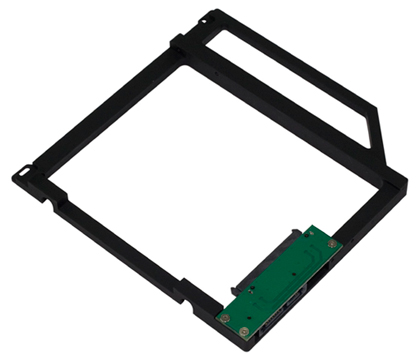
If you look at the other option you posted, it is a 2.5" SSD drive with a SATA II interface, with a custom 5.25" bracket specifically designed this MBP customization:

Data_Doubler_empty.jpg


An interesting option would be to purchase the custom bracket separate if possible, and pick your 2.5" SSD drive. But I don't know if the brackets are sold separately.

Finally, make sure to check warranty details. Mac might not be able to even notice if you swapped it, or they might, but I am pretty sure it voids some sort of warranty.

Looking forward to have all of this corroborated by someone with specific experience.
 
I can't speak for the OCZ drives but I replaced the optical drive in my aging first-generation unibody MacBook Pro with an Intel SSD and I am very happy with it. I think it is the best thing you can do to speed up your MacBook Pro. While before I hated this computer for its spinning beach balls and overall lack of speed, now it happily zips around and it feels like a different computer altogether!

I chose Intel because the OCZ's were more difficult to get over here and because the Intels are generally regarded as very good and work well with Mac. They do have slower write speed but might be better at handling lots of small files.

I don't think it matters where you put your SSD, it can go both in the optical bay or in the hard drive space. I put it in the optical bay and replaced my hard drive with a 1TB one - when I found out that it is a thicker than normal model I got worried for a bit but it fits just fine!

Replacing the optical drive with the tray can be a bit fiddly and you might want someone to do that for you.
 
An interesting option would be to purchase the custom bracket separate if possible, and pick your 2.5" SSD drive. But I don't know if the brackets are sold separately.

Yes, you can buy the bracket separately. I think it is $75. I almost bought one the other day for my new 17" 2.3 MBP. I decided to wait a month or two before I need to do the upgrade and buy new SSDs. There should be new ones out by then.
 
I just got the 2.3 15" macbook pro with the apple 128GB SSD drive (+$100 it's currently the cheapest option for that size). I then got a Maxupgrades bracket and put a seagate 750GB 7200rpm drive in the optical bay.

So far everything works great! I have the operating system and all applications etc. on the SSD and my media, photo library and footage etc. on the seagate. The laptop loads form the login screen in like 2 seconds!

I have been wondering if it would be better to put the SSD in the optibay and the spinning drive in the original slot which utilizes the motion sensors in case the drive is dropped etc. but I also figured it's probably better to have the boot drive in the original slot instead of the adapter...??? If anyone knows more about this I would love to know.
 
I just got the 2.3 15" macbook pro with the apple 128GB SSD drive (+$100 it's currently the cheapest option for that size). I then got a Maxupgrades bracket and put a seagate 750GB 7200rpm drive in the optical bay.

So far everything works great! I have the operating system and all applications etc. on the SSD and my media, photo library and footage etc. on the seagate. The laptop loads form the login screen in like 2 seconds!

I have been wondering if it would be better to put the SSD in the optibay and the spinning drive in the original slot which utilizes the motion sensors in case the drive is dropped etc. but I also figured it's probably better to have the boot drive in the original slot instead of the adapter...??? If anyone knows more about this I would love to know.

The optical bay drive is likely not SATAIII capable where the original one is, so depending on the SSD you are using you may see some speed increases.
 
I too have the new 2.3 MBP. I played around with a ton of different SSD's, but I really like the OCZ's. I currently have an OCZ Vertex 3 in my primary drive bay. It's insanely fast (The fastest on the market I believe?). I was also looking into replacing my optical drive with a second vertex 3, but I realized that the optical drive's SATA connection only supports SATA II. The primary drive bay does support SATA III. It would be a waste of money to buy a SATA III drive & only get SATA II speeds. That being said you could always put your spinning drive in your optical bay and your SSD in your primary drive bay.
 
OWC Mercury Pro is a good performer and have strong reliability. The Apple 512GB SSD is also a great option and good performer, seriously reliable too. Apple SSD doesn't get enough credit, that's for sure. Both the Apple and OWC options are 3Gbps SATA and are now a generation behind what is just entering the market.

If you want to go for ultimate performance, check out the new OCZ Vertex 3 that is just hitting the market. The Crucial C600 is also a good option. Both of those have 6Gbps SATA interfaces and do a good job of not slowing down too much when they move non-compressable data (R3D, H264, AVC, etc..). The new Hitachi SSDs are the performance kings, but are also some of the most expensive. I haven't got my hands on a Vertex3 yet, but I'm already reading several reports of them failing under stress. OCZ has great support and warranty if that does happen, but like any new products, there are some pains for those who buy first.

If you want to spend the $$$ (2x the price of the OWC Mercury Pro and close to 2X the claimed performance), here's the Vertex3 480GB.


IMO, the OWC is probably the best choice at the moment. It's priced alright and performance is good, reliability is proven. To me, that's a win.
 
OWC Mercury Pro is a good performer and have strong reliability. The Apple 512GB SSD is also a great option and good performer, seriously reliable too. Apple SSD doesn't get enough credit, that's for sure. Both the Apple and OWC options are 3Gbps SATA and are now a generation behind what is just entering the market.

If you want to go for ultimate performance, check out the new OCZ Vertex 3 that is just hitting the market. The Crucial C600 is also a good option. Both of those have 6Gbps SATA interfaces and do a good job of not slowing down too much when they move non-compressable data (R3D, H264, AVC, etc..). The new Hitachi SSDs are the performance kings, but are also some of the most expensive. I haven't got my hands on a Vertex3 yet, but I'm already reading several reports of them failing under stress. OCZ has great support and warranty if that does happen, but like any new products, there are some pains for those who buy first.

If you want to spend the $$$ (2x the price of the OWC Mercury Pro and close to 2X the claimed performance), here's the Vertex3 480GB.


IMO, the OWC is probably the best choice at the moment. It's priced alright and performance is good, reliability is proven. To me, that's a win.

OWC actually just launched a 6Gb/s capable drive. And looks like one of the most capable yet | http://barefeats.com/ssd6g.html

And a heads up to those with the 2011 17" MBP | http://blog.macsales.com/9754-owc-offers-fix-for-2011-17-mbp-sata-problems
 
Last edited:
Interesting about the shielding on the SATA cable. 6Gbps SATA uses a much faster signaling than 3Gbps (obviously) and there's probably a short enough TTL on the signal where interference is a problem for 6Gbps and not slower modes. Good to know. I also had not been paying attention and didn't realize we could now order the 6Gbps OWC units. I'm anxious to see how they perform and would be more inclined to pre-order one of these than to order the Vertex3.
 
and would be more inclined to pre-order one of these than to order the Vertex3.

Really sounds like the way to go. If I had to buy right now I would try these new 6GB/s versions from OWC, hands down.

our sample was of 120GB capacity, this model is also available in 240GB and 480GB capacities.

The prices for the 240GB and 480GB look nasty though.
http://eshop.macsales.com/search/Mercury+Extreme+Pro+6G+SSD

But for projects that would fit in 240-480GB, they sound like a great investment as a second drive with the OC drive being a 120GB or a cheaper yet still fast SSD at about 128GB.
 
The prices for the 240GB and 480GB look nasty though. http://eshop.macsales.com/search/Mercury+Extreme+Pro+6G+SSD

Unfortunately, they're priced right in line with other top-performing 6Gbps options. The OWC 480GB is already $100 cheaper than the Vertex3 480GB from Newegg or other discount vendors. Prices will fall, that is certain. Which also still means the 3Gbps OWC or similar like the C300 from Crucial, could be a more practical SSD option.

Here and there I put SSDs in notebooks, but overall I cringe at the prices. This is a great example -- $1800 for a 480GB SSD. In most situations a 500~750GB 7200rpm HDD is just fine and I can buy close to 20 of them for the price of that one SSD.
 
Agreed. Now start to think 5k RAW with a Rocket in an external enclosure... and maybe you will think the fast SSDs are worth while..?
(So long as the capacity of the drive in question is enough for the project, or course)

Now if you really don't care to carry an external Rocket, then you probably won't care so much about carrying a second external enclosure as well. For $1,800 you could could buy a decent 6x RAID enclosure, affordable 7200rpm's as large as the money allows, and a get a solid RAID card for under $500.

With about $1,000 of the $1,800 budget left over after buying the RAID card and decent 6x7200 enclosure, you would be only about $100 short of filling those six slots with 3TB Hitachi's... http://www.newegg.com/Product/Product.aspx?Item=N82E16822145472 Just spend a touch more to buy an extra to have handy and do things right.

Set them up in a RAID-5, and you would get ~12TB actual capacity with speeds that will keep the Rocket more than happy. SSD media download speeds should be maxed out as well.

Or ~9.6TB actual capacity if you feel the need for dual hard drive failure protection and go with RAID-6, which means you can keep working through a HDD failure if absolutely necessary.
 
One nice thing about the OWC SSDs is you know they are specifically testing in all the different Mac models. There are quite a few people who have had odd issues with other 6gb/s options on the 2011 MBPs. Just make sure you give yourself the time if you are moving from another drive to make sure everything will be stable with these newest SSDs. Always good to do a clean install if you can, but a great solution for moving data on laptop drives if you have a Mac Pro is laying it on its side and popping the 2.5" drives on the SATA connectors (supporting them with something, don't break your SATA connectors!) and not having to worry about sleds or anything else.

There is no questioning the usefulness of an SSD as your boot drive for anyone who multi-tasks like an insane person. Taking your main storage out of the equation as something that interfere's with your workflow is an amazing thing. If you use any applications that take more than 10-15secs to launch, you will never look back. As far as extra storage goes it doesn't make a lot of sense yet. 256GB seems like the sweet spot right now as far as price is concerned. I was able to pick up a C300 256GB for under $400 (brand new) after some hunting around. 500GB/750GB HDD in optical bay and you are good to go. With something like a Mac Pro, I say go for the smallest SSD that will still support your main workflow as a boot up drive, a good RAID card, and some big HDDs in a RAID-0 array, and keep it all backed up. It is all really a question of how much storage you actually need in the end though.
 
Last edited:
Back
Top