Welcome to our community

Be a part of something great, join today!

  • Hey all, just changed over the backend after 15 years I figured time to give it a bit of an update, its probably gonna be a bit weird for most of you and i am sure there is a few bugs to work out but it should kinda work the same as before... hopefully :)

Solid Green Frames? HELP!

Peter Kagan

Active member
Joined
Jan 2, 2007
Messages
27
Reaction score
0
Points
0
Location
Los Angeles
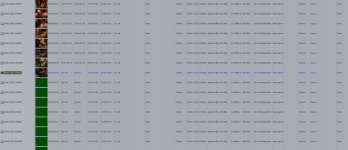
Editor and I working on project. We ingested into FCP as Pro Res HQ with newly downloaded plug in from RED, FCP Studio 3. While working shots went from looking fine to solid chroma key green frames with no information. Thumbnails also in finder as well as FCP.
Is this a corrupt QT problem? New QT part of plug-in no?
 
The most likely cause of this is bad frames in the R3D you transcoded from. Do you still have the original camera footage? Did you use a Data Manager to check the footage as you made copies?
 
DIT did. yes. Client edit already done from same footage. I'm going back to do my own.
Seems unlikely. Also looked fine this morning. some clips seems unaffected.
 
all clips run through R3D data manager.. there were no Bad R3D's these same r3d's have worked before in other systems as peter stated.

he updated to fcp3 and downloaded the fcp3 download rom red.com and installed everything...

the clips work.. and then all of a sudden turn green (in the bin and on the timeline)

its not them being green from the start or at a certain point in the clip.. its totally random.

this isnt a r3d or footage issue.. this is a quicktime or fcp issue. anyone else experience something like this?
 
Green Frames IN FCP.

Green Frames IN FCP.

Here's what the browser looks like in FCP.
 

Attachments

  • Green Frames.jpg
    Green Frames.jpg
    70.5 KB · Views: 0
The last time I saw something like this was a problem with the transfer from CF card to computer. The CF reader couldn't handle it. It didn't happen every time but once is enough.
 
Have sent a message to RED tech support, pleading for attention. Wondering if this might be a bug in the FCP studio 3, or RED Cine I downloaded yesterday before all this began. I have had multiple crashes, both in RED Cine and FCP. In fact the reason I bailed on RED Cine and went to FCP plugin for transcode was multiple crashes in Red Cine.
 

The issue with most of the prior "Green Footage" issues is that they're caused by known bad frames. If this footage has already worked on previous edits, that's probably not the cause.

Question: Are the files you're getting the green on the *EXACT SAME* as the ones the client did the edit with? Same drive or, at the very least, checksummed against those copies?

Define "Randomly turn green" please? So they're not, say, always turning green at frame 145 (Which would indicate a bad frame) but will play fine and then turn green at a random point?
 
Back
Top