Carl Dieker
Well-known member
Hi,
I really love the RED TRIM export function in the latest versions of REDCINE-X. It's fast and it helps me save a lot of disk space. But there seems to be a bug.
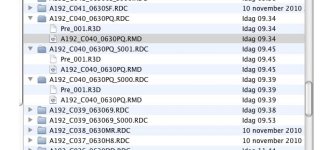
When trimming down an original RDM-folder some of its RDC-subfolders do not contain correctly named R3Ds but instead files that are named Pre_001.R3D, Pre_002-R3D, etc. These RDC-subfolders do not include any QuickTime-wrappers. And more over, the included R3D(s) will not load in the clip browser window. The subfolder is in the folder browser window but its clip(s) is/are not showing.
However, when you individually select such a RDC-subfolder its clip will show up alone in the browser clip window. It is also possible to make QT-wrappers. But they will then get their names from the wrongly named R3D, that is Pre_001_F.mov, and so on. Now, if you try to fix the later by renaming the Pre_001.R3D-file correctly (outside of REDCINE-X), that is its prefix being the same as the one of the RDC-folder, it is then impossible to make new wrappers. Next time the R3D is loaded in REDCINE-X and you try to make new wrappers the app will crash. There may be other conflicts as well.
Notice that the file name Pre_001.R3D resembles the name of temporary files when you shoot with pre-record.
The real dangerous part comes when you throw away the original RDCs in the RDM-folder replacing them with the trimmed ones.
Fortunately I discovered the RED TRIM-bug before deleting the original files.
Anyone else seen the same problem? Is it a known bug? Then I am sorry if I missed it being reported.
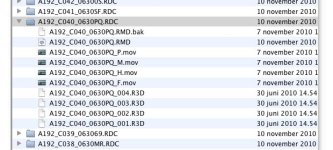
I include screen grabs of the folder containing the trimmed RDC-subfolders A192_C040_0630PQ.RDC, A192_C040_0630PQ_S000.RDC, A192_C040_0630PQ_S001.RDC as well as A192_C040_0630PQ.RDC in the original RDM-folder.
PS: The fastest way to solve this problem is to throw away the not correctly trimmed RDC-folder(s) and replace them with the untrimmed original.
I really love the RED TRIM export function in the latest versions of REDCINE-X. It's fast and it helps me save a lot of disk space. But there seems to be a bug.
When trimming down an original RDM-folder some of its RDC-subfolders do not contain correctly named R3Ds but instead files that are named Pre_001.R3D, Pre_002-R3D, etc. These RDC-subfolders do not include any QuickTime-wrappers. And more over, the included R3D(s) will not load in the clip browser window. The subfolder is in the folder browser window but its clip(s) is/are not showing.
However, when you individually select such a RDC-subfolder its clip will show up alone in the browser clip window. It is also possible to make QT-wrappers. But they will then get their names from the wrongly named R3D, that is Pre_001_F.mov, and so on. Now, if you try to fix the later by renaming the Pre_001.R3D-file correctly (outside of REDCINE-X), that is its prefix being the same as the one of the RDC-folder, it is then impossible to make new wrappers. Next time the R3D is loaded in REDCINE-X and you try to make new wrappers the app will crash. There may be other conflicts as well.
Notice that the file name Pre_001.R3D resembles the name of temporary files when you shoot with pre-record.
The real dangerous part comes when you throw away the original RDCs in the RDM-folder replacing them with the trimmed ones.
Fortunately I discovered the RED TRIM-bug before deleting the original files.
Anyone else seen the same problem? Is it a known bug? Then I am sorry if I missed it being reported.
I include screen grabs of the folder containing the trimmed RDC-subfolders A192_C040_0630PQ.RDC, A192_C040_0630PQ_S000.RDC, A192_C040_0630PQ_S001.RDC as well as A192_C040_0630PQ.RDC in the original RDM-folder.
PS: The fastest way to solve this problem is to throw away the not correctly trimmed RDC-folder(s) and replace them with the untrimmed original.