Welcome to our community

Be a part of something great, join today!

  • Hey all, just changed over the backend after 15 years I figured time to give it a bit of an update, its probably gonna be a bit weird for most of you and i am sure there is a few bugs to work out but it should kinda work the same as before... hopefully :)

SDI out 1080 monitoring.

Mark Andersen

Well-known member
Joined
Feb 12, 2008
Messages
1,483
Reaction score
4
Points
38
Age
63
Location
USA
Website
www.rubberball.com
Has anyone had any luck monitoring Redcine X via the rocket SDI output? I want to get RCx up on my broadcast monitor but can only seem to do it via DVi to computer. The SDI on the rocket card just gives a greenish "weird" image, but you probably know what I'm talking about.
 
You probably haven't set it up right...

Sounds like you've either mixed the RGB/YUV setting or 444/422 single/dual settings.

Cheers!

G
 
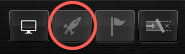
Gunleik is right, I had the same problems until I switched up my settings. It's usually the fact that the rocket defaults to RGB settings, and broadcast monitors, most of them require to have a YUV signal at 422. If you are running newest RCX, click on the "rocket icon" under the view canvas. and your settings should pop up. Make sure you're on single link, YUV, 422. should solve all your problems.
 
Tom,
Do you mean "right click" or "command-click"? When I click on the icon it merely turns the rocket on and off.
Just coming up to speed as I'd been stubbornly sticking with Rocketcine X until recently.
Cheers,
Harry
 
Tom,
Do you mean "right click" or "command-click"? When I click on the icon it merely turns the rocket on and off.
Just coming up to speed as I'd been stubbornly sticking with Rocketcine X until recently.
Cheers,
Harry
I think its right-click. It wont blow if you try either ;) I ran into this problem at my first go with the RRC and REDCine X :)
 
Harry, I think you're pressing the wrong button. It should be a left click of the rocket icon, circled in the attached screenshot.
 

Attachments

  • Screen shot 2011-01-11 at 4.20.45 PM.png
    Screen shot 2011-01-11 at 4.20.45 PM.png
    13.6 KB · Views: 0
Harry, I think you're pressing the wrong button. It should be a left click of the rocket icon, circled in the attached screenshot.
Im gonna be honest and say that I spent hours trying to get the Rocket/BOB going at first. I must have clicked on everything but that :)
So yes its the Rocket button :)
Plus it didnt help that I had the wrong build at the time :P
 
Back
Top