Welcome to our community

Be a part of something great, join today!

  • Hey all, just changed over the backend after 15 years I figured time to give it a bit of an update, its probably gonna be a bit weird for most of you and i am sure there is a few bugs to work out but it should kinda work the same as before... hopefully :)

Black Level off??

bobbystone

Well-known member
Joined
Mar 30, 2008
Messages
210
Reaction score
0
Points
0
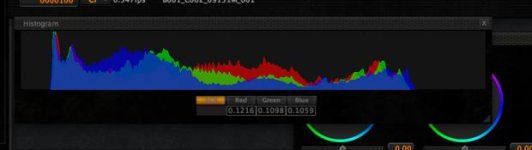
I've noticed while playing with Build 30 Mysterium X footage in Redcine that the floor of the black level is oddly high. That is to say on the histogram, the black level is moved a bit to the right and has to be "crushed" by lowering the shadows slider. See the attached screencap of a histogram. does anyone else notice this? What can be done to fix this?
 

Attachments

  • blkhisto.jpg
    blkhisto.jpg
    12 KB · Views: 0
With the same gamma space selection as †he previous?
 
If you adjust shadow slider, how much does it take to put the toe at the left?
 
Bobby, that just means you're exposing an image with less than 13.5 stops of range :) Which is a good thing as you have the entire image range accessible to work with in post. To maximise the latitude in your NLE during the colour correction phase (if transcoding to something else) first set the ISO slider and FLUT so that the right hand side is almost at the clipping point (but not clipping), then move the Shadow slider to bring the shadow range down to almost clipping on the left (but again, not clipping). Voila! Maximum latitude to use in your grading application with zero artefacting due to noise :)

HTH

Paul
 
If you adjust shadow slider, how much does it take to put the toe at the left?

Hey Deanan. It adjusts out to about .06 or .09 on the shadow slider. This is using B30, all of the last versions of redcine-x and redgamma / redcolor. Everything looks fine once you crush the blacks back down to zero, but it seems like it should already be there.
 
We don't really want black to be recorded aropund the zero point, as it will take away a lot of the precission in the bottom of the image. That's sorta why we want higher bitrates (among other things) to preserve nuances in the lowlight.

It's very easy to push all that info into black in post, if that's how you prefer your image for any particular production.

Milky whites = good for your latitude and precission when recording...
 
We don't really want black to be recorded aropund the zero point, as it will take away a lot of the precission in the bottom of the image. That's sorta why we want higher bitrates (among other things) to preserve nuances in the lowlight.

It's very easy to push all that info into black in post, if that's how you prefer your image for any particular production.

Milky whites = good for your latitude and precission when recording...

But if you're not using pixel values under a certain level, aren't you essentially wasting available data? In other words.. If the histogram values range from 1 - 1096 and you're not using any values under say, 25, arent you wasting or losing something?
 
You are loosing noise…
 
Hey Deanan. It adjusts out to about .06 or .09 on the shadow slider. This is using B30, all of the last versions of redcine-x and redgamma / redcolor. Everything looks fine once you crush the blacks back down to zero, but it seems like it should already be there.

Why should it already be there? The camera doesn't know what you're pointing it at, let alone what should be absolute zero-black in your image. REDCOLOR and REDGAMMA have a wider gamut than other spaces and you will have more room to pull the toe on your histogram. This is why it's great to finally have RAW exposure tools in the camera, so you can see how well you are exposing. You want to shoot a "thick negative" or a s much of a full histogram as you can, in order to maximize the use of available DR.

Chances are, if you're in REDspace, or even more so in REC709, that histogram is going to look a lot thicker. If it's older footage shot with the camera monitoring in those spaces, you may have filled that gamut. Bring it into RC-X now and go to REDColor/REDGamma and you'll see you have more room to work.

In a 12bit system, like the RED One, EV's run from 0 to 4095. The only thing you're missing by not using the lowest values on there, other than some potentially available DR, is the noise. With MX, we gain a usable stop or even a stop and a half of DR on the low end because the lower noise floor. We can rate the sensor much higher -- like EI 800 or 1000 before noise is really a concern at all, and this helps expand our range greatly while improving the highlight roll-off. All because that lower noise floor.

In turn, you can run into some DR compression or end up not maximizing your exposure if you rate the MX camera too low. Rating it at 320 like you would the original M sensor can have this effect. Similar to rating the original M sensor at 160 ISO -- it works, but you're compressing your exposure relative to what the camera is capable of, and potentially sacrificing DR.
 
Black Level

Black Level

As an experiment.

Go to the camera press VIDEO then VIDEO / COLOR and set SHADOW to -0.2

That should move your blacks close to "zero" when you open the clip in REDCINE-X
 
Actually, yes it does...

Really? In all my experience with RED shooting for about 2 years now, i have never had the monitor output on set match the look of the file when brought in to redcine. Method: Calibrating a 17" panasonic btlh1700 with the test patterns from the red on set and dialing in a look (or just using the basic factory look viewing redcolor) and then opening the file in redcine, viewing with camera metadata through a red rocket card on a same calibrated panasonic monitor. The image always looks lower contrast and needs black level brought down, despite looking contrasty with waeveform on set showing 0 ire for black. This is a VERY common way to work on set. Every time i dial in a look on set, it has to be readjusted before transcoding for dailies because when opened in RedcineX it doesn't match what we see on set. This has always been very frustrating.

Stuart, if you're not seeing these results i would LOVE to know HOW.

CJ, i know you feel my pain as we've commiserated over this issue for going on at least a year and always being ignored by RED when we bring it up in the forums.
 
Well it's not just that way in Redcine-X, but RedAlert/Rushes, the original redcine & rocketcine. Eric and I got good enough with curves from the purely numerical menus on camera that we could dial in the desired look on camera, while viewing the SDI's out. However, the image never appeared the same once we opened it in every piece of software Red has created.

The images are always clamped down, never showing the thicker negative it appears to have from monitoring out the SDI's, EVF or LCD's. Blacks usually fall in the 10 IRE range and whites around 90. Even if totally blown out.

Adjusting the shadows, LGG, curves or flut will get it to where you need it to be, but it does need to be tinkered with.

Stuart, I'm not sure how you can suggest adjusting the shadows then claim that the image is the same on camera as it is in post. Clearly the image needs to be manipulated to match what we see on camera.

Thanks. I'd love to hear the explanation for this.

-CJ
 
We protect the noise floor through rendering (by lifting the black point a fixed amout) because you don't want to clip the noise floor by putting it 0. We do this provide headroom to grade. Also, because there are many options for output, we can't assume that you're going to need restricted range smpte, full range, log, or other formats/gammas. For instance, if you're looking at or grading computer monitor, then restricted range isn't applicable. The flexibility is there because it's there are many different possible uses that need different settings.

That said, we're looking at doing a quick set of recommendations if you want to follow more defined workflow paths.
 
But if you're not using pixel values under a certain level, aren't you essentially wasting available data? In other words.. If the histogram values range from 1 - 1096 and you're not using any values under say, 25, arent you wasting or losing something?

Actually, no...

You gain precission in the lower levels by doing this, at the expense of giving away a bit in the highlights, but if you run the numbers, it's pretty insignificant, and if you don't do that, and just look at the images - it's pretty awesome as far as you know what too look for.

Of course you don't allways want/need that extra precission in the lows, but the "nigh-shots" we're all raving about are pretty dependent on this apporach.

Gentle recording and gentle processing...

Actually you have 4096 levels per channel (in theory), but most of these are mapped to highligt-precission.

Giving away, say 128 of these to get some lowlight precission is nay impossible to notice on anything I have ever viewed the images on, but is quite significant for lowlight performance...

remember that a computer screen - on a good day - only show 8 bit (which is 256 levels per channel), so a proper preview is important if you want to peek into this stuff...

The most important thing about it, is that it works very well...
 
I think the main issue is quite simple. The default image back in a rocket/redcine station isn't the same as what was shot. "That's not how I shot that" or "That's not how it looked when we shot it" is something that I hear quite a lot. That prompts me to explain that with a minor adjustment, the image gets close to how it appeared to them but it's not the same. This is then usually followed by annoyance with Red.

But they're DP's and they are right. The image we get in at the DIT cart is not what they looked at when they made critical decisions to compose the shot. It's really great that there is protection and I think the majority gather that there is since it's "raw", but there is something to be said for having no surprises.

Also, one of the greatest and coolest potentials of Red was dialing in looks and applying that to camera non-destructively. That's dead and gone because of this issue.

And if post isn't going back to the raw (Yes, this happens more than you would like) the DIT cart is the last stand for the DP to have his last say, image-wise for the majority of commercials & music videos. They really should be given the opportunity to judge the look of their image on their own monitors. It's their work, they should have control over it. The camera should tell them exactly what they're getting.

my .02
 
@ CJ

This would differ a lot as to what kind of production it is.

Redcolor/Redgamma is sort of a "middle way" which I am not too fond of.
I - for one - really dig the new redlogFilm as a startingpoint for post, I used to use redlog. I find the redgamma as far to brutal in top and bottom for a lot of uses, BUT I have no problem seeing applications for it....

The userbase for RED ONE is very diverse, and to make solutions for people who want to "see what they saw on set" on one hand, and people who "want to protect every bit of info for post/DI" on the other hand is quite a wide bill to cover.

RED does a good job at it for post. When it comes to onset preview I would have preferred an even more milky look, while others want it to be more punchy... There you go -:)

I am actually not at all a big fan of the "judging the post process from a half-debayer 8 bit 4:2:2 image on a less than 720p monitor with a pretty rough S curve applied" approach, but I can see how that can be a good thing for some work....
 
Also, one of the greatest and coolest potentials of Red was dialing in looks and applying that to camera non-destructively. That's dead and gone because of this issue.

I don't agree. You should dial in the look in redcinex with the video output and then put that back to the camera. The camera is the video tap not a video camera. The output of importance is from redcinex/rocket side so you want that to be your reference, not the camera tap. If you're dialing in the look for full or restricted range, it should be done at the delivery point.

I find the film DPs have no problems with this.
The guys who are video dps who are used to having to have to dial in a look exactly because you had to do that on the camera before it went to tape. Film workflow is you dial it at the printing side, not on the video tap.
 
Here's the issue - You want it exactly the same, then you do testing and provide a processing methodology that is repeatable - just like a telecine/film processing house would have done with film. Alternatively, if they want an absolutely WYSIWYG post set up then I suggest you just record a feed off the SDI out of the camera... Because downscaling to a broadcast format from the 4K images, and also putting those images into an SMPTE broadcast colour scheme is likely to change how the colours appear to some extent anyway (just as going from Rec.709 HD to Rec/ITU601 for SD will cause some amount of shift because of a different gamut.) And then there's the H.264 o Mpeg-2 compression for broadcast...

Maybe it's just because I work in post, but I'm confused as to what sort of DOP would EVER think that what they took on the day wouldn't immediately be effected by the post chain in some way, and thus the post guys may have to do some work to retain the look that they were going for...
 
Back
Top