Welcome to our community

Be a part of something great, join today!

  • Hey all, just changed over the backend after 15 years I figured time to give it a bit of an update, its probably gonna be a bit weird for most of you and i am sure there is a few bugs to work out but it should kinda work the same as before... hopefully :)

HDR with MX using RCX and any HDR app

Sanjin Jukic

Well-known member
Joined
Dec 28, 2006
Messages
8,929
Reaction score
1
Points
36
Location
Vienna, Austria
Website
www.sanjinjukic.com
Today I was playing with some of my MX shots to get a kind of HDR with R1MX images.

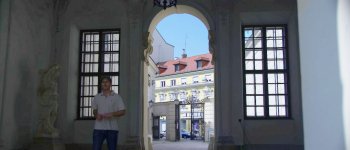
The location of this particular shot was the gate entrance to Belvedere Gardens in Vienna.

What you need for that is R3D MX file, Redcine-X and any HDR app to make HDR tone mapping.

Below are three basic images that were processed and save as TIFF in RCX using different FLUT values 1.0, 0.0, -1.0, -2.0, etc...


belvedere_passage_01.jpg

Shot on R1-MX with Tokina 11-16mm f/2.8 @ f/8.0, ISO 800, 25fps, 1/50 shutter, Filters: Circ-Pola, FLUT -1.0

belvedere_passage_02.jpg

Shot on R1-MX with Tokina 11-16mm f/2.8 @ f/8.0, ISO 800, 25fps, 1/50 shutter, FLUT 0.0

belvedere_passage_03.jpg

Shot on R1-MX with Tokina 11-16mm f/2.8 @ f/8.0, ISO 800, 25fps, 1/50 shutter, FLUT +1.0


---------------------------------------------------------------------------------

The final HDR image made with Photomatix Pro app:

belvedere_passage_HDR.jpg

Shot on R1-MX with Tokina 11-16mm f/2.8 @ f/8.0, ISO 800, 25fps, 1/50 shutter, Filters: Circ-Pola, HDR enhanced.

Looking forward to get your samples here at this tread and also a serious discussion about how to get more DR from MX files.
 
Last edited:
Give you two more examples to get an idea:

Location Schwarzenberg Platz, Vienna.

streetcat-oberbank_orig.jpg

Shot on R1-MX with Leica-Apo Summicron 75mm f/2.0 @ wide open f/2.0, ISO 1600, 25 fps, 1/50 shutter, original image output from RCX.

streetcar-oberbank_hdr.jpg

Shot on R1-MX with Leica-Apo Summicron 75mm f/2.0 @ wide open f/2.0, ISO 1600, 25 fps, 1/50 shutter, HDR enhanced image with Photomatix Pro.

soviet_monument_orig.jpg

Shot on R1-MX with Leica-Apo Summicron 75mm f/2.0 @ wide open f/2.0, ISO 1600, 25 fps, 1/50 shutter, original image output from RCX.

soviet_monument_hdr.jpg

Shot on R1-MX with Leica-Apo Summicron 75mm f/2.0 @ wide open f/2.0, ISO 1600, 25 fps, 1/50 shutter, HDR enhanced image with Photomatix Pro.

fountaine_origin.jpg

Shot on R1-MX with Leica-Apo Summicron 75mm f/2.0 @ wide open f/2.0, ISO 1600, 25 fps, 1/50 shutter, original image output from RCX.

fountaine_HDR.jpg

Shot on R1-MX with Leica-Apo Summicron 75mm f/2.0 @ wide open f/2.0, ISO 1600, 25 fps, 1/50 shutter, HDR enhanced image with Photomatix Pro.
 
Nice...
 
If I get this right, you've been using the same image with different FLUT adjustments, and then combining them.

If that's the case, you should be able to achieve exactly the same result just using a curve adjustment on the original image... Right ?
 
If I get this right, you've been using the same image with different FLUT adjustments, and then combining them.

If that's the case, you should be able to achieve exactly the same result just using a curve adjustment on the original image... Right ?

Yup... without the added FLUT noise.
 
I don't know much about FLUT, but isn't it more appropriate to adjust the ISO value during the RAW processing...like still guys do when they want to simulate bracketed HDR.
 
If I get this right, you've been using the same image with different FLUT adjustments, and then combining them.

If that's the case, you should be able to achieve exactly the same result just using a curve adjustment on the original image... Right ?

Actually you can't.

That is a reason that HDR was invented.

Yup... without the added FLUT noise.

And you don't use image with "high" FLUT just because to avoid the noise.

Very simple.

A creative trick is to make best output images adjusting FLUT in RCX.

Btw, to try out yourself is the best way to learn about HDR and MX before you get your hands on EPIC.

Also follow WIKI definition:

In image processing, computer graphics, and photography, high dynamic range imaging (HDRI or just HDR) is a set of techniques
that allow a greater dynamic range of luminances between the lightest and darkest areas of an image than standard digital imaging
techniques or photographic methods.


LINK>>>

Also the best adjusting FLUT in RCX and REDRocket card is to use FLUT knob in Tangent WAVE or Avid Euphonix consoles...
 
Actually you can't.

That is a reason that HDR was invented.
Wait... HDR was invented to combine multiple images taken at different exposures to increase the final dynamic range.

Here you're combining different versions of the same image, so you're not increasing the dynamic by any means, you're just adjusting what you're seeing in the shadows and highlights. Which in my opinion could also be done with a simple curve.
 
Wait... HDR was invented to combine multiple images taken at different exposures to increase the final dynamic range.

Here you're combining different versions of the same image, so you're not increasing the dynamic by any means, you're just adjusting what you're seeing in the shadows and highlights. Which in my opinion could also be done with a simple curve.

This could be a sort of tone-mapped with exposure fusion HDR that uses a different values of ISO, Exposure, Contrast, Shadow and Saturation.

All those image parameters are possible to control in a single image and from it to generate several basic images for the further HDR use.
 
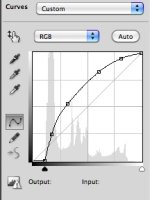
I just quickly did the test in Photoshop, took you original JPEG image and applied a curve on top of it, trying to approximately match your final result.

Obviously there are a lot of artifacts on my test that are due to the fact that I started with a highly compressed JPEG image, but I'm absolutely sure that you could get a clean result by using the original RAW file as a starting point.

I also included a snapshot of the curve I used.
 

Attachments

  • HDR curve.jpg
    HDR curve.jpg
    92 KB · Views: 0
  • Capture d’écran 2010-08-16 aÌ€ 23.31.42.JPG
    Capture d’écran 2010-08-16 aÌ€ 23.31.42.JPG
    19.6 KB · Views: 0
I just quickly did the test in Photoshop, took you original JPEG image and applied a curve on top of it, trying to approximately match your final result.

Obviously there are a lot of artifacts on my test that are due to the fact that I started with a highly compressed JPEG image, but I'm absolutely sure that you could get a clean result by using the original RAW file as a starting point.

I also included a snapshot of the curve I used.

Practically and theoretically you'll get very close result with your workflow but the beauty of RAW image is that you have an option

to generate several different exposure valued images and from that to MERGE them in one HDR enhanced final image.
 
I don't know much about FLUT, but isn't it more appropriate to adjust the ISO value during the RAW processing...like still guys do when they want to simulate bracketed HDR.

And the lower you keep the ISO/FLUT during development, the cleaner the image you can develop...
 
didn't want to be the first one to pipe up...

but these aren't really examples of HDR...

I'm no expert, but isn't the point to:

shoot three separate exposures, one to maximize highlights, one to maximize mids, one to maximize shadows (of course it can be much more complex than this, using multiple photos of the same scene, but that is the basic idea...), then merge using photomatix or some other software.

how RED is going to pull this together with motion - another day, another revolutionary breakthrough in imaging!
 
didn't want to be the first one to pipe up...

but these aren't really examples of HDR...

I'm no expert, but isn't the point to:

shoot three separate exposures, one to maximize highlights, one to maximize mids, one to maximize shadows (of course it can be much more complex than this, using multiple photos of the same scene, but that is the basic idea...), then merge using photomatix or some other software.

how RED is going to pull this together with motion - another day, another revolutionary breakthrough in imaging!

Yup. That's spot on.
And if RED manages to make it look "natural", too... Not only "ultra compressed realism" (which can be fun, BTW...) I'm hungry as hell.

But Graeme has given some reasuring pointers...
 
Sanjin, I'm not trying to crap on your post. The images are gorgeous, we're just pointing out that there are easier ways to get what you show out of the RAW images than the procedure you're describing. RAW is that cool...
 
Wait... HDR was invented to combine multiple images taken at different exposures to increase the final dynamic range.

Here you're combining different versions of the same image, so you're not increasing the dynamic by any means, you're just adjusting what you're seeing in the shadows and highlights. Which in my opinion could also be done with a simple curve.

An HDR image is defined by tone mapping to compress a wider dynamic range image or set of images into a narrower dynamic range display medium. You move highlight and low light details more into the mid tone range to better simulate the way the eye actually perceives the original scene dynamic range. If a camera can effectively capture dynamic range wider than your display medium in one exposure, then HDR tone mapping will bring out more shadow and highlight detail. It was invented at a time when cameras could only capture 8 stops or so, making multiple exposures desirable. With 12-13 stops you have a lot to work with to get an HDR image mapped into the typical 7-8 stop range of an electronic display.
 
Nobody knows how EPIC feature 21 will work.


EPIC uses the same sensor as the RED ONE M-X. People seem to be very happy with the R1 M-X. However, it should be noted that the RED ONE M-X processes at 12 bit. EPIC is 16 bit. And that doesn't count the EPIC HDR mode. While the HDR mode may not (or may) be available when EPIC ships, we can tell you that it is quite a feat. Some people wish that RED just shipped cameras that were done. Sorry. That is never likely to happen. Since the release of the RED ONE, we have improved everything, and almost everything for free. We see that as a good thing. Don't ever expect that concept to change.

There seems to be some confusion about our philosophy. I have been told that some think we put resolution ahead of dynamic range. Not true. We believe in both. We think those that put dynamic range ahead of resolution are short-sighted. Both matter. There is no question that the industry is moving to a 4K delivery. Sony, Sharp, Panasonic, Samsung, Epson, Barco, Christie, Chimei and others have, or are poised, to release 4K displays. There is no turning back.

Every new sensor design from RED will have more DR than the last. And more resolution. Both. Not one. And we make upgrading as painless as possible for our customers. I am a customer. That's the way I want it.

We love the fact the other companies are moved by our example to improve their cameras. That is really terrific for the industry. But make no mistake, we are not done pushing the industry along. Until others actually give you enough resolution to be "future-proof", plenty of DR and at a price that everyone can afford, we will stay in business. When they provide all of the above, we just might take a vacation. Until then...

Jim

Here in this tread it was a basic idea about "possible" HDR out of MX today (12 bit) that I displayed at 30 bit LCD like a HP Dreamcolor.

Some of complaints were already expected from a sort of "doctors" and "professors" here :laugh:

and of course that could come from the people who watch it mostly at LDR 6 bit to 8 bit ordinary LCD.

Also no doubts that there are many ways of HDR interpretation and variability.
 
Sanjin I decided to also test this with Peter Majtan's provided M-X test footage.

I did some poor man tone maping, let me describe what I did:

I exported 3 images with REDcolor/REC709, one at ISO 50, one at ISO 640 and one at ISO 6400.

I then combined these three images in AE with the ADD blending mode. The ISO 50 at bottom layer with 100% opacity, the ISO 320 next with 33% opacity and then the brightest of them at 11% opacity.

I'm not sure this subject is the best to judge what is happening to the image, but what really pleases me is how the contrast in the shadows behaves and how much detail I have in it.

What made test this was seeing how much detail there was hidden in one apparently overxposed tree branch, but when I lowered the ISO to 50 there was all sorts of colors there and when I raised the ISO to 6400 the shadow detail came up.

But that's just wild experimentation, I realized later that exporting as REDcolor/REDLog with a slight highlight reduction curve I could grade the resulting TIFF with similar results, with even better midtones and better rendition on the apparently overexposed area I was trying to rescue.

Here's the pseudo-HDR madness I did:


And here's the REDLog graded:


And here's the grades I applied to the REDLog image:


So Sanjin, try getting your FLUT to 0, exporting as REDLog and getting the grade to match the faux-HDR.

It's a good thing that RED is working in HDRx, observing this only leads me to think that REDCODE is quite a powerful format and can images captured and compressed to it can still be quite versatile.

And now I pose a question: Why does REDgamma clip so much the highlights?
 
An HDR image is defined by tone mapping to compress a wider dynamic range image or set of images into a narrower dynamic range display medium. You move highlight and low light details more into the mid tone range to better simulate the way the eye actually perceives the original scene dynamic range. If a camera can effectively capture dynamic range wider than your display medium in one exposure, then HDR tone mapping will bring out more shadow and highlight detail. It was invented at a time when cameras could only capture 8 stops or so, making multiple exposures desirable. With 12-13 stops you have a lot to work with to get an HDR image mapped into the typical 7-8 stop range of an electronic display.
I think you're confusing what HDR is (a few bracketed exposures combined into one 16 or 32 bit image in order to increase the native dynamic range of the camera) with how it is interpreted afterwards.

Tone mapping is one application, but thanks God it's not the only one. You could also just use this increased dynamic range during grading to get a nicer rollof in the highlights, or to recover some detail in an otherwise blown out window for example. Or even just clip on one or both ends and make a more contrasty image, effectively throwing away some information.

Here is a quote from Wikipedia :
Representing HDR images on LDR displays

Contrast reduction

HDR images can easily be represented on common LDR devices, such as computer monitors and photographic prints, by simply reducing the contrast, just as all image editing software is capable of doing.

Clipping and compressing dynamic range

Scenes with high dynamic ranges are often represented on LDR devices by cropping the dynamic range, cutting off the darkest and brightest details, or alternatively with an S conversion curve that compresses contrast progressively and more aggressively in the highlights and shadows while leaving the middle portions of the contrast range relatively unaffected.

Tone mapping

Main article: Tone mapping
Tone mapping reduces the dynamic range, or contrast ratio, of the entire image, while retaining localized contrast (between neighboring pixels), tapping into research on how the human eye and visual cortex perceive a scene, trying to represent the whole dynamic range while retaining realistic color and contrast.
Images with too much tone mapping processing have their range over-compressed, creating a surreal low-dynamic-range rendering of a high-dynamic-range scene.
 
I think you're confusing what HDR is (a few bracketed exposures combined into one 16 or 32 bit image in order to increase the native dynamic range of the camera) with how it is interpreted afterwards.

Tone mapping is one application, but thanks God it's not the only one. You could also just use this increased dynamic range during grading to get a nicer rollof in the highlights, or to recover some detail in an otherwise blown out window for example. Or even just clip on one or both ends and make a more contrasty image, effectively throwing away some information.

Here is a quote from Wikipedia :

It is the tone mapped image that most people think of with HDR.

I'm just saying that by comparison to the native DR of digital cameras before the last year or so, a 13+ stop camera IS an HDR device.
 
Back
Top