Welcome to our community

Be a part of something great, join today!

  • Hey all, just changed over the backend after 15 years I figured time to give it a bit of an update, its probably gonna be a bit weird for most of you and i am sure there is a few bugs to work out but it should kinda work the same as before... hopefully :)

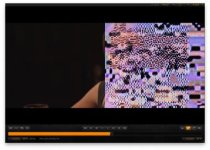
Frame scrambled

GraySkies

Member
Joined
Aug 5, 2009
Messages
8
Reaction score
0
Points
0
Hey guys,

Just on set and I have received footage from the camera that contains a few frames with the image scrambled (random colours/pixelation). The checksums from R3D DM indicate that the footage was copied successfully from the CF card off the camera. Just wondering if this is like a drop frame, or what may be causing it.

We were firing a hand gun at the time of the first skip. This would make sense, only we were using 2 reds, and the B cam rolled fine. The other odd thing is that the second two times A cam had messed up frames, there was no gun fire whatsoever. We were shooting on cards, so I don't think this is an issue related to the traditional drop frame. Is there any internal camera hardware that could have "failed" for a frame?

Any ideas?

Thanks,
Spence
 
That sounds like there are some corrupted frames. Did you erase the original media yet? I've seen this one time on a copy that seemed okay (valid checksum), but the original media was fine. That's why I always at least scrub through the footage before erasing any media.

Also, is it present viewing the R3D directly, or through the QT proxies, or both? I doubt it's a problem related to the hand gun, it's more likely a data corruption issue.
 
It is present in both the R3D and QT proxies. It has all of the ear markings of a data corruption issue, I just mentioned the gun only because we've been shooting with these bodies for a month now with no issue, and have not experienced any issue since.
 
Also, I know that the Data did transfer successfully, because part of my workflow includes doing a simple Apple+i on the .RDM folder of the original mag and the copy on my harddrive to ensure that both folders match down to the very last byte.
 
I get this same problem at least twice a shoot, when copying CF card to internal HD.

Copy more than once if you can, it never seems to botch the same frame twice.
 
Just because you have the same number of bytes doesn't mean you have the same information, only that you have the same amount of information.

I've once had a clip that passed checksum but was corrupt. Because I scrubbed through before erasing the CF card, I caught it in time and was able to retransfer from the card with no problems. You just have to be extremely careful and visually confirm footage (or get confirmation from editorial or the lab or someone else) before erasing any camera data. Even scrubbing through the clips is better than nothing, and will often help catch corrupt frames.

I'm dealing with terabytes of footage weekly and this is the only way I work when the job is important enough to not lose data by trying to move too quickly.

Tim
 
I get this same problem at least twice a shoot, when copying CF card to internal HD.

Copy more than once if you can, it never seems to botch the same frame twice.

What CF reader are you using? Might be time for a new one from a different brand. Calumet sells a nice FW800 one for $50 or so.

Tim
 
Anyone seen this before?

a frame that looks like a DARK red or blue filter has been put on the camera? I had this show up a few times when scrubbing though footage.
I exported hi res tiffs but it didn't show up the same as it appeared in rocket cineX.

But the editor also verified that he found it as well.
The camera (to my knowledge) didn't indicate any drop frames.
And R3D data manager confirmed that it was a good transfer.
we were using CF cards (hand held) and there was no gunfire/loud concussive noise etc. in the scenes.

Anyone seen this before?
 
Problem resolved.

It seems that after viewing the same footage in other red software the problem was not showing up. So I did a reinstall of rocketcine and the problem has not shown up again until today.....so I did a rebuild preferences, restart , and it when away.

I thought it might be a rocket card issue...but because the problem was not evident in redcineX that was ruled out.

Also tried changing card readers, cables, and checked all media. It was totally random and didn't occur in the same places as seen in rocket, as occurred in my exported FCP prores 422's.
 
Corrupt Frame issues

Corrupt Frame issues

I'm on a feature on day 8, and I have had issues with corrupt frames causing RCX to crash. It's so bad that we may have to re-shoot a half day of footage. We have been shooting mainly to CF cards, but also occasionally to drives for long takes. To date no issues with files from the drives. The cameras are loaded with accessories including Comtex audio receiver, IDX Transmitter and Lockit Box. I've replaced all card readers, and FW cables, re-seated RR card, re-installed firmware, and all was good yesterday until the last two rolls. They had corrupt frames. I switch camera over to 320gb drive to re-shoot the corrupted takes, and all was fine. However, this morning at the suggestion of a friend Steve, I disabled the RED Rocket, relaunched RCX and the clips from the CF cards played through (all with the exception of one that stuttered). Can anyone shed some light, as production is getting very nervous about shooting on the RED.

Von
 

Attachments

  • Screen shot 2010-06-17 at 7.22.20 PM.jpg
    Screen shot 2010-06-17 at 7.22.20 PM.jpg
    19.9 KB · Views: 0
Von which rcx build are you working with? Is the issue coming up on source media or copied media?
 
I'm on a feature on day 8, and I have had issues with corrupt frames causing RCX to crash. It's so bad that we may have to re-shoot a half day of footage. We have been shooting mainly to CF cards, but also occasionally to drives for long takes. To date no issues with files from the drives. The cameras are loaded with accessories including Comtex audio receiver, IDX Transmitter and Lockit Box. I've replaced all card readers, and FW cables, re-seated RR card, re-installed firmware, and all was good yesterday until the last two rolls. They had corrupt frames. I switch camera over to 320gb drive to re-shoot the corrupted takes, and all was fine. However, this morning at the suggestion of a friend Steve, I disabled the RED Rocket, relaunched RCX and the clips from the CF cards played through (all with the exception of one that stuttered). Can anyone shed some light, as production is getting very nervous about shooting on the RED.

Von

Based on the pic you attached that is the same type of scrambled image you get when you send 4.5k proxies to Color, for example. I've also gotten that in FCP as well. In both cases, the footage itself wasnt corrupt for me. For Color, it obviously just isnt supported and it plays fine in FCP. The one or two times that it appeared that way in FCP, reinstalling the fcp support and qt codec did the trick. I have no way to be certain but in my case, I think it occurred after I performed a software update to fcp.

In your case, it strange because you said most of the drive/card is fine except a few shots. I'd be curious to know what's up here too.
 
I'm using RCX 221. It's mostly been found after the fact on copied data, but last night I found it on the source CF card.

Von

Check the pins in your reader for both camera and offload... I have had a bent pin in the camera's cf module and still been able to mount cards on the camera.

Is this happening to EVERY copy? OR very intermittent, but no idea when it will pop up?
 
The CF modules on both A and B camera were switched out yesterday. New card readers were brought in for the 2nd time, and so far no corrupt clips. However, I've had negative confirmation on R3D Data manager, that I have to re-transfer.
 
Back
Top