Welcome to our community

Be a part of something great, join today!

  • Hey all, just changed over the backend after 15 years I figured time to give it a bit of an update, its probably gonna be a bit weird for most of you and i am sure there is a few bugs to work out but it should kinda work the same as before... hopefully :)

How old is your Mac..?

Karel Bata

Well-known member
Joined
Jul 13, 2009
Messages
163
Reaction score
0
Points
0
I ask because I'm thinking of buying a second-hand 17" Macbook Pro and swapping out the HDD for 2 OCZ Vertex SSDs. Doing that with a one year old Mac should yield a machine that is little more expensive than a new Mac, but performs significantly better. And with an even older Mac the price drops. But just how old can you go with what folks are doing here..?

One caveat of course is that the old Macs being offered only ever have 4 Gigs of RAM. Is that a deal breaker?

So - how old is your Mac?
 
I have an 06 Mac Pro an 08 Mac Pro a Macbook from 06 a Macbook Pro from 2010.
And a slew of older G series macs. I would have no probs buying any of them other than the Macbook again.
 
only second hand macbook pro i would by is the older model 15.4 inch where it still had the expresscard slot. I'd own a couple of them if i could afford it, great combination in speed and functionality. the expresscard was really what made the magic happen, plus a fw 400 port for additional daisy chaining. it all works off the same bus, but it's nice to have a few extra ports here and there. 17 inch model, you might be better off going brand new. better screen, processor, more ram you can put in, and then you can save some more money later on and put dual SSD's in there and you'll get a system much faster then what you are getting out of the used....

desktops are different, 64 bit is just really making its way through, lot of previous generation mac pro's, nobody even really saw how much power they could give you unless you were running maya, and certain composite tools that could give you 64 bit. but even a 2008 mac pro still give you a lot of bang for the buck.
 
"only second hand macbook pro i would buy is the older model 15.4 inch where it still had the expresscard slot"

Interesting suggestion Tom.
From Wiki I get: "Apple Inc. included single ExpressCard/34 slots in every MacBook Pro notebook computer from January 2006 through June 2009"

Anyone see any reason why I couldn't put a SSD in one of those? More importantly, anyone see a reason for this not working as a RED data offloading... er thingy (is there a term for it?).


Jay, why would you not buy a Macbook again?
 
My oldest Mac is 26 years old.

Newest is 2008 3.2GHz 8 core (MacPro 3.1) and late 2008 2.8GHz Macbook Pro. Working OK with RED footage within reason.
 
"only second hand macbook pro i would buy is the older model 15.4 inch where it still had the expresscard slot"

Interesting suggestion Tom.
From Wiki I get: "Apple Inc. included single ExpressCard/34 slots in every MacBook Pro notebook computer from January 2006 through June 2009"

Anyone see any reason why I couldn't put a SSD in one of those? More importantly, anyone see a reason for this not working as a RED data offloading... er thingy (is there a term for it?).


Jay, why would you not buy a Macbook again?

The white Macbook just can't take abuse. Case cracked in multiple places, discoloration of the keyboard and palm wrest, slow bad screen backlighting.
Very happy with the new 13" Macbook Pro though solid and powerful even without the Expresscard, I needed something really portable but still powerful, got it as a refurb in MicroAnvika in London, very happy with it.
 
Interesting suggestion Tom.
From Wiki I get: "Apple Inc. included single ExpressCard/34 slots in every MacBook Pro notebook computer from January 2006 through June 2009"

All 17" Macbook Pro systems ever made have the ExpressCard slot. Apple removed the ExpressCard slot from the 15" Macbook Pro when they moved to the latest design, almost a year ago. The 13" Macbook Pro was also introduced at that time and it does not have the ExpressCard slot.

Anyone see any reason why I couldn't put a SSD in one of those? More importantly, anyone see a reason for this not working as a RED data offloading... er thingy (is there a term for it?).

2.5" SSDs are the same form factor as a 2.5" hard drive. You just swap out your hard drive and away you go. They fit into any of these systems. Personally, I haven't been that pleased with them in a notebook setting. Yes, they can be fast, mostly for read speeds, but the cost is high compared to the total performance and capacity you actually get. I would buy a new 17" Macbook Pro and pair it with a good ExpressCard and external RAID before I double-stack SSDs inside.

As for using an old Macbook Pro, I bought a new 17" last October and it's great. But it replaced a 15" model that was bought in september of '06. That old 15" had seen a lot of RED projects. The old 2.33GHz Core 2 Duo with 2GB RAM was a real champ when paired with an eSATA CalDigit RAID (S2VR - old style). I cut a couple short films, TV spots, several corporate projects on it and it handled admirably. I preferred using it with Adobe CS4 for RED workflow at the time, but FCS did alright too. My new one feels like it's a good 40% faster and seems as if it's almost 2X as fast for actual rendering.

Jay, why would you not buy a Macbook again?

I agree with Jay's comments. The Macbook (not Pro) just doesn't hold up. If I needed a 13", I would most definitely go with the Pro version or possibly the Air if I don't need the FW800 or the integrated optical drive.
 
Thanks for the replies! If you guys say a second-hand 15" works fine, then that gives me a lot of confidence. :thumbup1:

What I'm faced with now is that age old question with buying computers - do I buy something that does what I really need? Or spend twice as much on something I really want? :willy_nilly:

Which begs the question - where will I be in two years?
 
brand new everything you want... obsolete within months
used, decent for what you need... obsolete now, even more obsolete within months.

no matter what, unless your Jim Jannard, you will never able to catch up on the technological curve. Whether you get the latest and greatest or second hand that will adequately get the job done, key is, make sure you run that sucker to the ground so in 2 years you can easily justify an upgrade, and made your money's worth and than some of what you have already paid for. That's the best anybody can ever hope for really.
 
:iagree:​

Jeff, you say:
"Personally, I haven't been that pleased with them (SSDs) in a notebook setting. Yes, they can be fast, mostly for read speeds, but the cost is high compared to the total performance and capacity you actually get."

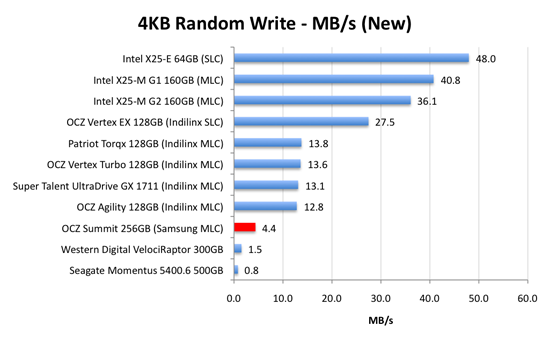
What SSDs do you have experience of? Are these the rebranded Samsung's I've been fretting about in another thread here? http://www.anandtech.com/show/2829/19

"The largest SSD maker in the world is Samsung. Samsung makes the drives offered by Apple in its entire MacBook/MacBook Pro lineup. Samsung makes the drives you get if you order a Lenovo X300. In fact, if you're buying any major OEM system with an SSD in it, Samsung makes that drive.

It's just too bad that those drives aren’t very good."


samsung-new.png

.
Though someone told me today that Apple have changed to Toshiba. Yet to be confirmed.
 
Outside of using a MacBook / Pro for heavy editing, I wish that Apple made a smaller MacBook for real travel. I loved my old 12". I could use something smaller then the 13".
 
Back
Top