Welcome to our community

Be a part of something great, join today!

  • Hey all, just changed over the backend after 15 years I figured time to give it a bit of an update, its probably gonna be a bit weird for most of you and i am sure there is a few bugs to work out but it should kinda work the same as before... hopefully :)

Whats going on here HDcam / Red

Paul Harding

Well-known member
Joined
Mar 11, 2010
Messages
382
Reaction score
0
Points
0
Location
UK
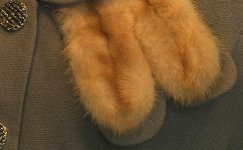
Just got my red and not getting good results so shot Red one 4KHD with red 50 to 150 lens
Shot HDcam 1080 with HJ22 zoom

There is more detail in the HDcam! see jpeg's

The red footage was shot 4K HD and red rushes to 1080 pro res 4 2 2
The raw red footage looks really soft

Any suggestions?

 

Attachments

  • manakin RED Croped.jpg
    manakin RED Croped.jpg
    50.5 KB · Views: 0
  • manakin Croped HDCAM.jpg
    manakin Croped HDCAM.jpg
    63.5 KB · Views: 0
I personally wouldn't swap that HDCAM image for the RED from this little test....

I see a lot of compression/resolution issues in the HD-cam image. and a lot of nice stuff to work with in the RED image.

Could you post tiff frames for download. This could be due to the jpg's...

Cheers!
 
I have been trying for over a week but cannot get the image quality on the red. I have done lots of tests. bear in mind I am looking at the raw red and uncompressed 10 bit hdcam, I know the jpegs are not up to much but it does show the results I am getting
Paul
 
I have been trying for over a week but cannot get the image quality on the red. I have done lots of tests. bear in mind I am looking at the raw red and uncompressed 10 bit hdcam, I know the jpegs are not up to much but it does show the results I am getting
Paul

Your saying that the HDCAM looks better in those JPEG's? Because it doesn't at all. There is tons of aliasing on the fur in the HDCAM jpeg. I think what you are confusing is crap sharpness for more detail. Try taking up the sharpness to 3 in RedCine-X and see if that helps. But if I were going to pick between the two JPEG, I would take the RED because it's much much smoother and nicer looking.

Matthew
 
In the HDCAM camera there's lot of artificial sharpening that makes the image have the video look. RED uses no sharpening at all, but responds well to you adding a small amount afterwards as necessary, resulting in a more natural image. Does the fabric in your shot really have lots of black holes in it?

Graeme
 
dude...that HDcam pic looks horrible...so much fake sharpening on it....that is not what I would consider "more detail on the HDcam"...
 
Also what did you use as far as lighting?

Keep in mind Red's sensor is daylight balanced. You'd get getter results if using hmi, kino, etc as opposed to tungsten.
 
Have to agree with everyone else, the HDCAM still looks awful, not just in comparison to the Red Raw.
 
This is def not a tungsten issue. The RED image is useable. I would have thrown the HDCAM image out of post as faulty/screwed up by some mysterious bug/bad developing settings... If I was told that it had come from a RED -:)
 
Thank you for the feedback, I understand the sharpening on the Hdcam etc, my thinking is that because were are doing 4K on red I expected to see more detail, Or am I wrong?

Paul
 
you ARE getting more detail. blow up the 1080p hdcam to 4k, and see how much detail is still there compared to the 4k raw file. You'll see the difference.
 
There's a big difference between actual resolution and sharpness:

http://www.cambridgeincolour.com/tutorials/sharpness.htm

Bottom line: In post, you can make the R1 footage as sharp as the HDcam footage, but you can't make the HDcam footage have as much detail as the R1 footage.
 
The detail in 1080 will be limited to 1080...

I see a lot more detail in the RED example than the HDCAM, but a lot of "blobs" and sharpening in the HDCAM.

The downsampled 1080 from RED looks a lot smoother, though...
 
I'm assuming your JPEGs are 100% crops... That said, it looks about as it should, perhaps a bit soft from being out of focus. There is no more detail in that HDCAM shot, quite the opposite, actually. It is over-sharpened to the point of total aliasing on the fur fibers. I think it's more an issue what what you are accustomed to looking at vs. what you are seeing with RED.

When you downsample RED 4K to 1080p, you should not need to add any sharpening as a proper oversampled reduction will have the effect of sharpening and increasing of apparent detail. The RED camera adds no sharpening to the image, you will sometimes want or even need to do a bit a sharpening in post or add some noise or grain to your image to give the impression of increased perceptual detail.

If you want to compare actual detail captured with the HDCAM vs. the RED One, point them both at some charts and see for yourself.

And remember, pixel peeping at 100% is fine and dandy when you're working with the images. But 4K images from a RED One will rarely be delivered at 100% unless you go out to 4K projection, but that is a very big difference in viewing space compared to right up front on a desktop display or even at common viewing distances from an HDTV.
 
Sharpness

Sharpness

Sharpness is a great attribute when used correctly, but IMHO in HDCAM it isn't.

On a RED ONE we apply no edge detail enhancement at all, so to get a little more punch in your output, feel free to add a little as has been suggested.

Here are a couple of good links that provide one explanation of the difference between resolution, acutance (a.k.a. edge detail) and sharpness.

http://www.cambridgeincolour.com/tutorials/sharpness.htm

( A RED ONE native image is closest to the middle image of the three grey boxes )

http://www.cambridgeincolour.com/techniques/image-sharpening.htm
 
Paul, I am not sure we are seeing the same pictures, but the HDCAM looks AWFUL to me.

If you want a sharp picture, like everyone has mentioned, go into REDCine-X and turn up Sharpness. (Increasing Contrast will tighten up the image as well) Simple as that. Then we can compare.

That's the advantage of RAW - it offers so much flexibility. The disadvantage, you will always have people comparing RAW to processed images, like the case here. Though, in this case, the processing itself is awful.
 
You would expect similar detail in the Red-to-HD downsample because of the theoretical limits of 1080P, just a tiny bit more perhaps, but it's hard to tell here because the HDCAM version is so oversharpened, and seems to have aliasing problems as well, but trying to see past all of that, I'd say that the two shots are similar in actual detail.

You can add some mild sharpening to Red-to-HD footage and it looks great.
 
The HDCAM looks like it is interlaced too which does not help the comparison.
 
Looked at your first post again and it seems the crop from RED was made after converting to 1080. If that's so, then you were almost definitely out of focus. I'm also curious about your conversion settings. The image should appear a lot sharper being sized to 1080 in most cases. That said, everything else that I, and others, have said still applies. You will often need to add a bit of sharpening...
 
Back
Top