Welcome to our community

Be a part of something great, join today!

  • Hey all, just changed over the backend after 15 years I figured time to give it a bit of an update, its probably gonna be a bit weird for most of you and i am sure there is a few bugs to work out but it should kinda work the same as before... hopefully :)

Redcine-x Transcodes to Prores 4444 look WASHED OUT

I would try it both ways... If "none" isn't looking proper, try "automatic." I've had successful results both ways, but if you're transcoding to ProRes HQ, 4444, or Avid DNxHD, automatic should select 2.2 gamma.

- Jordan

Best results in my case seem to be set to NONE.
 
can you use 422 HQ in the meantime?

why is 4444 so important to you? when it's fixxed/solved you can re-render all of the material.


David
 
can you use 422 HQ in the meantime?

why is 4444 so important to you? when it's fixxed/solved you can re-render all of the material.


David

I get the same results David. In fact for 422; 422hq and 4444. Prores is my usual deliverable and in fact what i'm asked to supply so i'd be pleased to output another way, but from another users input it sounds like ALL transcodes from redcine-x build 221 and using beta QT are washed out and of no use as a finished deliverable as they were in the past for me using redince v20
 
I get the same results David. In fact for 422; 422hq and 4444. Prores is my usual deliverable and in fact what i'm asked to supply so i'd be pleased to output another way, but from another users input it sounds like ALL transcodes from redcine-x build 221 and using beta QT are washed out and of no use as a finished deliverable as they were in the past for me using redince v20

Yes they are all washed out. SO frustrating.
 
I'm not getting that with the 422 HQ, just the 4444

David

Very interesting David. I get washed out look with every transcode i have done now with the new b.221 and beta quicktime.
 
Are you watching the clips in FCP? or

only Quicktime.


I set up render preset for each codec. Put a clip in the timeline (about a second or so). render to each codec.

Open all of the clips in FCP and look at the waveform monitor in FCP. In my tests 422 (HQ) and LT were displaying "correct gamma", everything else was like shooting dice at a table in vegas. No continuity at all in QuickTime. I wish they would do a version called QT broadcast or something so that all these gamma standards could be sorted out between codecs.

David
 
Are you watching the clips in FCP? or

only Quicktime.


I set up render preset for each codec. Put a clip in the timeline (about a second or so). render to each codec.

Open all of the clips in FCP and look at the waveform monitor in FCP. In my tests 422 (HQ) and LT were displaying "correct gamma", everything else was like shooting dice at a table in vegas. No continuity at all in QuickTime. I wish they would do a version called QT broadcast or something so that all these gamma standards could be sorted out between codecs.

David


I was actually looking at them in Quicktime. BUT that said....they look "slightly" better in FCP. BUT still NOT a representation of the grade that I was doing....so basically a lost effort to even do color in RC-X. I've had better result grading in FCP/Color native R3D's....BUT, the render times are crazy without the rocket.

I have to hope RED will adress this and/or a better software solution will be coming soon with a 3rd party vendor that will utilize the Rocket card and native R3d color correction. Seems it's all right around the corner, but in the meantime i have to resort to this very archaic style of coloring.
 
This may have no bearing on your dilemma, but I figured it won't hurt to report that I'm getting those washed out colours on Windows when exporting to Quicktime with latest two Windows builds.

However, the exports exhibit washed out colours only when I view them on the Quicktime player; colours look fine (and the difference is remarkable) when I play the files on Windows Media Player.
 
I have the same problem exporting to ProRes 4444, but only some times!
- When I export one clip after an other, using the same clip setting and the same export setting for each clip, some clips renders washed out and some not.
- If I select several clips and render them all at once all will wash out or all will not, depending on how the first is rendered the others will look the same (washed out blacks or correct blacks).

I use Leopard on Mac Pro 8 Cores, RedCine X Build 221, Quicktime 7.6.6, have not installed Quicktime 4.1 Plugin
 
in my experience they have always been washed out... I have routinely added back contrast and sometimes saturation on all clips from the start.
 
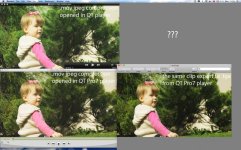
I think it's QuicktimePro bug, since regular Quicktime player opens files more saturated. And even if I export that washed out mov to .tga from QuicktimePro it turns back right (good contrast and saturation)So as in FinalCut timeline. Actually it's strange that Apple dare to call it Quicktime PRO! We shouldn't doubt that everything is correct with files that we open in that PRO player as we just ask our clients money for them!!!
 
So I'm not sure how will this clip look in real world.
Here's the comparison:
 

Attachments

  • MacOSX_10.6.3_RedcineX221.jpg
    MacOSX_10.6.3_RedcineX221.jpg
    97.1 KB · Views: 0
I don't think this is just a QuickTime Player issue. I'm pretty sure I'm also seeing this with ProRes 4444 transcodes on external monitoring when comparing 10-bit output from RCX via Rocket to 10-bit output form Final Cut via a Decklink Extreme HD. (Monitoring on Dreamcolor in Rec. 709 via HD-SDI and Hi5 converter.) Tried gamma setting at both 'None' and 'Automatic' -- they appear to produce identical files.

Will run some tests with ProRes 422 HQ.

Edit: also see this with 422 HQ.
 
I don't think this is just a QuickTime Player issue. I'm pretty sure I'm also seeing this with ProRes 4444 transcodes on external monitoring when comparing 10-bit output from RCX via Rocket to 10-bit output form Final Cut via a Decklink Extreme HD. (Monitoring on Dreamcolor in Rec. 709 via HD-SDI and Hi5 converter.) Tried gamma setting at both 'None' and 'Automatic' -- they appear to produce identical files.

Will run some tests with ProRes 422 HQ.

Edit: also see this with 422 HQ.

I've done every prores transcode and all are washed out. BUT, when i go back to Redcine v20....the prores transcodes DO NOT turn out washed out. So, my non-scientific conclusion is that there may be some REDCODE QT COMPONENT issues that have not yet been resolved with the new color science etc....purely a guess on my part, but seems logical based on my 3 days of testing and testing.
 
A Wash Out

A Wash Out

I consistently get washed out results with build 221. I took the same raw file (shot with build 20), and loaded into the old RedCine and it rendered fine to ProRes. I am guessing that on my machine there is a problem with build 221 as nothing even renders close to what is on the histogram or the preview.

I've also tried a number of new and old Red codecs and nothing makes a difference. None the less, when RedCine-X comes out of beta it's going to be a fantastic tool.

In the meantime, I'll be sticking with Apple Color and the new Beta Plug-In until things change. The waveform vector scope and secondary capabilities provide consistent results.

-DD
 
I went through some renderings and I can say this.

Mac Pro 4,1 with RED ROCKET
Beta REDLINE Build
REDCINE-X 221

Rendering DPX out from REDCINE-X renders the clips with the white point being "1023" and black point is "0". I already mentioned this before, however, I found out that when you import the DPX to Apple Color, although your project was set as DPX/0-1023, it would somehow read as 64-940 to the timeline. Even the DPX header carries 0-1023 setting, it would somehow read as 64-940. So, what you can do is to override it with 0-1023 in the down right tab and set it 0-1023.

Long story short, REDCINE-X exports DPX at 0-1023, but Apple Color wrongly imports DPX at 64-940. I can pretty much say this because if you import the same clip to AfterEffects then the clip shows perfectly.

Then for ProRes4444, you don't have the same way to fix the black/white point for QT in Apple Color, so REDCINE-X has to have the black/white point control for exporting. The ProRes422 correctly exports the video range from REDCINE-X and opens up in Apple Color correctly.

I don't think it's the gamma issue. I continue to believe it is the video range issue that QT export in REDCINE-X as far as the QT4444 goes.
 
Back
Top